Stencil testing
The depth buffer we just looked at has a companion. In the format
Here is the idea in LearnOpenGL's picture. The stencil buffer is cleared to 0, a frame of 1s is written into it, and then a scene is drawn that only keeps the pixels where the stencil holds 1:
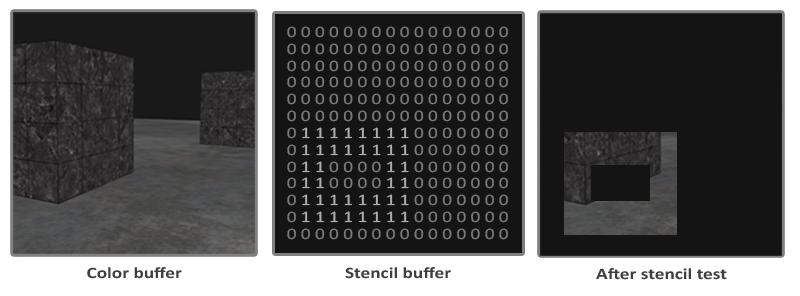
Whatever the effect, the recipe usually has the same shape:
- Draw some objects with stencil writes on, so their shape is recorded in the stencil buffer.
- Turn stencil writes off.
- Draw other objects with a stencil test that keeps or drops their pixels according to what step 1 left behind.
The stencil buffer is cleared with the depth buffer. The clear in
movf xmm3, 1.0
vcall context, ID3D11DeviceContext_ClearDepthStencilView, depth_dsv, D3D11_CLEAR_DEPTH or D3D11_CLEAR_STENCIL, 0, 0
The 1.0 in xmm3 is the depth to clear to (the fourth argument counting this, so its float travels in the fourth xmm register, and the first 0 only holds its place), and the last 0 is the stencil value.
Stencil functions
OpenGL configures stencil testing with three calls:
; rcx: stencil comparison, rdx: 1 to write the stencil, r8: 1 to test depth -> rax: the state
align 16
create_stencil_state proc func:qword, write:qword, depth:qword
    local desc:D3D11_DEPTH_STENCIL_DESC, state:qword
    invoke mem_zero, ADDR desc, sizeof D3D11_DEPTH_STENCIL_DESC
    mov eax, dword ptr depth
    mov desc.DepthEnable, eax
    mov desc.DepthWriteMask, D3D11_DEPTH_WRITE_MASK_ALL
    mov desc.DepthFunc, D3D11_COMPARISON_LESS
    mov desc.StencilEnable, 1
    mov desc.StencilReadMask, D3D11_DEFAULT_STENCIL_READ_MASK
    mov desc.StencilWriteMask, 0
    cmp write, 0
    je no_write
        mov desc.StencilWriteMask, D3D11_DEFAULT_STENCIL_WRITE_MASK
    no_write:
    mov eax, dword ptr func
    mov desc.FrontFace.StencilFunc, eax
    mov desc.FrontFace.StencilPassOp, D3D11_STENCIL_OP_REPLACE
    mov desc.FrontFace.StencilFailOp, D3D11_STENCIL_OP_KEEP
    mov desc.FrontFace.StencilDepthFailOp, D3D11_STENCIL_OP_KEEP
    ; the back faces the same
    mov rax, qword ptr desc.FrontFace
    mov qword ptr desc.BackFace, rax
    mov rax, qword ptr desc.FrontFace[8]
    mov qword ptr desc.BackFace[8], rax
    vcall device, ID3D11Device_CreateDepthStencilState, ADDR desc, ADDR state
    AssertHr
    mov rax, state
    ret
create_stencil_state endp
Piece by piece:
- StencilEnable is GL_STENCIL_TEST. With it off, as in the default state, no stencil test happens and nothing is written.
- StencilFunc is the comparison, with the same eight choices as the depth test (NEVER, LESS, EQUAL, ..., ALWAYS). It compares a
reference value against the stored one, "reference function stored". So LESS passes when the reference is less than what is in the buffer. - StencilReadMask is ANDed with both the reference and the stored value before they are compared. It is the third argument of
glStencilFunc . D3D11_DEFAULT_STENCIL_READ_MASK is 0xff, all bits. - StencilWriteMask chooses which bits a write may change, like
glStencilMask . 0xff writes all of them; 0 writes none, so the stencil is tested but left alone. - The three operations say what to write in each outcome, as the three arguments of
glStencilOp do: StencilFailOp when the stencil test fails, StencilDepthFailOp when it passes but the depth test fails, StencilPassOp when both pass.
Two things are different from OpenGL. The reference value is not in the state at all. It is given each time the state is bound, as the last argument of
rax carry all of it. qword ptr is needed because the field is declared as a structure, and MASM wants to be told the size of the move; desc.FrontFace[8] is eight bytes past its start.
The operations a stencil write can perform are these:
| Operation | What is written |
|---|---|
| D3D11_STENCIL_OP_KEEP | nothing: the stored value stays |
| D3D11_STENCIL_OP_ZERO | 0 |
| D3D11_STENCIL_OP_REPLACE | the reference value |
| D3D11_STENCIL_OP_INCR_SAT | the stored value plus 1, stopping at 255 |
| D3D11_STENCIL_OP_DECR_SAT | the stored value minus 1, stopping at 0 |
| D3D11_STENCIL_OP_INVERT | the stored value with every bit flipped |
| D3D11_STENCIL_OP_INCR | the stored value plus 1, wrapping from 255 to 0 |
| D3D11_STENCIL_OP_DECR | the stored value minus 1, wrapping from 0 to 255 |
So with a state from
Object outlining
Descriptions of stencil state only really make sense once you see them used, so let's build something with it: an outline around objects, the kind an editor draws around a selected object or a strategy game around selected units.
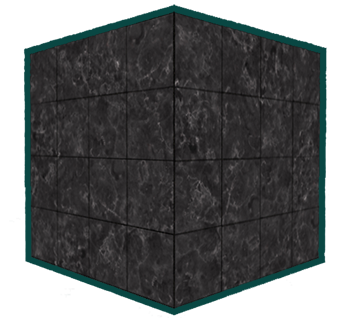
The trick is to draw each object twice. The first time, normally, and while doing so we write 1 into the stencil wherever the object lands. The second time, a little larger and in one flat colour, but only where the stencil is not 1. Everywhere the bigger copy covers the original, it is rejected; what is left is the rim that sticks out past the original's silhouette. In steps:
- Draw the floor, which gets no outline, without touching the stencil.
- Draw the cubes with a stencil test that always passes and a write of 1.
- Scale the cubes up slightly and draw them with a flat-colour pixel shader, a stencil test that passes only where the stencil is not 1, no stencil writes and no depth test.
The flat colour comes from a second shader file, single_color.hlsl, whose vertex shader is the usual one and whose pixel shader is as short as they come:
float4 ps_main(vs_out p) : SV_Target
{
    return float4(0.04, 0.28, 0.26, 1.0);
}
invoke shader_create, ADDR s, "src/4.advanced_d3d11/2.stencil_testing/stencil_testing.hlsl", ADDR cube_layout, cube_layout_count
invoke shader_create, ADDR single_color, "src/4.advanced_d3d11/2.stencil_testing/single_color.hlsl", ADDR cube_layout, cube_layout_countEach step's configuration is one depth-stencil state, created once at startup:
invoke create_stencil_state, D3D11_COMPARISON_ALWAYS, 0, 1
mov plain_state, rax
invoke create_stencil_state, D3D11_COMPARISON_ALWAYS, 1, 1
mov mark_state, rax
invoke create_stencil_state, D3D11_COMPARISON_NOT_EQUAL, 0, 0
mov outside_state, raxplain_state: the stencil test always passes and nothing is written. The depth test is on as usual. This is OpenGL'sglStencilMask(0x00)for the floor.mark_state: the test always passes, and since the pass operation is REPLACE with writes on, every cube pixel that also passes the depth test writes the reference into the stencil.outside_state: the test passes where the reference is not equal to the stored value, nothing is written, and the depth test is off.
The render loop then reads almost like the list of steps. The two cubes' positions are a small array, walked with rsi pointing at the current vec3 and ebx counting; both are registers a call leaves alone, which is why
; the floor, leaving the stencil alone
vcall context, ID3D11DeviceContext_OMSetDepthStencilState, plain_state, 0
invoke bind_texture, 0, floor_texture
invoke m4_identity, ADDR model
invoke draw_vertices, transforms_buffer, ADDR t, plane_vb, 6, ADDR model

; 1. the cubes, writing 1 into the stencil
vcall context, ID3D11DeviceContext_OMSetDepthStencilState, mark_state, 1
invoke bind_texture, 0, cube_texture
lea rsi, positions
xor ebx, ebx
cubes:
    invoke m4_translate, ADDR model, rsi
    invoke draw_vertices, transforms_buffer, ADDR t, cube_vb, 36, ADDR model
    add rsi, sizeof vec3
    inc ebx
    cmp ebx, 2
    jb cubes

; 2. a little larger, flat, only where the stencil is not 1: the rim
vcall context, ID3D11DeviceContext_OMSetDepthStencilState, outside_state, 1
invoke shader_use, ADDR single_color
lea rsi, positions
xor ebx, ebx
outlines:
    lea rcx, model
    mov rdx, rsi
    movf xmm2, 1.1
    call m4_translate_scale
    invoke draw_vertices, transforms_buffer, ADDR t, cube_vb, 36, ADDR model
    add rsi, sizeof vec3
    inc ebx
    cmp ebx, 2
    jb outlines
vcall context, ID3D11DeviceContext_OMSetDepthStencilState, 0, 0
The reference value 1 appears twice, once when binding mark_state, where it is the value written, and once when binding outside_state, where it is the value compared against. The outline cubes are scaled by 1.1 about their own centres: xmm2, and the call is written out by hand rather than with
Why switch the depth test off for the outline? With it on, the outline would lose its bottom edge, which lies below the floor (the scaled cubes reach down to y = -0.55), and it would vanish wherever anything nearer covers it. With it off, the outline shows through everything, which is the look an editor wants for a selection: you can find the object even when it is behind a wall. (A disabled depth test also writes no depth, so the outline does not hide anything drawn after it.)
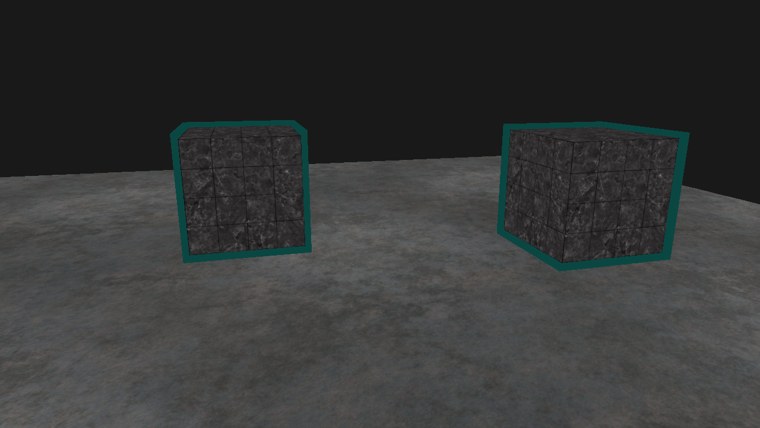
The outline is not the same width all round: scaling about the centre pushes each face out by a fixed distance in the world, and perspective makes that look wider where the cube is nearer the camera. A scale is not a true constant-width outline, but for convex shapes like a cube it is convincing.
Because both cubes write into the same stencil before either outline is drawn, the outlines merge where the cubes overlap on screen: one border around the pair, not a border on top of each cube. For a group of selected units that is usually what you want. For separate borders you would clear the stencil, or use a different reference value, per object. The full program is here, and its shaders here and here.
Outlines are only one use. A stencil can limit drawing to the inside of a mirror or a portal, so a second view of the scene appears exactly there. Counting with INCR and DECR as shadow geometry is drawn is the basis of
Additional resources
- D3D11_DEPTH_STENCIL_DESC and D3D11_STENCIL_OP: the reference for every field and operation.
- Configuring depth-stencil functionality: Microsoft's guide, including the order of the tests.
- LearnOpenGL's Stencil testing: the OpenGL version, with
glStencilFunc andglStencilOp .
Exercises
- Turn the depth test back on for the outline pass (the last argument of
create_stencil_state foroutside_state) and fly around the cubes. Where does the outline disappear? - Give each cube its own border: write reference 1 for the first cube and 2 for the second, and draw each outline with the matching reference.
- Draw the floor so that it only shows through a window: before drawing it, write 1 into the stencil with a small square (without drawing its colour, using a blend state whose RenderTargetWriteMask is 0), then draw the floor with EQUAL and reference 1.