Colors
We have been throwing colours around since the first triangle, without ever saying what a colour is. Before we start lighting things, that deserves a proper answer, because lighting is, in the end, nothing but arithmetic on colours. In this chapter we pin down what an object's colour means, and then build the small scene that every lighting chapter after this one works in.
Light in the real world comes in a continuous spread of wavelengths, far more than any screen can show. A monitor gets by with three: it mixes red, green and blue light at different strengths, and our eyes read the mix as a single colour. So in a program a colour is three numbers, one per channel, each running from 0 (none of that channel) to 1 (all of it). We have written colours as float4 in HLSL already; the fourth number, alpha, is about transparency, and in lighting we mostly ignore it. A warm coral colour, for example, is the first three numbers of this lesson's colours:
colors colors_constants <<1.0, 0.5, 0.31>, 0.0, <1.0, 1.0, 1.0>, 0.0>full red, half green, and a little under a third of blue. (The rest of that line is the light's colour, white, and two floats of padding we come to below.)
Colours are what gets reflected
Here is the part that makes lighting work. The colour we see when we look at an object is not something the object "has" on its own. It is the part of the incoming light that the object sends back towards us. Sunlight looks white because it carries a bit of every visible colour. When it hits a coral toy, the toy swallows most of the blue, a fair amount of the green, and throws back nearly all of the red. What reaches our eye is that leftover mix, and we call it coral.

LearnOpenGL's diagram above shows the idea: white light arrives with every colour in it, and only the coral part leaves. (The real physics is richer than this, and the PBR chapters come back to it, but this picture carries us a long way.)
That gives us a precise meaning for "the colour of an object": for each of red, green and blue, the fraction of that channel's light the object reflects. And it gives us the rule for computing what we see. Take the light's colour and the object's colour, and multiply them channel by channel:
\[ \text{result} = (L_r \cdot O_r,\; L_g \cdot O_g,\; L_b \cdot O_b) \]
With white light, \(L = (1, 1, 1)\), the result is the object's colour unchanged, \((1.0, 0.5, 0.31)\): coral under white light looks coral, as it should. Now shine a pure green light on the same toy, \(L = (0, 1, 0)\). There is no red or blue arriving, so none can be reflected, and of the green that does arrive the toy sends back half:
light  = (0.0, 1.0, 0.0)
object = (1.0, 0.5, 0.31)
result = (0.0, 0.5, 0.0)     a dark green
The coral toy has turned dark green. Nothing about the object changed; it simply had no red light to give back. One more, with a murky olive light:
light  = (0.33, 0.42, 0.18)
object = (1.0,  0.5,  0.31)
result = (0.33, 0.21, 0.06)  a dull brown
This channel-by-channel product is the core of every lighting model we will write. In HLSL it costs nothing to say: multiplying two float3s with * multiplies them component by component. (That is not the same as mulps, four floats at a time, but the lighting itself all happens in the shaders; the CPU side only hands over the colours.
A lighting scene
To experiment with light we need two things in the world: an object for the light to fall on, and something that shows where the light is. We use the cube from the previous chapters for both. A big one sits at the origin as our subject; a small one, scaled down to a fifth, marks the light's position. On its own a light is just a point in space with no shape at all, so this little
The vertex data
The cube's vertex array already carries everything the lighting chapters will need, so it lives in includes/learn/cube.asm and every lesson from here on includes it unchanged. Every vertex has a position, a
align 4
cube_vertices label byte
              ; right (+x)
              real4   0.5,  -0.5,   0.5,     1.0,   0.0,   0.0,   0.0, 1.0
              real4   0.5,  -0.5,  -0.5,     1.0,   0.0,   0.0,   1.0, 1.0
              real4   0.5,   0.5,  -0.5,     1.0,   0.0,   0.0,   1.0, 0.0
; ...
cube_stride equ 32
cube_vertices_size equ 36 * cube_stride
.erre ($ - cube_vertices) eq cube_vertices_size
Thirty-six vertices of eight floats, 32 bytes each. The .erre line is a check the assembler makes: if the table were a row short or long, $ - cube_vertices (how far we got since the label) would differ from the size we claim, and assembling would stop with an error. The input layout names the three attributes and where each starts within a vertex, in bytes:
cube_semantic_position byte "POSITION", 0
cube_semantic_normal byte "NORMAL", 0
cube_semantic_texcoord byte "TEXCOORD", 0
align 8
cube_layout D3D11_INPUT_ELEMENT_DESC <offset cube_semantic_position, 0, DXGI_FORMAT_R32G32B32_FLOAT, 0, 0, D3D11_INPUT_PER_VERTEX_DATA, 0>
            D3D11_INPUT_ELEMENT_DESC <offset cube_semantic_normal, 0, DXGI_FORMAT_R32G32B32_FLOAT, 0, 12, D3D11_INPUT_PER_VERTEX_DATA, 0>
            D3D11_INPUT_ELEMENT_DESC <offset cube_semantic_texcoord, 0, DXGI_FORMAT_R32G32_FLOAT, 0, 24, D3D11_INPUT_PER_VERTEX_DATA, 0>
cube_layout_count equ 3
The fifth field of each element is the byte offset: 0, 12 and 24. When the buffer is created and bound, we give the stride, 32 bytes per vertex:
invoke create_buffer, D3D11_BIND_VERTEX_BUFFER, ADDR cube_vertices, cube_vertices_size
mov cube_vb, rax
stride dword cube_stride
offset_ dword 0vcall context, ID3D11DeviceContext_IASetVertexBuffers, 0, 1, ADDR cube_vb, ADDR stride, ADDR offset_
LearnOpenGL gives the light cube a VAO of its own, so that changing the container's attribute setup later cannot disturb the lamp. In Direct3D that question does not come up. There is no VAO: the input layout belongs to the shader (our
POSITION. Creating an input layout with more elements than the shader uses is fine: Direct3D checks that every input the shader does read is supplied, and simply ignores the rest. So one cube_layout serves both shaders.
The transforms, shared by every shader
Each object needs its model matrix, and everybody needs the view and projection. In the earlier chapters a constant buffer carried these three. The lighting lessons extend it with two more members that the coming chapters need, a normal_matrix and the camera's position, view_position. Here is the HLSL side, which every shader in the lesson declares identically:
cbuffer transforms : register(b0)
{
    float4x4 model;
    float4x4 normal_matrix;
    float4x4 view;
    float4x4 projection;
    float3 view_position;
};
and the assembly struct that mirrors it, register for register. Every lesson from here to the end of the site uses it, so it lives in includes/learn/transforms.asm:
transforms struct
    model mat4 <>
    normal_matrix mat4 <>       ; inverse transpose of model, for normals
    view mat4 <>
    projection mat4 <>
    view_position vec3 <>       ; the eye, in world space
    pad real4 ?
transforms ends
The trailing pad is there because HLSL thinks of a constant buffer as a row of 16-byte float3 fills twelve bytes of its register; we pad the last four ourselves so the two sides agree on the size, and sizeof transforms comes out at 272, seventeen registers. (The normal matrix is computed, though the colours lesson does not use it yet; Basic Lighting explains it.)
Since the model matrix changes for every object while the rest stays the same within a frame, the lessons fill the view, projection and eye position once per frame:
; rcx: &transforms, rdx: &camera
;
; view from the camera, projection with its zoom as the field of view (0.1 to 100 units), and
; where the eye is.
align 16
transforms_from_camera proc t:qword, cam:qword
    mov rcx, t
    lea rcx, [rcx].transforms.view
    invoke camera_view, rcx, cam
    mov rcx, t
    lea rcx, [rcx].transforms.projection
    invoke camera_projection, rcx, cam
    mov rcx, t
    mov rdx, cam
    v3load xmm0, [rdx].camera.position
    v3store [rcx].transforms.view_position, xmm0
    ret
transforms_from_camera endp
and let a small helper rewrite the buffer before each draw:
; rcx: constant buffer, rdx: &transforms, r8: model matrix
;
; The model matrix and its normal matrix, sent; then the 36 vertices of the cube already bound.
; HLSL has no inverse(), so the normal matrix is worked out here, for every draw.
align 16
draw_cube proc buffer:qword, t:qword, model:qword
    mov rcx, t
    mov rdx, model
    for row, <0, 16, 32, 48>
        movups xmm0, [rdx + row]
        movups [rcx + row], xmm0
    endm
    lea rcx, [rcx].transforms.normal_matrix
    invoke m4_normal_matrix, rcx, model
    invoke update_buffer, buffer, t, sizeof transforms
    vcall context, ID3D11DeviceContext_Draw, 36, 0
    ret
draw_cube endp
for row, <0, 16, 32, 48> is not a loop the program runs: it is a loop the assembler runs, writing the two lines inside out four times with row replaced by each number. The result is four 16-byte copies, one matrix row each, with no counter and no branch. model is the first member of transforms, so the copy goes to offset 0 of t. movups rather than movaps because nothing promises the matrices are 16-byte aligned.
The lighting shader
The cube we light gets colors.hlsl. Its vertex shader already does more than this chapter needs: it works out the vertex's world position and normal and passes them on, ready for the next chapter. For now the pixel shader ignores them. It needs only two colours, which arrive in a second constant buffer, in register b1:
cbuffer colors : register(b1)
{
    float3 object_color;
    float3 light_color;
};

float4 ps_main(vs_out p) : SV_Target
{
    return float4(light_color * object_color, 1.0);
}
That is the rule from the start of the chapter, in one line. The assembly side of the buffer has a padding float after each colour:
; Mirrors `cbuffer colors` in colors.hlsl: a float3 fills a register only with the float after it.
colors_constants struct
    object_color vec3 <>
    pad0 real4 ?
    light_color vec3 <>
    pad1 real4 ?
colors_constants ends
Why after object_color too? HLSL's
float3 followed by a float share one register; a float3 followed by another float3 do not. Whenever you add a member to a cbuffer, add it to the assembly struct in the same place and work out where the padding goes. MASM lays a struct out exactly as written, with no padding of its own, so every gap is one you put there.
The initializer we started the chapter with fills the struct in the same order: the coral vec3, a zero for pad0, the white vec3, a zero for pad1. Angle brackets nest, one pair per struct.
The light cube's shader
In the coming chapters the lighting shader will change a lot: ambient light, highlights, falloff. None of that should touch the light cube, which ought to stay bright whatever we do, since it stands for the light itself. So it has a shader file of its own, light_cube.hlsl, that is never edited:
cbuffer lamp : register(b1)
{
    float4 lamp_color;
};

float4 vs_main(float3 position : POSITION) : SV_Position
{
    return mul(projection, mul(view, mul(model, float4(position, 1.0))));
}

float4 ps_main() : SV_Target
{
    return lamp_color;
}
It declares the same transforms buffer at b0 (left out above) and ignores everything but the model, view and projection. Where LearnOpenGL's lamp shader hard-codes white, ours reads its colour from a buffer of its own, also at b1. That costs one float4, sixteen bytes, and later chapters use it to tint each light cube to match its light.
Both shaders are compiled from their files at startup, with the same layout, and each constant buffer is made at the size of the struct it will carry:
invoke shader_create, ADDR lighting_shader, "src/2.lighting/1.colors/colors.hlsl", ADDR cube_layout, cube_layout_count
invoke shader_create, ADDR lamp_shader, "src/2.lighting/1.colors/light_cube.hlsl", ADDR cube_layout, cube_layout_count
invoke create_constant_buffer, sizeof transforms
mov transforms_buffer, rax
invoke create_constant_buffer, sizeof colors_constants
mov colors_buffer, rax
invoke create_constant_buffer, sizeof vec4
mov lamp_buffer, raxRegisters are shared
Notice that two different buffers, colors and lamp, both live in register b1. That is fine, because a register is just a slot on the pipeline: whatever buffer we bind there before a draw is what that draw's shaders see. The
; rcx: register (b0, b1, ...), rdx: buffer
;
; The same buffer in the same register for the vertex, geometry and pixel stages.
align 16
bind_constants proc slot:qword, buffer:qword
    vcall context, ID3D11DeviceContext_VSSetConstantBuffers, slot, 1, ADDR buffer
    vcall context, ID3D11DeviceContext_GSSetConstantBuffers, slot, 1, ADDR buffer
    vcall context, ID3D11DeviceContext_PSSetConstantBuffers, slot, 1, ADDR buffer
    ret
bind_constants endp
The ADDR buffer points at where it was saved in the frame.
The transforms go to b0 once per frame and stay there for every draw; the lighting lessons keep their own constants at b1 and up. This takes the place of OpenGL's
Drawing it
The light sits at a fixed point in the world, up and to the right of the cube and a little towards the camera:
light_position vec3 <1.2, 1.0, 2.0>
Each frame
invoke window_begin, floats(0.1, 0.1, 0.1, 1.0)
vcall context, ID3D11DeviceContext_IASetPrimitiveTopology, D3D11_PRIMITIVE_TOPOLOGY_TRIANGLELIST
vcall context, ID3D11DeviceContext_IASetVertexBuffers, 0, 1, ADDR cube_vb, ADDR stride, ADDR offset_
invoke bind_constants, 0, transforms_buffer
invoke transforms_from_camera, ADDR t, ADDR cam

; the object: coral, under white light
invoke update_buffer, colors_buffer, ADDR colors, sizeof colors_constants
invoke shader_use, ADDR lighting_shader
invoke bind_constants, 1, colors_buffer
invoke m4_identity, ADDR model
invoke draw_cube, transforms_buffer, ADDR t, ADDR model

; the lamp: a small white cube where the light is
invoke update_buffer, lamp_buffer, ADDR lamp_color, sizeof vec4
invoke shader_use, ADDR lamp_shader
invoke bind_constants, 1, lamp_buffer
lea rcx, model
lea rdx, light_position
movf xmm2, 0.2
call m4_translate_scale
invoke draw_cube, transforms_buffer, ADDR t, ADDR modelrcx and rdx, and 0.2 in xmm2, the register of the third position. .const section and loads it from there, since an SSE register cannot take a float straight from the instruction.
The camera starts in front of the cube and a little to its left, turned slightly to look at it, so the light cube appears near the right edge of the window. If everything is in place, you get this:
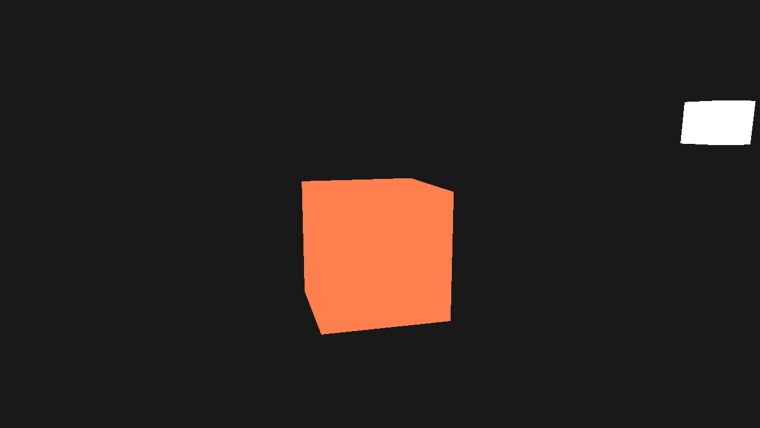
Admittedly not much to look at: a flat coral shape and a white square. Every face of the cube has exactly the same colour, because nothing in our shader yet cares which way a face points or where the light is. That changes in the very next chapter. As before, WASD moves the camera, space and shift move it up and down, and holding the right mouse button lets you look around.
The full program is here, the lighting shader here and the light cube's shader here.
Additional resources
- Packing rules for constant variables: Microsoft's description of how HLSL lays out a
cbuffer, with examples. - How to: create a constant buffer: the Direct3D 11 basics of constant buffers.
- LearnOpenGL's Colors: the OpenGL version of this chapter.
Exercises
- Change the light colour in colors to pure green,
<0.0, 1.0, 0.0>, and check that the cube turns the dark green worked out above. Then try the olive light<0.33, 0.42, 0.18>. - Make the light cube show the light's colour, by copying colors.light_color into lamp_color before the lamp's buffer is updated, instead of leaving it white. (
v3loadandv3storemove a vec3; the alpha can stay 1.) - Move pad0 in colors_constants so that it sits after light_color, next to pad1, and reorder the initializer to match. The struct keeps its size, so nothing fails, but the cube changes colour. Work out from the packing rule which bytes the shader now reads as light_color, and explain the colour you see. (Put the padding back afterwards.)