Advanced Lighting
Back in the Lighting chapters we built the Phong lighting model, and it has served us well: three cheap terms that together make a surface look lit. It is not perfect, though, and its specular term in particular has a flaw that is easy to miss until you go looking for it. This chapter is about that flaw and the small change, due to James Blinn, that removes it. It is a short chapter, but the model it ends with is the one every later lesson in this part of the book lights with.
Blinn-Phong
Phong's highlight is good at small, sharp shines, the kind a high shininess exponent gives. It goes wrong in the opposite case: a rough surface, a low exponent, and so a wide, soft highlight. Look at a flat floor lit from just above with an exponent of 1, and the highlight does not fade out at its edges. It stops, with a visible rim, as if someone had cut it out with scissors.
Recall how the term is computed. We reflect the light direction about the normal, and compare the reflection with the direction to the eye:
spec = pow(max(dot(to_eye, reflect(-to_light, n)), 0.0), shininess)
The

On the right, the eye is far from the reflected ray and Phong says there is no highlight. With a high exponent that is harmless: the highlight would have been practically zero there anyway, because the cosine of a large angle raised to the power 32 or 64 is tiny. With a low exponent the highlight is wide enough to still have a real value at 90 degrees, and the clamp chops it from that value straight to zero. That jump is the rim.
In 1977 Blinn proposed measuring a different angle. Instead of reflecting the light, take the

The gain is that the halfway vector stays within 90 degrees of the normal for any eye position that can see the front of the surface, as long as the light is in front of it too. Both directions are in the upper hemisphere, so their average is as well. The cosine never goes negative where it matters, the clamp never bites, and the highlight fades all the way to its edge. This model,
Getting the halfway vector is one addition and one normalization:
\[\bar{H} = \frac{\bar{L} + \bar{V}}{\|\bar{L} + \bar{V}\|}\]and the specular term becomes the clamped cosine between it and the normal, raised to the shininess exponent as before. In our shader it reads:
float3 halfway = normalize(to_light + to_eye);
spec = pow(max(dot(n, halfway), 0.0), 4.0);
That is all there is to it. Phong measures the angle between the eye and the reflection; Blinn-Phong measures the angle between the normal and the halfway vector. Everything else in the lighting stays the same.
Matching exponents
The two models do not give the same highlight for the same exponent. The angle between the normal and the halfway vector is smaller than the angle between the eye and the reflection; for a light, normal and eye in one plane it is exactly half. A smaller angle has a larger cosine, so with the same exponent Blinn-Phong's highlight comes out wider. To get roughly the size of highlight Phong gave you, raise Blinn-Phong's exponent: two to four times Phong's is the usual rule of thumb. LearnOpenGL compares Phong at 8 with Blinn-Phong at 32, for example. Expect some tweaking when moving an existing scene from one model to the other.
Cost
Blinn-Phong is also cheap, a little cheaper than Phong in fact.
On modern GPUs neither cost matters much, and we compute the halfway vector per pixel, from the real eye and light positions, everywhere in this book. The choice between the two models is about how they look, and Blinn-Phong looks better.
The lesson
The program draws a wooden floor, twenty units square with its texture repeated ten times, and a small white cube marking a point light that hangs at the origin, half a unit above the floor. The camera starts three units back at the light's own height, so it looks along the floor at a low angle: the case where the eye is far from the reflected ray for most of the floor, and Phong's clamp shows. Tab switches between the two models.
The pixel shader needs the light's position and which model to use. Both go in one small constant buffer, mirrored on the CPU by a struct:
; Mirrors `cbuffer light` in advanced_lighting.hlsl.
light_constants struct
    position vec3 <>
    blinn dword ?
light_constants ends
cbuffer light : register(b1)
{
float3 light_position;
int blinn;
};
This one needs no padding. A float3 fills three quarters of a 16-byte register and the int slots into the last four bytes, so the assembly struct, a vec3 of three real4s and a dword, lines up byte for byte. (The Advanced Data chapter has the packing rules.) The flag is an int to match the dword plainly, and the shader tests it with if (blinn), which treats any non-zero value as true. The global starts out with the light at the origin and the flag set:
light light_constants <<0.0, 0.0, 0.0>, 1>Tab flips the flag in the render loop, and the flag is copied into the buffer every frame along with the position:
; mode 0 is Blinn-Phong, mode 1 plain Phong
invoke window_mode, 2
mov ecx, 1
sub ecx, eax
mov light.blinn, ecx
; the floor, lit from the origin
invoke update_buffer, light_buffer, ADDR light, sizeof light_constants
invoke shader_use, ADDR s
invoke bind_constants, 1, light_buffer
eax: Tab steps to the next, wrapping round, and the keys 1 to 9 pick one directly. It reads key presses that the window procedure's WM_KEYDOWN handler recorded, and forgets them as it reads, so holding Tab down changes the mode once rather than every frame. Here there are two modes, and the flag is one minus the mode, so the program starts in Blinn-Phong. The pixel shader then does ordinary lighting with one of the two specular terms:
// Deliberately rough (low exponents, wide highlights): the case where the
// difference shows. Blinn needs about four times Phong's exponent to match.
float4 ps_main(vs_out p) : SV_Target
{
    float3 color = albedo.Sample(linear_wrap, p.uv).rgb;
    float3 n = normalize(p.normal);
    float3 to_light = normalize(light_position - p.world);
    float3 to_eye = normalize(view_position - p.world);

    float spec;
    if (blinn)
    {
        float3 halfway = normalize(to_light + to_eye);
        spec = pow(max(dot(n, halfway), 0.0), 4.0);
    }
    else
    {
        spec = pow(max(dot(to_eye, reflect(-to_light, n)), 0.0), 1.0);
    }

    float3 ambient = 0.05 * color;
    float3 diffuse = max(dot(n, to_light), 0.0) * color;
    return float4(ambient + diffuse * 0.5 + 0.5 * spec, 1.0);
}
The exponents are 4 for Blinn-Phong and 1 for Phong, much lower than you would pick for a real material, and on purpose: the whole point of this program is to put a wide highlight on screen so that Phong's edge has somewhere to show. The vectors are the usual ones from Basic Lighting, worked out in world space, with the eye position view_position coming from the shared transforms buffer in register b0.
Here is the floor with Blinn-Phong, the mode the program starts in, and then with Phong after pressing Tab:
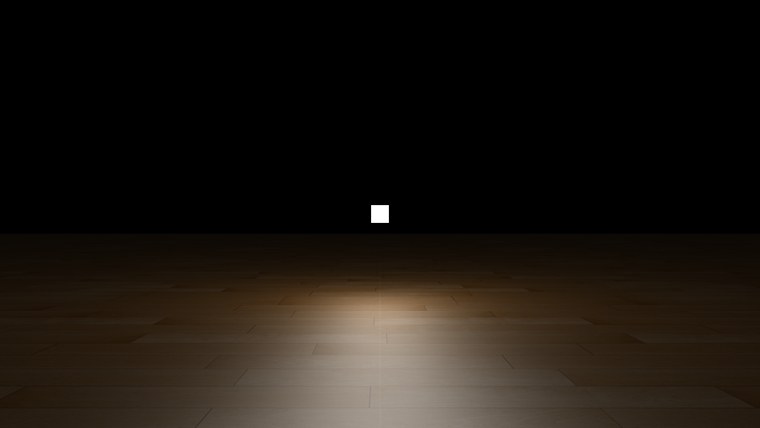
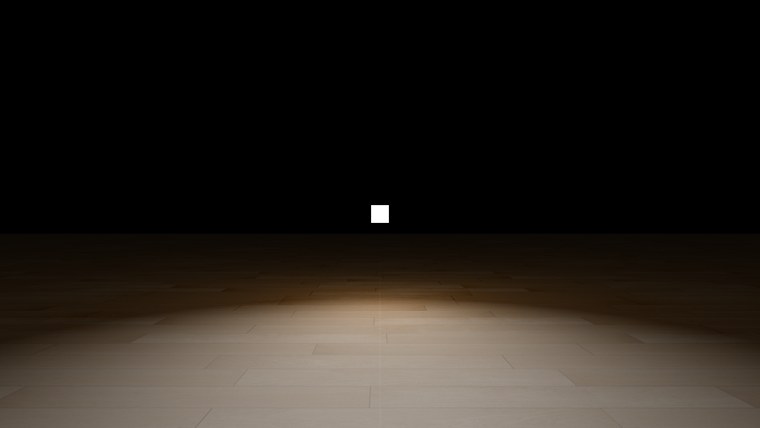
With Phong (right), the bright patch in front of the camera ends along a curved line, and past it the floor drops abruptly to its diffuse light alone. That line is where the angle between the eye and the reflected ray crosses 90 degrees. With Blinn-Phong (left), the same patch thins out gradually and there is no line to find. Move the camera around (W, A, S, D, and the right mouse button to look) and the edge moves with you, because it depends on where the eye is.
Blinn-Phong is not only a fix for an edge case. For most surfaces it is also simply closer to how real materials reflect light, which is why the rest of this book uses it: from the next chapter on, every specular term is computed from the halfway vector. The full program is here, and its shader here.
Additional resources
- LearnOpenGL's Advanced Lighting: the OpenGL version of this chapter.
- Blinn-Phong reflection model: the model's history, and its relation to the microfacet models of the PBR chapters.
- Specular lighting (Direct3D 9): how the fixed-function pipeline computed its halfway-vector highlight.
Exercises
- Raise both exponents in
advanced_lighting.hlsl, say Phong to 8 and Blinn-Phong to 32, and switch between the modes. Does the edge still show? Try to find the Blinn-Phong exponent that makes its highlight about the same size as Phong's at 8. - Move the light up, to
<0.0, 2.0, 0.0>in the light global's initializer, and compare the two modes again. Where does Phong's edge go, and why? Sketch the light, the eye and a point on the floor beyond the light to work it out. - Output only the specular term,
float4(spec.xxx, 1.0), for both modes. Looking at the highlight on its own makes the cut-off very clear.