Shadow Mapping
A shadow is where light does not arrive because something is in the way. Our lighting has ignored that so far: each pixel is lit by every light in front of it, whether or not another object stands between them. Shadows add a lot. They anchor objects to the ground, they show which of two objects is in front, and they make it obvious when something is floating. Without them a scene's spatial relationships are surprisingly hard to read.
They are also hard to get right in real time. There is no single perfect shadow algorithm for rasterized graphics, only good approximations, each with its own artefacts to manage. The one used by most games, and the one this chapter builds, is
Shadow mapping
The idea is simple. Look at the scene from the light. Everything the light can see is lit; everything hidden from it, behind something nearer, is in shadow. Picture a large box between a light and a floor: from where the light stands, the box covers part of the floor, and that part of the floor is in shadow.
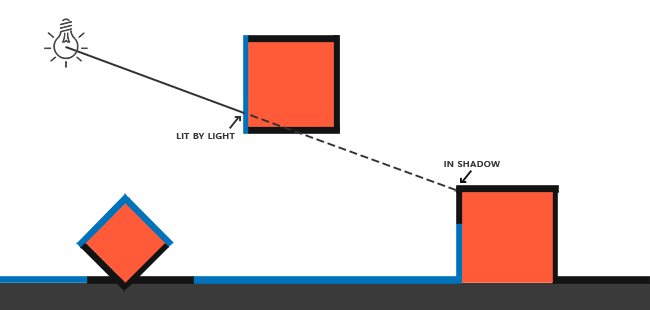
In LearnOpenGL's diagram, the blue surfaces are the ones the light sees first along each ray, and the black ones are behind something. We could find these by tracing rays from the light, but tracing a ray for every pixel through every object is not something a rasterizer does well. What a rasterizer does do well is answer exactly the question "what is nearest along this ray?" for a whole grid of rays at once. That is the depth buffer. As we saw in Depth testing, after drawing a scene the depth buffer holds, for every pixel, the depth of the nearest surface the camera sees there.
So we draw the scene from the light's point of view, keep only its depth buffer, and store that in a texture. This texture is the
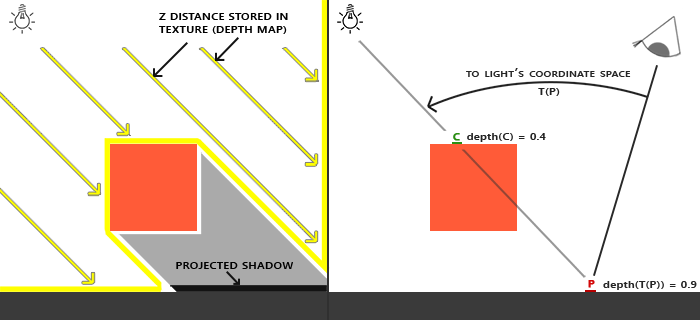
To render the depth map we need a view and a projection matrix for the light. Together they make a transformation \(T\) that takes any world-space position into the light's clip space. Then, when we draw the scene normally from the camera, for each pixel we take its world position \(P\), transform it with \(T\), and get two things: where it lands in the shadow map, and its depth as the light sees it. In the right half of the diagram, \(P\) has a light-space depth of 0.9, but the shadow map at that spot records 0.4, the depth of point \(C\) on the box. Something is nearer to the light than \(P\) along that ray, so \(P\) is in shadow.
Shadow mapping is therefore two passes. First render the depth map from the light; then render the scene as usual from the camera, using the depth map to decide which pixels are lit. Let's build each in turn.
The depth map
The first pass draws depth into a texture. In OpenGL that means a framebuffer object with a depth texture attached and the colour buffers switched off with
Direct3D's answer is a
This lives in shadow.asm, shared with the next chapter, whose shadow map is a cube of six such squares. The procedure takes a flag for that; for one square it is 0, and these are the lines that run:
shadow_map struct
    dsv qword ?         ; ID3D11DepthStencilView, while drawing the light's view
    srv qword ?         ; ID3D11ShaderResourceView, while reading it
shadow_map ends

.code
; rcx: &shadow_map, rdx: size, r8: 1 for a cube of six faces, 0 for one square
align 16
create_shadow_texture proc out_ref:qword, map_size:qword, cube:qword
    local desc:D3D11_TEXTURE2D_DESC, texture:qword
    local dsv:D3D11_DEPTH_STENCIL_VIEW_DESC, srv:D3D11_SHADER_RESOURCE_VIEW_DESC
    USING rbx
    SaveRegs
    mov rbx, out_ref
    invoke mem_zero, ADDR desc, sizeof D3D11_TEXTURE2D_DESC
    mov eax, dword ptr map_size
    mov desc._Width, eax
    mov desc.Height, eax
    mov desc.MipLevels, 1
    mov desc.ArraySize, 1
    mov desc.Format, DXGI_FORMAT_R32_TYPELESS
    mov desc.SampleDesc.Count, 1
    mov desc.BindFlags, D3D11_BIND_DEPTH_STENCIL or D3D11_BIND_SHADER_RESOURCE
    ; ...
    vcall device, ID3D11Device_CreateTexture2D, ADDR desc, 0, ADDR texture
    AssertHr
    ; ...
    invoke mem_zero, ADDR dsv, sizeof D3D11_DEPTH_STENCIL_VIEW_DESC
    mov dsv.Format, DXGI_FORMAT_D32_FLOAT
    mov dsv.ViewDimension, D3D11_DSV_DIMENSION_TEXTURE2D
    ; ...
    lea rax, [rbx].shadow_map.dsv
    vcall device, ID3D11Device_CreateDepthStencilView, texture, ADDR dsv, rax
    AssertHr

    ; read as one float a texel
    invoke mem_zero, ADDR srv, sizeof D3D11_SHADER_RESOURCE_VIEW_DESC
    mov srv.Format, DXGI_FORMAT_R32_FLOAT
    mov srv.ViewDimension, D3D11_SRV_DIMENSION_TEXTURE2D
    mov srv.Texture2D.MipLevels, 1
    ; ...
    lea rax, [rbx].shadow_map.srv
    vcall device, ID3D11Device_CreateShaderResourceView, texture, ADDR srv, rax
    AssertHr
    release texture
    RestoreRegs
    ret
create_shadow_texture endp

; rcx: &shadow_map, rdx: size in texels
align 16
create_shadow_map proc out_ref:qword, map_size:qword
    invoke create_shadow_texture, out_ref, map_size, 0
    ret
create_shadow_map endp
The two views are written straight into the caller's shadow_map, whose address is kept in rbx; lea rax, [rbx].shadow_map.dsv is the address of its dsv field, which
invoke create_shadow_map, ADDR depth_map, shadow_size
The map is 2048 by 2048 texels (shadow_size, an equ), and has no stencil, since a shadow map only needs depth. The window's own depth buffer is a different texture entirely; this one exists only for the light.
Rendering into it looks like this, at the start of each frame:
; 1. render depth of scene to texture (from light's perspective)
; --------------------------------------------------------------
call unbind_textures
vcall context, ID3D11DeviceContext_OMSetRenderTargets, 0, 0, depth_map.dsv
movf xmm3, 1.0                          ; the depth, a float: xmm3
vcall context, ID3D11DeviceContext_ClearDepthStencilView, depth_map.dsv, D3D11_CLEAR_DEPTH, 0, 0
invoke set_viewport, shadow_size, shadow_size
Three details matter here.
OMSetRenderTargets with zero render targets and a depth view is how Direct3D says "depth only". That is allglDrawBuffer (GL_NONE) was doing.- The viewport must match the shadow map, 2048 by 2048, not the window. Forget this and the depth is drawn into the top left 1280 by 720 corner of the map only.
set_viewport , from gpu.asm, binds a viewport of the given size at the top left corner;window_begin puts the window's own back for the second pass. - Last frame's second pass left the shadow map bound as a texture, in slot
t1. A resource cannot be read and written at the same time, so before binding it as a depth target we clear all the pixel shader's texture slots. (If we did not, the runtime would unbind it for us and the debug layer would warn about it. Doing it explicitly says what we mean.)
The clear's depth of 1.0 is a float, and its fourth argument counting the context itself, so it goes in xmm3 before the call, with a 0 standing in for it in the argument list.
; Clears the pixel shader's texture registers t0..t7. A texture cannot be read and drawn into at
; once, so this runs before drawing into one that was just being read.
align 16
unbind_textures proc
    local views[8]:qword
    invoke mem_zero, ADDR views, 8 * 8
    vcall context, ID3D11DeviceContext_PSSetShaderResources, 0, 8, ADDR views
    ret
unbind_textures endp
Light space transform
The light in this lesson is a sun: a directional light, all its rays parallel. A perspective projection would make rays fan out from a point, so instead we use an orthographic one, a box. Everything inside the box goes into the shadow map; anything outside it casts no shadow, so the box should fit around the part of the scene that matters, and not much more, since every unit of box spends shadow map texels.
A directional light has no position, but to render from it we need one. We place a stand-in position along the light's direction, far enough back to see the whole scene, and look from there at the centre of the scene. The box itself never changes shape, so its projection is made once, before the render loop:
; The sun's view never changes shape: a 20 x 20 box, 1 to 20 units from it.
movf xmm0, 10.0
movss real4 ptr [rsp + 32], xmm0        ; top
movf xmm0, 1.0
movss real4 ptr [rsp + 40], xmm0        ; z_near
movf xmm0, 20.0
movss real4 ptr [rsp + 48], xmm0        ; z_far
lea rcx, light_projection
movf xmm1, -10.0                        ; left
movf xmm2, 10.0                         ; right
movf xmm3, -10.0                        ; bottom
call m4_orthoxmm1, xmm2 and xmm3, by position; the other three are the fifth to seventh arguments, and go on the stack like any argument past the fourth, at [rsp + 32], [rsp + 40] and [rsp + 48], eight bytes apart above the shadow space. In our lesson the sun also moves, circling slowly so that the shadows sweep across the floor. Its position is worked out every frame, from the time, one coordinate at a time:
; the sun circles slowly, so the shadows sweep across the floor:
; (-4 cos(0.3 t), 8, -2 - 2 sin(0.3 t))
movss xmm0, current_frame
movf xmm1, 0.3
mulss xmm0, xmm1
call cosf
movf xmm1, -4.0
mulss xmm0, xmm1
movss light_position.x, xmm0
storef light_position.y, 8.0
movss xmm0, current_frame
movf xmm1, 0.3
mulss xmm0, xmm1
call sinf
movf xmm1, -2.0
mulss xmm0, xmm1
addss xmm0, xmm1
movss light_position.z, xmm0
invoke m4_look_at, ADDR light_view, ADDR light_position, ADDR origin, ADDR up_axis
invoke m4_mul, ADDR sh.light_space, ADDR light_projection, ADDR light_view
; light_direction = normalize(-light_position)
lea rcx, sh.light_direction
lea rdx, light_position
movf xmm2, -1.0
call v3_scale
lea rcx, sh.light_direction
mov rdx, rcx
call v3_normalize
invoke update_buffer, shadow_buffer, ADDR sh, sizeof shadow_constants
fcos and fsin instructions. The box is 20 units wide and high around the light's line of sight, and reaches from 1 to 20 units in front of it, which covers the three cubes and most of the floor. Like every projection in these lessons, cbuffer, padded to a whole register:
; Mirrors `cbuffer shadow` in shadow_mapping.hlsl.
shadow_constants struct
    light_space mat4 <>
    light_direction vec3 <>     ; where the sunlight travels
    pad real4 ?
shadow_constants ends
Render to depth map
For the depth pass we only need positions in the light's clip space, so it gets its own tiny shader:
// The shadow pass: positions into the light's clip space, and nothing
// else. The pixel shader writes no colour; only the depth buffer is bound.
#pragma pack_matrix(row_major)

cbuffer transforms : register(b0)
{
    float4x4 model;
    float4x4 normal_matrix;
    float4x4 view;         // the light's
    float4x4 projection;   // the light's
    float3 view_position;
};

float4 vs_main(float3 position : POSITION) : SV_Position
{
    return mul(projection, mul(view, mul(model, float4(position, 1.0))));
}

void ps_main()
{
}
It reads the same transforms buffer as every other shader, and we simply fill its view and projection with the light's instead of the camera's. The pixel shader is empty: the rasterizer computes each pixel's depth, and the output merger writes it into the depth buffer, without the shader having to do anything. Direct3D would even let us bind no pixel shader at all for a depth-only pass; our shader helper always compiles a ps_main, so the empty one is the simplest thing that fits. Then we draw the whole scene, the floor and three cubes:
vcall context, ID3D11DeviceContext_RSSetState, bias_state
invoke mem_copy, ADDR t.view, ADDR light_view, sizeof mat4
invoke mem_copy, ADDR t.projection, ADDR light_projection, sizeof mat4
invoke shader_use, ADDR depth_shader
call draw_scene
vcall context, ID3D11DeviceContext_RSSetState, raster_state
(The first and last lines set and reset a rasterizer state with a depth bias; we will come to them under shadow acne.) The scene is drawn twice a frame, once from the light and once from the camera, so it is a small procedure of the lesson's own, drawing with whatever shader and view are bound:
; The floor and the three cubes, with whatever shader and view are bound.
align 16
draw_scene proc
    USING rbx, rsi
    SaveRegs
    invoke m4_identity, ADDR model
    invoke draw_vertices, transforms_buffer, ADDR t, plane_vb, 6, ADDR model
    lea rsi, cubes
    xor ebx, ebx
    each_cube:
        invoke draw_vertices, transforms_buffer, ADDR t, cube_vb, 36, rsi
        add rsi, sizeof mat4
        inc ebx
        cmp ebx, 3
        jb each_cube
    RestoreRegs
    ret
draw_scene endp
The cubes' model matrices are worked out once at startup into cubes, an array of three mat4; rsi walks it, 64 bytes at a time, and ebx counts. Both registers must survive the calls in the loop, which is why they are the callee-saved ones, saved on entry and restored on the way out.
Seeing the depth map
It helps to look at the shadow map before using it. Press Tab and the lesson skips the lit scene and draws the map over the whole window instead, black near the light and white far away:
invoke window_mode, 2
mov ebx, eax                            ; 1: show the shadow map
invoke window_begin, floats(0.1, 0.1, 0.1, 1.0)
test ebx, ebx
jz scene
invoke shader_use, ADDR debug_shader
invoke bind_texture, 0, depth_map.srv
vcall context, ID3D11DeviceContext_Draw, 3, 0
jmp drawnThree vertices, and no vertex buffer that matters. The debug shader makes a full-screen triangle from SV_VertexID alone, the vertex's index in the draw:
// One triangle covering the screen, made from SV_VertexID alone: no
// vertex buffer, no input layout. uv runs 0..1 across and down the screen,
// and the parts of the triangle past the edges are clipped away.
struct fullscreen_vertex
{
    float4 position : SV_Position;
    float2 uv : TEXCOORD;
};

fullscreen_vertex vs_main(uint id : SV_VertexID)
{
    fullscreen_vertex o;
    o.uv = float2((id << 1) & 2, id & 2);
    o.position = float4(o.uv * float2(2.0, -2.0) + float2(-1.0, 1.0), 0.0, 1.0);
    return o;
}

// the shadow map on screen: near is black, far is white
Texture2D<float> depth_map : register(t0);
SamplerState linear_wrap : register(s0);

float4 ps_main(fullscreen_vertex p) : SV_Target
{
    return float4(depth_map.Sample(linear_wrap, p.uv).xxx, 1.0);
}
Vertex 0 gets uv (0, 0), vertex 1 gets (2, 0) and vertex 2 gets (0, 2): a triangle twice the size of the screen, whose visible part is exactly the screen with uv running from 0 to 1. It is a common trick, cheaper than a quad and with no buffer to create; the shader was created with no input layout, a 0 for the layout and its count, since it reads no vertex attributes:
invoke shader_create, ADDR debug_shader, "src/5.advanced_lighting/3.1.shadow_mapping/debug_quad.hlsl", 0, 0
Texture2D<float> declares a single-channel texture, so a sample returns one float, which .xxx spreads to grey.
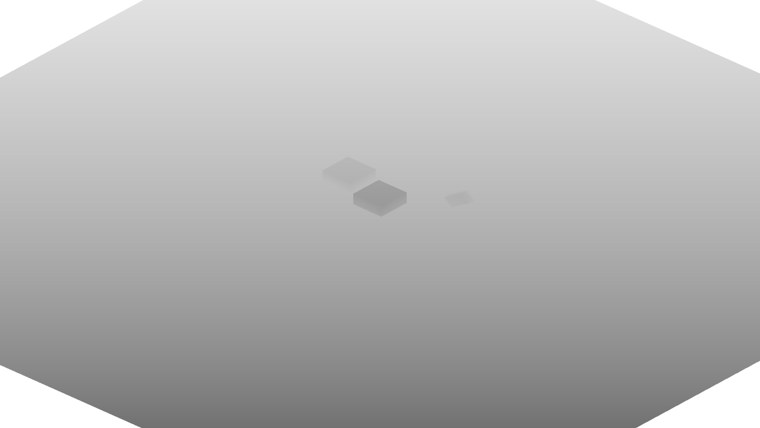
The floor is a smooth gradient, nearer to the light at the bottom of the map, and the cubes stand out as patches closer to the light than the floor around them. The white corners are outside the floor, where nothing was drawn and the cleared depth of 1 remains. The map is square and the window is not, so it appears stretched. Since an orthographic projection keeps depth linear, the raw values are already readable; with a perspective projection they would crowd near 1 and need linearizing first, as we will see at the end of the chapter.
Rendering shadows
With the depth map filled, the second pass draws the scene from the camera. The vertex shader is the usual one from earlier chapters, passing the world-space position on to the pixel shader. (LearnOpenGL transforms the position into light space in the vertex shader and interpolates that; we do the transform per pixel instead, which costs one matrix multiplication per pixel and keeps the vertex shader shared with other lessons. For an orthographic light both give the same result.) The pixel shader gets the light-space matrix and the light direction in a constant buffer:
cbuffer shadow : register(b1)
{
    float4x4 light_space;
    float3 light_direction;  // where the sunlight travels
};

Texture2D albedo : register(t0);
Texture2D<float> shadow_map : register(t1);
SamplerState linear_wrap : register(s0);
SamplerComparisonState shadow_compare : register(s1);
Ignore shadow_compare for a moment; it comes in with PCF below. The lighting is Blinn-Phong, with the shadow test scaling the diffuse and specular terms but leaving a little ambient light. Real shadows are rarely black, since light bounces in from elsewhere:
float4 ps_main(vs_out p) : SV_Target
{
    float3 color = albedo.Sample(linear_wrap, p.uv).rgb;
    float3 n = normalize(p.normal);
    float3 to_light = -light_direction;
    float3 to_eye = normalize(view_position - p.world);
    float3 halfway = normalize(to_light + to_eye);

    float diffuse = max(dot(n, to_light), 0.0);
    float spec = pow(max(dot(n, halfway), 0.0), 64.0);
    float lit = lit_fraction(p.world);
    return float4((0.15 + lit * (diffuse + 0.3 * spec)) * color, 1.0);
}
1.0 - shadow; it is the same idea.) Its first job is to find where the pixel lands in the shadow map:
float4 clip = mul(light_space, float4(world, 1.0));
float3 ndc = clip.xyz / clip.w;
// past the far end of the light's box: nothing there to cast a shadow
if (ndc.z > 1.0) return 1.0;
// clip space y is up, texture v is down
float2 uv = float2(ndc.x * 0.5 + 0.5, 0.5 - ndc.y * 0.5);
The world position goes through \(T\) into the light's clip space. Then we divide by w, the perspective divide the rasterizer did for the depth pass, to get normalized device coordinates. For an orthographic projection w is always 1, so the divide changes nothing, but keeping it means the code works unchanged with a perspective light.
Mapping NDC to the shadow map is where Direct3D differs from LearnOpenGL's code, in two ways.
- LearnOpenGL maps all three coordinates from -1..1 to 0..1 with
* 0.5 + 0.5. In Direct3D, NDC depth already runs from 0 to 1, and it is exactly what the depth pass stored. So z is used as it is, and only x and y are remapped. - NDC y points up, while texture v runs from 0 at the top of the image to 1 at the bottom. The rasterizer applies the same flip when it maps NDC to the viewport, so the top of the light's view is row 0 of the map. To find the right texel we have to flip y as well: \(v = 0.5 - 0.5y\). Forget this and the shadows appear mirrored, on the wrong side of their objects.
With these coordinates the basic test is one sample and one comparison: read the nearest depth the light saw at uv, and if our own depth ndc.z is greater, something is in front of us.
float closest = shadow_map.Sample(point_clamp, uv);   // nearest depth the light saw
float lit = ndc.z > closest ? 0.0 : 1.0;               // farther than that: in shadow
That is the whole of shadow mapping. As LearnOpenGL's own screenshots show, though, this naive version is covered in artefacts. Our lesson's shader does not contain this version, because it has the fixes built in. The rest of the chapter is about those fixes.
Improving shadow maps
Shadow acne
Run the naive test and large parts of the floor are covered in a striped, moiré-like pattern of shadow, even where nothing is above them. This is
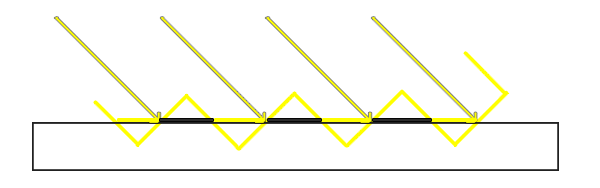
Each texel of the shadow map stores one depth for a small patch of the floor, the depth at that patch's centre. Many screen pixels fall inside the same patch, and each compares its own exact depth with that one stored value. When the light hits the floor at an angle, the patch is a slope, and the stored value is a flat step across it, as in LearnOpenGL's diagram: half of the pixels in the patch are slightly nearer to the light than the stored depth and pass, and the other half are slightly farther and fail. The surface shadows itself, in stripes.
The fix is a
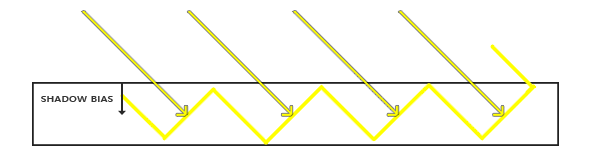
LearnOpenGL subtracts a small constant from the pixel's depth in the shader before comparing, and makes it depend on the angle between the normal and the light, since steeper slopes need more:
float bias = max(0.05 * (1.0 - dot(normal, lightDir)), 0.005);
Direct3D can do this for us, in hardware, and in a more precise way. The rasterizer state has a
- DepthBias is a constant, counted in units of the depth format's precision \(r\). For a float depth buffer like ours, \(r\) depends on the depth's floating point exponent, so it is in effect the size of one step of the float at that depth: 1000 of them comes to about \(6 \times 10^{-5}\) at a depth of 0.5.
- SlopeScaledDepthBias multiplies the triangle's depth slope, how fast its depth changes from one pixel to the next in the shadow map. A surface facing the light has a slope near zero and gets almost no extra bias; a surface the light grazes has a large slope and gets a lot. That is precisely the angle dependence the shader formula above approximates, but measured per triangle, in the shadow map's own pixels.
The lesson makes a second rasterizer state for the shadow pass, with
; -> rax: ID3D11RasterizerState for shadow passes: GL's conventions, as the window's, with depth
; pushed away from the light, more on slopes seen at a grazing angle.
align 16
shadow_bias_state proc
    local desc:D3D11_RASTERIZER_DESC, state:qword
    invoke mem_zero, ADDR desc, sizeof D3D11_RASTERIZER_DESC
    mov desc.FillMode, D3D11_FILL_SOLID
    mov desc.CullMode, D3D11_CULL_NONE
    mov desc.FrontCounterClockwise, 1
    mov desc.DepthClipEnable, 1
    mov desc.DepthBias, 1000
    storef desc.SlopeScaledDepthBias, 2.0
    vcall device, ID3D11Device_CreateRasterizerState, ADDR desc, ADDR state
    AssertHr
    mov rax, state
    ret
shadow_bias_state endp
The first four fields repeat the window's own rasterizer state, counter-clockwise front faces and no culling, so that only the bias differs. DepthBias is an integer and is moved in directly; SlopeScaledDepthBias is a float, so
; The shadow pass's rasterizer: push depth away from the light, more on slopes seen at a
; grazing angle.
call shadow_bias_state
mov bias_state, rax
and binds it around the depth pass's draws, restoring the window's normal state, raster_state, afterwards: the first and last lines of the depth pass we saw above. The lit pass's shader then compares with no bias of its own. As with any bias, the right values depend on the scene, the depth format and the size of the light's box, and are found by raising them until the acne is gone. A third field, DepthBiasClamp, caps the total; ours is left at 0, which means no cap.
Peter panning
A bias has a price. Pushing depths away from the light also moves shadows: with too much bias, an object's shadow starts a little way from where the object touches the ground, and the object seems to float above its own shadow. The effect is called
LearnOpenGL suggests a trick for closed objects: cull front faces during the shadow pass, so that the shadow map stores the depth of each object's back faces. For a solid cube that changes nothing about which points are in shadow, because the inside of the cube is never visible anyway, but it moves the stored depth well behind the lit front faces, so they need little or no bias to avoid acne.
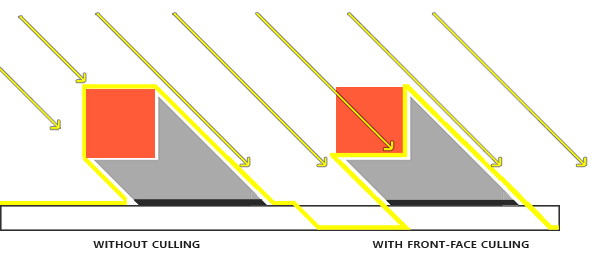
In Direct3D that would be a rasterizer state with CullMode set to D3D11_CULL_FRONT; with FrontCounterClockwise set, as ours is, "front" still means counter-clockwise. Our lesson does not use the trick. It only works for closed shadow casters: our floor is a single flat quad, and culling its front face would take it out of the shadow map entirely. Here that would happen to be harmless, since nothing below the floor needs its shadow, but open geometry in general (walls, leaves, a sheet of paper) still needs a bias. The lesson uses one method for everything, the slope-scaled hardware bias, which keeps the bias on surfaces facing the light small enough that the gap is hard to see.
Over sampling
The light's box covers only part of the world. A pixel outside it lands outside the shadow map, with uv below 0 or above 1, and what it reads there depends on the sampler's address mode. With wrapping, it reads depths from the other side of the map and gets shadows that belong elsewhere; with clamping, it smears the map's edge texels outward. Either way, areas the light never looked at get shadows they should not have.
The better answer for areas outside the box is "lit": there is nothing there in the map to cast a shadow, so we should not invent one. OpenGL does this with GL_CLAMP_TO_BORDER and a border colour of 1.0, the far plane. The Direct3D sampler has the same address mode, D3D11_TEXTURE_ADDRESS_BORDER, and a border colour in its description; we will see it in the sampler below. Any lookup outside the map then returns a depth of 1, which nothing can be farther than.
That leaves one case: a pixel beyond the box's far end. Its light-space depth is greater than 1, so it is farther than everything, the border included, and always fails the test. The fix is the early return we already saw at the top of if (ndc.z > 1.0) return 1.0;. Between the border and that check, shadows appear only where the light's box can actually see. Shadows end at the edge of the box, which is why the box should cover everything the camera will see, or at least fade out somewhere far away.
PCF
With acne and over sampling fixed, there is still the resolution. Get close to a shadow's edge and you see the shadow map's texels as jagged steps, since every screen pixel inside one texel gets the same yes-or-no answer. A larger map or a tighter box helps, but the steps never go away entirely. The usual remedy is
Note that it is the results of the tests that are averaged, not the depths. Averaging depths and then comparing would still give a hard edge, in a slightly different place. This is why we cannot just switch the shadow map's sampler to linear filtering: that would blend depth values.
Direct3D has hardware for exactly this, the COMPARISON filters, with a comparison function. Instead of returning texel values, it compares a reference value we pass in with each texel, gets a 1 or 0 for each, and then filters those results. With linear filtering, one lookup does four depth tests on the 2x2 texels around the sample point and blends them bilinearly: a little PCF in every call. The sampler is made by
; -> rax: a sampler that compares instead of filtering, for shadow maps: hardware PCF. Outside the
; map the border is 1, the far plane, so nothing there is in shadow.
align 16
create_shadow_sampler proc
    local desc:D3D11_SAMPLER_DESC, sampler:qword
    invoke mem_zero, ADDR desc, sizeof D3D11_SAMPLER_DESC
    mov desc.Filter, D3D11_FILTER_COMPARISON_MIN_MAG_LINEAR_MIP_POINT
    mov desc.AddressU, D3D11_TEXTURE_ADDRESS_BORDER
    mov desc.AddressV, D3D11_TEXTURE_ADDRESS_BORDER
    mov desc.AddressW, D3D11_TEXTURE_ADDRESS_BORDER
    mov desc.ComparisonFunc, D3D11_COMPARISON_LESS_EQUAL
    mov eax, 3F800000h                      ; 1.0
    mov dword ptr desc.BorderColor[0], eax
    mov dword ptr desc.BorderColor[4], eax
    mov dword ptr desc.BorderColor[8], eax
    mov dword ptr desc.BorderColor[12], eax
    mov dword ptr desc.MaxLOD, 7F7FFFFFh    ; D3D11_FLOAT32_MAX
    vcall device, ID3D11Device_CreateSamplerState, ADDR desc, ADDR sampler
    AssertHr
    mov rax, sampler
    ret
create_shadow_sampler endp
The border colour is four floats of 1.0, written here as their bits: 3F800000h is 1.0 in IEEE single precision, and 7F7FFFFFh is the largest finite float, the MaxLOD that means "no limit". Loading the bits into eax once and storing it four times is shorter than a constant per field. D3D11_COMPARISON_LESS_EQUAL makes each test pass, and count as lit, when the reference depth is less than or equal to the stored one. The border address mode and colour are the over-sampling fix from above. The sampler goes in slot s1, next to the ordinary sampler in s0, and in HLSL it is declared as a SamplerComparisonState rather than a SamplerState. OpenGL gets the same hardware through GL_TEXTURE_COMPARE_MODE and a sampler2DShadow, which LearnOpenGL does not use.
invoke bind_texture, 1, depth_map.srv
vcall context, ID3D11DeviceContext_PSSetSamplers, 1, 1, ADDR compare_sampler
One hardware lookup softens the edge by about a texel. For a wider soft edge, the shader takes a 3x3 grid of lookups around the pixel's position, one texel apart, and averages them, as LearnOpenGL's PCF loop does:
float w, h;
shadow_map.GetDimensions(w, h);
float2 texel = 1.0 / float2(w, h);
float sum = 0.0;
for (int y = -1; y <= 1; y++)
{
    for (int x = -1; x <= 1; x++)
    {
        sum += shadow_map.SampleCmpLevelZero(shadow_compare, uv + float2(x, y) * texel, ndc.z);
    }
}
return sum / 9.0;
ndc.z as the reference, always from mip level 0 (the map has no other). Each of the nine lookups already blends four comparisons, so the result is a smooth, bilinearly weighted blend over a 4x4 block of texels: smoother than the nine plain yes-or-no samples of LearnOpenGL's loop, for the same number of lookups.
And here is the result, with the sun partway through its circle:
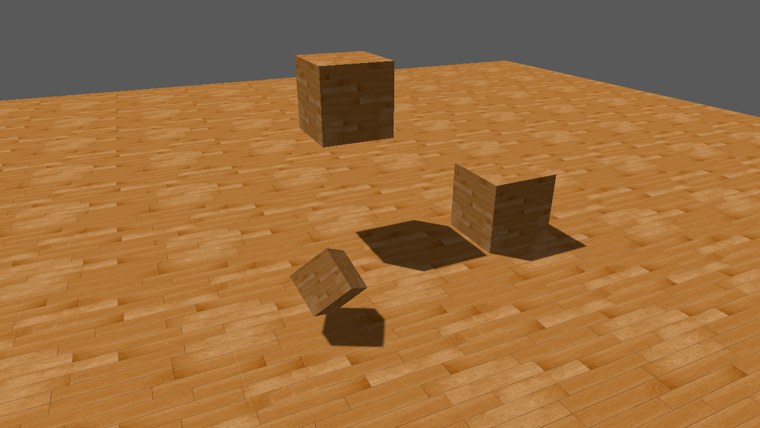
The shadows are free of acne, they reach right up to the cubes, and their edges are soft without being blurry. The highest cube's shadow lies on the floor well away from the cube itself, which tells you at once how high it floats. Let the program run and the shadows swing around the cubes as the sun circles. Get close with the camera and you can still find the map's resolution at the edges, but softened. Notice also the grey background: the clear colour is 0.1, written through the sRGB view of the back buffer that this lesson, like all from now on, draws through (see Gamma Correction), which encodes it as a lighter grey.
There is far more to soft shadows than this. Variance shadow maps, percentage-closer soft shadows with a blur that grows with distance from the caster, and cascaded maps that give nearby shadows more texels than distant ones, are all built on what we have here. The full program is here, and its shaders here, here and here.
Orthographic vs perspective
We used an orthographic projection because our light is directional: its rays are parallel, and so are the projection's. A light with a real position, a spotlight, sends its rays out from a point, and its shadow map is better rendered with a perspective projection, a frustum from the light. Both work with exactly the same code in the second pass, which is why

The one place they differ is in how the depth map looks. A perspective projection stores depth non-linearly, with most of the precision near the near plane, so a raw view of the map is almost entirely white. To look at it you first turn the stored depth back into a distance, as in Depth testing. With Direct3D's 0 to 1 depth the formula is:
float linear_depth(float d)   // d: depth from a perspective projection, 0..1
{
    return near_plane * far_plane / (far_plane - d * (far_plane - near_plane));
}
Divided by the far plane, that gives a picture much like our orthographic one. This only matters for looking at the map; the shadow test compares depths that came through the same projection, so it works with the raw values either way. Point lights, which shine in every direction at once, are the subject of the next chapter.
Additional resources
- Common techniques to improve shadow depth maps: Microsoft's long article on biases, fitting the light's box, PCF and cascades, written for Direct3D.
- Depth bias: Microsoft's description of DepthBias and SlopeScaledDepthBias, and the exact formula for each depth format.
- Tutorial 16: Shadow mapping: opengl-tutorial.org's version, with notes on fitting the light's box.
- How I implemented shadows in my game engine: ThinMatrix on making shadow maps look good in practice.
- LearnOpenGL's Shadow Mapping: the OpenGL version of this chapter, with screenshots of each artefact.
Exercises
- Set DepthBias and SlopeScaledDepthBias to 0 and look at the floor and the cubes' sides. Then bring back only the slope-scaled part. Which surfaces still need the constant one?
- Replace the 3x3 loop with a single
SampleCmpLevelZero at uv, and compare the edges. Then make the sampler's filter D3D11_FILTER_COMPARISON_MIN_MAG_MIP_POINT, so that each lookup does one comparison only, and compare again. - Shrink the light's box to 8 by 8 units, a left and bottom of -4.0 and a right and top of 4.0 in the
m4_ortho call. What happens to the shadows' sharpness, and to the floor outside the box? Then remove thendc.z > 1.0check and shorten the box's far plane to 9 to see what it was protecting against. - Make shadow_size 512 and look at the shadow edges up close. How much of the lost resolution does the PCF hide?