Normal Mapping
Every surface we draw is made of flat triangles. Textures disguise that well from a distance: paint bricks onto a flat quad and it reads as a brick wall. Light it, though, and the disguise slips. A real brick wall is anything but flat. The mortar between the bricks is sunken, the bricks' edges are rounded off, their faces are pitted and cracked, and every one of those details catches the light differently. A flat quad lit by a point light is lit as a flat quad, evenly, whatever its texture shows.
Why is it lit as flat? Because, to the lighting, a surface's shape is nothing but its normal. Diffuse and specular light both come from dot products with the normal, and a flat quad has one normal everywhere (interpolated from identical normals at its corners). Every pixel of the wall answers the light the same way.
So what if each pixel had a normal of its own? Tilt the normals near a brick's top edge upwards, those near its bottom edge downwards, and those in the mortar's grooves at angles, and the lighting will treat the surface as if it had all that shape, though the geometry is still two triangles.

This is
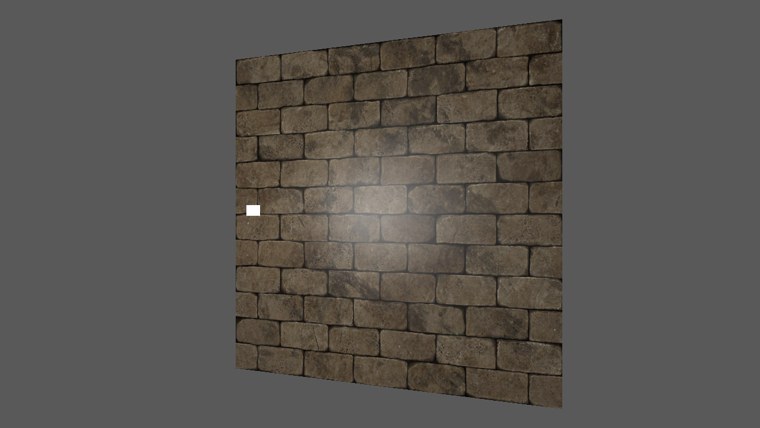
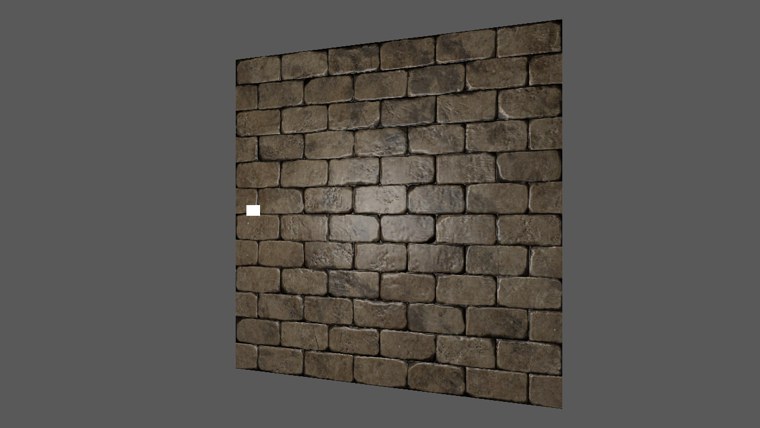
On the left the highlight slides across the wall like a reflection on a printed photograph. On the right the light picks out the edge of every brick.
Normal mapping
To give every pixel its own normal, we store normals in a texture, as we stored diffuse and specular strength in Lighting maps. A normal is a vector of three components, x, y and z, and a texel has three colour channels, so the components go into red, green and blue. Components run from -1 to 1 and colour channels from 0 to 1, so they are squeezed on the way in:
rgb = normal * 0.5 + 0.5;          // [-1, 1] to [0, 1], when the map is made
normal = rgb * 2.0 - 1.0;          // [0, 1] to [-1, 1], when the shader reads it
Normal maps nearly always look pale blue. The normals mostly point straight out of the surface, and if "out of the surface" is +z, such a normal is (0, 0, 1), stored as (0.5, 0.5, 1.0): a light blue. The tilted normals at the bricks' edges show up as shifts towards red, green, or their opposites.
A normal map holds data, not a colour, so it must not be decoded as sRGB when it is read: the shader should see the stored values exactly. As the Gamma Correction chapter said, colour textures get the sRGB flag and data textures do not. The lesson loads its two maps accordingly:
; the bricks' colours (sRGB) and their normals (data, linear)
invoke filesystem_path, "resources/textures/brickwall.jpg"
invoke load_texture, rax, 1
mov maps[0], rax
invoke filesystem_path, "resources/textures/brickwall_normal.jpg"
invoke load_texture, rax, 0
mov maps[8], rax
maps is an array of two pointers, maps qword 2 dup(0). MASM's brackets count bytes, not elements, so the second pointer is maps[8]. With the two views side by side in memory, both are bound at once, to registers t0 and t1, with a single call:
vcall context, ID3D11DeviceContext_PSSetShaderResources, 0, 2, ADDR mapsIn the pixel shader, the simplest possible use reads the normal, unpacks it, and lights with it:
float3 n = normalize(normal_map.Sample(linear_wrap, p.uv).rgb * 2.0 - 1.0);
// ... light with n as usual
For a wall facing +z this works, because the map's normals point roughly along +z, and so does the wall. Now lay the same wall down as a floor, facing +y. The map's normals still point along +z, which is now sideways across the floor, and the floor is lit as if it were standing upright. The normals would need turning to match the surface, and turning differently for every surface the map is put on.
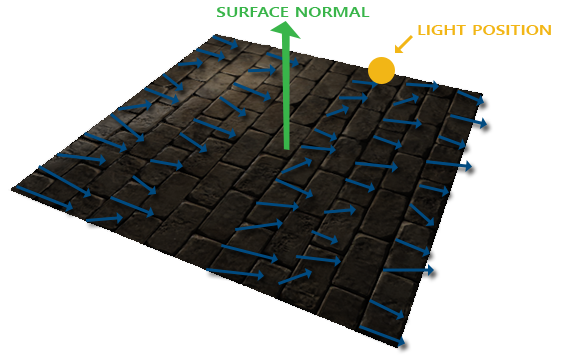
We could make one normal map per orientation, six for a cube, but not for a curved model with a different orientation at every vertex. What we need instead is to store normals relative to the surface, and turn them into place in the shader.
Tangent space
That is what the normal map really stores: normals in
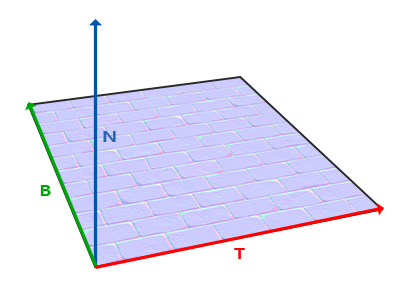
We already have N, the vertex normal. T and B lie in the surface, along the directions the texture runs: T is the direction in which u grows, and B is the map's y direction, which LearnOpenGL's diagram draws running up the image. We will come back to which way B really runs below, because it is where Direct3D and OpenGL part ways.
The tangent has to be computed from the mesh. Take a triangle with corners \(P_1\), \(P_2\), \(P_3\), and texture coordinates \((U_1, V_1)\) and so on. Each edge is a step across the surface, and also a step across the texture. The edge \(E_1 = P_2 - P_1\) moves \(\Delta U_1\) in u and \(\Delta V_1\) in v. If T is the world-space direction (and length) of one unit of u, and \(B_v\) that of one unit of v, then each edge is made of so many of each:
\[E_1 = \Delta U_1 T + \Delta V_1 B_v\] \[E_2 = \Delta U_2 T + \Delta V_2 B_v\]Every \(E\) and \(\Delta\) here is known from the triangle, and T and \(B_v\) are unknown: two vector equations, two unknown vectors. In matrix form:
\[\begin{bmatrix} E_{1x} & E_{1y} & E_{1z} \\ E_{2x} & E_{2y} & E_{2z} \end{bmatrix} = \begin{bmatrix} \Delta U_1 & \Delta V_1 \\ \Delta U_2 & \Delta V_2 \end{bmatrix} \begin{bmatrix} T_x & T_y & T_z \\ B_{vx} & B_{vy} & B_{vz} \end{bmatrix}\]and multiplying both sides by the inverse of the 2x2 matrix of texture steps solves it. The inverse of a 2x2 matrix is one over its determinant times its adjugate, which gives:
\[\begin{bmatrix} T_x & T_y & T_z \\ B_{vx} & B_{vy} & B_{vz} \end{bmatrix} = \frac{1}{\Delta U_1 \Delta V_2 - \Delta U_2 \Delta V_1} \begin{bmatrix} \Delta V_2 & -\Delta V_1 \\ -\Delta U_2 & \Delta U_1 \end{bmatrix} \begin{bmatrix} E_{1x} & E_{1y} & E_{1z} \\ E_{2x} & E_{2y} & E_{2z} \end{bmatrix}\]The top row is the tangent: \(T = f(\Delta V_2 E_1 - \Delta V_1 E_2)\), with \(f\) the one over the determinant. Don't worry if the algebra is not all clear; what matters is that the tangent follows from a triangle's positions and texture coordinates, because the texture coordinates say how the texture lies on the surface.
Manual calculation of tangents
The lesson's wall is a 2 by 2 square facing +z, made from four corners and two triangles.
; the four corners and their texture coordinates
wall_corners vec3 <-1.0, -1.0, 0.0>, <1.0, -1.0, 0.0>, <1.0, 1.0, 0.0>, <-1.0, 1.0, 0.0>
wall_uvs vec2 <0.0, 1.0>, <1.0, 1.0>, <1.0, 0.0>, <0.0, 0.0>
; which corner each of the six vertices is
wall_order dword 0, 1, 2, 0, 2, 3
and the tangent is solved for from the first triangle's two edges:
; edges
lea rcx, e1
lea rdx, wall_corners[1 * sizeof vec3]
lea r8, wall_corners[0]
call v3_sub
lea rcx, e2
lea rdx, wall_corners[2 * sizeof vec3]
lea r8, wall_corners[0]
call v3_sub
; du1 = xmm0, dv1 = xmm1, du2 = xmm2, dv2 = xmm3
movss xmm0, wall_uvs[1 * sizeof vec2].x
subss xmm0, wall_uvs[0].x
movss xmm1, wall_uvs[1 * sizeof vec2].y
subss xmm1, wall_uvs[0].y
movss xmm2, wall_uvs[2 * sizeof vec2].x
subss xmm2, wall_uvs[0].x
movss xmm3, wall_uvs[2 * sizeof vec2].y
subss xmm3, wall_uvs[0].y
; f = 1 / (du1 dv2 - du2 dv1)
movss xmm4, xmm0
mulss xmm4, xmm3
movss xmm5, xmm2
mulss xmm5, xmm1
subss xmm4, xmm5
movss xmm5, math_one
divss xmm5, xmm4
movss f, xmm5
; tangent = normalize((e1 dv2 - e2 dv1) f)
v3load xmm4, e1
shufps xmm3, xmm3, 0
mulps xmm4, xmm3
v3load xmm5, e2
shufps xmm1, xmm1, 0
mulps xmm5, xmm1
subps xmm4, xmm5
movss xmm5, f
shufps xmm5, xmm5, 0
mulps xmm4, xmm5
v3store tangent, xmm4
lea rcx, tangent
mov rdx, rcx
call v3_normalize
The four texture steps each live in the low lane of an xmm register, where the scalar instructions (subss, mulss, divss) work on them one float at a time. For the vector part, shufps xmm3, xmm3, 0 copies the low lane into all four, so that a single mulps scales every component of the edge at once: SSE doing what
Note the texture coordinates: the bottom left corner (-1, -1) has uv (0, 1), and the top left corner has (0, 0). In Direct3D the first row of an image is at v = 0, so this puts the image upright on the wall without flipping anything. For this square the tangent comes out as (1, 0, 0), along +x, as you would expect: u grows to the right. Because the square is flat, both triangles share one tangent, so it is computed once.
The rest of the procedure writes the six vertices into a local array with a fourth attribute, the tangent, after position, normal and uv:
; six vertices: position, normal (0, 0, 1), uv, tangent
lea rdi, vertices
lea rsi, wall_order
xor ebx, ebx
each_vertex:
    mov eax, [rsi + rbx * 4]
    lea rcx, wall_corners
    imul edx, eax, sizeof vec3
    v3load xmm0, [rcx + rdx]
    v3store [rdi], xmm0
    mov dword ptr [rdi + 12], 0
    mov dword ptr [rdi + 16], 0
    mov dword ptr [rdi + 20], 3F800000h
    lea rcx, wall_uvs
    mov rdx, [rcx + rax * 8]
    mov [rdi + 24], rdx
    v3load xmm0, tangent
    v3store [rdi + 32], xmm0
    add rdi, wall_stride
    inc ebx
    cmp ebx, 6
    jb each_vertex
invoke create_buffer, D3D11_BIND_VERTEX_BUFFER, ADDR vertices, 6 * wall_stride
The normal (0, 0, 1) is written as bits, 3F800000h being 1.0, and the uv, two floats, is copied as one eight-byte mov. The corner tables are globals, so each is addressed by loading its address with lea first and indexing the register: a global indexed directly, wall_uvs[rax * 8], would need a 32-bit absolute address, which a 64-bit program cannot use. The input layout gets a matching fourth element, with a semantic of its own:
wall_stride equ 44

.data
wall_semantic_position byte "POSITION", 0
wall_semantic_normal byte "NORMAL", 0
wall_semantic_texcoord byte "TEXCOORD", 0
wall_semantic_tangent byte "TANGENT", 0
align 8
wall_layout D3D11_INPUT_ELEMENT_DESC <offset wall_semantic_position, 0, DXGI_FORMAT_R32G32B32_FLOAT, 0, 0, D3D11_INPUT_PER_VERTEX_DATA, 0>
            D3D11_INPUT_ELEMENT_DESC <offset wall_semantic_normal, 0, DXGI_FORMAT_R32G32B32_FLOAT, 0, 12, D3D11_INPUT_PER_VERTEX_DATA, 0>
            D3D11_INPUT_ELEMENT_DESC <offset wall_semantic_texcoord, 0, DXGI_FORMAT_R32G32_FLOAT, 0, 24, D3D11_INPUT_PER_VERTEX_DATA, 0>
            D3D11_INPUT_ELEMENT_DESC <offset wall_semantic_tangent, 0, DXGI_FORMAT_R32G32B32_FLOAT, 0, 32, D3D11_INPUT_PER_VERTEX_DATA, 0>
wall_layout_count equ 4
The wall is drawn with a stride of 44 bytes, rather than through the lessons'
vcall context, ID3D11DeviceContext_IASetVertexBuffers, 0, 1, ADDR wall_vb, ADDR wall_vertex_stride, ADDR wall_offset
vcall context, ID3D11DeviceContext_Draw, 6, 0
Which way is the bitangent?
The bottom row of the solved matrix gives \(B_v\), the direction in which v grows, and LearnOpenGL computes its bitangent that way and passes it in as a fifth attribute. We do not, for two reasons.
The first is that B does not need to be stored at all. T, B and N are perpendicular, so B is the cross product of the other two, and the vertex shader can compute it. That saves twelve bytes per vertex.
The second is the sign. What B has to be is the direction the normal map's y component means, and that is a convention of the map, not a property of the triangle. In Direct3D, v grows down the image, and \(B_v\) for our wall comes out as (0, -1, 0), down the wall. A map whose green channel means "down the image" fits that directly; one whose green means "up the image" would be read upside down.
Our brick map, as it sits in its file, is of the first kind, so the lesson's bitangent points down the image, along v. For a surface facing us with T to the right, that is \(T \times N\):
// The map's y points down the image, the way v increases: the files are
// made for GL, which shows images upside down, so seen the right way up
// their +y is down. For a surface facing the viewer that is
// cross(tangent, normal).
o.b = cross(o.t, o.n);
Normal maps in the wild come in both conventions. Up-the-image green is often called the OpenGL convention (or "Y+"), and down-the-image green the DirectX convention ("Y-"), after the APIs whose texture coordinates each suits. Neither is wrong; what matters is that the shader's B matches the map it reads. You cannot tell which you have from the API, only from the map, by checking which edges of a raised feature are green.
Tangent space normal mapping
The vertex shader takes the tangent along with everything else and builds the three vectors in world space:
tangent_out vs_main(tangent_in v)
{
    tangent_out o;
    float4 world = mul(model, float4(v.position, 1.0));
    o.world = world.xyz;
    o.position = mul(projection, mul(view, world));
    o.uv = v.uv;
    o.n = normalize(mul((float3x3)normal_matrix, v.normal));
    // Gram-Schmidt: make the tangent exactly perpendicular to the normal
    float3 t = normalize(mul((float3x3)model, v.tangent));
    o.t = normalize(t - dot(t, o.n) * o.n);
    // The map's y points down the image, the way v increases: the files are
    // made for GL, which shows images upside down, so seen the right way up
    // their +y is down. For a surface facing the viewer that is
    // cross(tangent, normal).
    o.b = cross(o.t, o.n);
    return o;
}
The normal goes through the normal matrix as always. The tangent lies in the surface, so it transforms like a position difference, through the model matrix's upper 3x3. Then it is made exactly perpendicular to the normal, which we will come back to at the end of the chapter, and the bitangent is crossed from the two. All three are passed to the pixel shader as separate interpolated vectors: HLSL could pass a float3x3, but three named vectors are clearer and cost the same.
With T, B and N in world space there are two ways to use them, and LearnOpenGL shows both.
The first, which this lesson uses, turns the sampled normal from tangent space into world space, and lights as usual. In the pixel shader:
float4 ps_main(tangent_out p) : SV_Target
{
    float3 color = albedo.Sample(linear_wrap, p.uv).rgb;
    float3 n = normalize(p.n);
    if (use_map)
    {
        float3 tangent_normal = normal_map.Sample(linear_wrap, p.uv).rgb * 2.0 - 1.0;
        float3x3 tbn = float3x3(normalize(p.t), normalize(p.b), n);
        // tbn's rows are the axes, so this is t * x + b * y + n * z
        n = normalize(mul(tangent_normal, tbn));
    }
    float3 to_light = normalize(light_position - p.world);
    float3 to_eye = normalize(view_position - p.world);
    float3 halfway = normalize(to_light + to_eye);
    float diffuse = max(dot(n, to_light), 0.0);
    float spec = pow(max(dot(n, halfway), 0.0), 32.0);
    return float4((0.1 + diffuse) * color + 0.2 * spec, 1.0);
}
The interpolated vectors are renormalized first, since interpolation shortens them. The matrix multiplication needs a moment's care, because HLSL and GLSL build matrices differently. The float3x3 constructor takes its arguments as rows, so tbn has T, B and N as its rows; GLSL's mat3(T, B, N) takes them as columns. (The row_major pragma at the top of our shaders only changes how matrices are read from constant buffers; it does not affect constructors.) Multiplying a row vector on the left, mul(v, tbn), gives \(x T + y B + z N\): the tangent-space normal's components, used as amounts of each axis. That is the tangent-to-world transform, the same thing GLSL's TBN * normal does with its column matrix.
use_map comes from the light's constant buffer, and Tab flips it, which gives the comparison at the top of this chapter:
; mode 0 uses the normal map, mode 1 the flat normal
invoke window_mode, 2
mov ecx, 1
sub ecx, eax
mov light.use_map, ecx
The light wanders in a loop in front of the wall, and the wall itself turns slowly back and forth around y, so you can see that the lighting stays right however the surface is turned:
; the light wanders in front of the wall: (0.8 cos t, 0.8 sin 1.3t, 0.6)
movss xmm0, current_frame
call cosf
movf xmm1, 0.8
mulss xmm0, xmm1
movss light.position.x, xmm0
movss xmm0, current_frame
movf xmm1, 1.3
mulss xmm0, xmm1
call sinf
movf xmm1, 0.8
mulss xmm0, xmm1
movss light.position.y, xmm0
storef light.position.z, 0.6
; the wall turns a little, back and forth: rotate(radians(-25) sin(0.4 t), y)
movss xmm0, current_frame
movf xmm1, 0.4
mulss xmm0, xmm1
call sinf
movf xmm1, -25.0
mulss xmm0, xmm1
call radians
movaps xmm1, xmm0
lea rcx, t.model
lea r8, y_axis
call m4_rotate
invoke m4_normal_matrix, ADDR t.normal_matrix, ADDR t.model
invoke update_buffer, transforms_buffer, ADDR t, sizeof transforms
rcx, the angle as its second argument, so in xmm1, and the axis as its third, in r8; rdx goes unused. Since the wall is not drawn through
The second way goes the other direction: transform the light and eye vectors into tangent space and light there, where the normal from the map can be used as it is. The inverse of the TBN matrix does that, and since its rows are perpendicular unit vectors, its inverse is simply its transpose. In HLSL, with T, B and N as rows, that is mul(tbn, v): each component of the result is the dot product of v with one axis. The advantage is that the light and eye positions, and the vertex's own position, can be transformed into tangent space in the vertex shader and interpolated, which saves the matrix work per pixel. The next chapter uses this direction, because parallax mapping needs the eye direction in tangent space anyway.
The full program is here, and its shader here.
Complex objects
A single square is easy to do by hand. A model has thousands of triangles, and in practice tangents come from the model loader. LearnOpenGL asks Assimp to compute them with aiProcess_CalcTangentSpace. Our own loader, from the Model chapter, does not compute tangents, but the method is the same as
- For each triangle, solve for its tangent from its edges and texture coordinates.
- Add that tangent to each of the triangle's three vertices.
- When all triangles are done, make each vertex's sum perpendicular to the vertex normal and normalize it.
Summing across triangles gives smooth tangents over a curved surface, the way averaged normals give smooth shading. One complication: artists often mirror a texture, using the same half of an image for the left and right sides of a face, say. On the mirrored half, u runs backwards and the bitangent must be flipped. Loaders handle that by storing a fourth component in the tangent, +1 or -1, that the shader multiplies the crossed bitangent by.
Normal mapping is also a performance tool. A high-detail model of millions of triangles can be baked into a normal map for a low-detail model of a few thousand, and the two look almost the same under lighting, at a fraction of the vertices.
One last thing
When tangents are averaged over shared vertices, as above, they generally end up not quite perpendicular to the normal, and the TBN matrix is then not quite a rotation. The error is small, but easy to remove with the
o.t = normalize(t - dot(t, o.n) * o.n);Crossing N with the corrected T then gives a B perpendicular to both, and the three make a proper orthonormal frame. For our flat wall the tangent was perpendicular already, so it changes nothing here, but it costs very little and it makes the shader correct for any mesh.
Additional resources
- Tutorial 26: Normal mapping: ogldev's version.
- Normal mapping mathematics: TheBennyBox on the derivation, including Gram-Schmidt.
- Tutorial 13: Normal mapping: opengl-tutorial.org, with notes on mirrored texture coordinates.
- MikkTSpace: the tangent space convention most modelling tools bake normal maps in, and code to compute matching tangents.
- LearnOpenGL's Normal Mapping: the OpenGL version of this chapter.
Exercises
- Find out which convention the brick map uses. Hold the light still above the wall, at (0, 1.5, 0.6), and look at the bricks' top and bottom edges; then flip the bitangent to the other convention,
o.b = cross(o.n, o.t);, and look again. Which version lights the top edges when the light is above? - Draw the wall as a floor: rotate it by -90 degrees about x and put the light above it. With the normal map on, does the lighting still look right? Now replace the TBN transform with the naive
n = tangent_normal;and see why tangent space is needed. - Compute the bitangent \(B_v\) in
create_wall from the bottom row of the solved matrix, \(B_v = f(\Delta U_1 E_2 - \Delta U_2 E_1)\), and check in the debugger that it points down the wall. (print has no%f; to print it, scale the components by 1000 and convert them withcvtss2sifirst.)