Shaders
In Hello Triangle we met shaders briefly: small programs that run on the GPU, one stage of the pipeline each, once per vertex or once per pixel. A shader is a function from inputs to outputs and nothing more. It can't call another shader or keep anything between one invocation and the next; everything it knows arrives through its inputs, and everything it does leaves through its outputs. This chapter looks at the language we write them in, HLSL, and at the two ways data gets into them from our program.
HLSL
The
A GLSL shader is a file that starts with a #version line, declares global in, out and uniform variables, and has a main function. An HLSL file is organised differently:
- There is no version line. The shader model is chosen when the shader is compiled, by the
target we pass:vs_5_0for a vertex shader,ps_5_0for a pixel shader. - There is no
main. Each shader is an ordinary function with a name we choose, itsentry point , and one file can hold several of them. Ours always hold a vertex shader calledvs_mainand a pixel shader calledps_main. - Inputs and outputs are not global variables. They are the function's parameters and return value, and each is tagged with a
semantic that says what it is. - Values that are the same for a whole draw, GLSL's uniforms, are grouped into
constant buffers , declared withcbuffer.
In outline, an HLSL file looks like this:
cbuffer name : register(b0)
{
    type constant_name;
};

struct vs_out
{
    float4 position : SV_Position;
    type out_name : SOME_SEMANTIC;
};

vs_out vs_main(type in_name : INPUT_SEMANTIC)
{
    vs_out o;
    // compute o.position and the other outputs from the inputs
    return o;
}

float4 ps_main(vs_out p) : SV_Target
{
    // compute the pixel's colour
}
Inputs to a vertex shader are also called
Types
HLSL has C's basic scalar types and a few of its own: bool, int, uint, float, double, and half, nominally a lower-precision float, which shader model 5 simply treats as a float. On top of those it has vectors and matrices, which we use all the time. Matrices wait for the Transformations chapter.
Vectors
A vector type is a scalar type followed by its number of components, from 1 to 4:
float2,float3,float4: vectors of floats, the counterpart of GLSL'svec2tovec4, and what we use almost always.int3,uint4,bool2and so on for the other scalar types, GLSL'sivec,uvecandbvec.
The components are named .x, .y, .z and .w, or, when the vector holds a colour, .r, .g, .b and .a. (GLSL's third set, stpq, does not exist in HLSL.) Both sets support
float2 a = float2(0.5, 0.7);
float4 b = a.xyxx;            // (0.5, 0.7, 0.5, 0.5)
float3 c = b.zyw;             // (0.5, 0.7, 0.5)
float4 d = a.xxxx + c.yxzy;
float4 e = float4(a, 0.0, 1.0);
float4 f = float4(e.rgb, 1.0);
The two sets can't be mixed in one swizzle, and we can't name a component the vector doesn't have, such as .z of a float2. Constructors take any mixture of scalars and vectors as long as the component count comes out right, as the last two lines show. That is exactly how our vertex shaders extend a position to four components: float4(position, 1.0).
float4 to a float3 silently drops the last component (the compiler only warns, "implicit truncation"), and a scalar assigned to a vector fills every component. Both are handy on purpose and confusing by accident, so read the compiler's warnings.
Ins and outs
Shaders are only useful as part of the pipeline, so each needs inputs and outputs that connect to the stages around it. GLSL connects them by name: an out in the vertex shader feeds the in of the same name and type in the fragment shader. HLSL connects them by
At the start, the vertex shader's inputs are filled from vertex buffers, and the semantics are the link: the input layout we create on the CPU names a semantic for each attribute, and the attribute goes to the vertex shader input with that semantic. We saw that in Hello Triangle, where POSITION joined the two. Semantics like POSITION and COLOR are names we pick; only the ones starting with SV_, the
At the other end, the pixel shader must produce a colour. It returns a float4 marked SV_Target, which goes to the bound render target.
In between, the vertex shader's outputs travel through the rasterizer to the pixel shader's inputs, matched by semantic. A vertex shader always outputs SV_Position, the clip-space position the rasterizer needs, and can output more alongside it. The tidiest way to write this is one struct for the vertex shader's output, used again as the pixel shader's input, so the two sides cannot disagree. Here is this lesson's shader file, shaders.hlsl, apart from its constant buffer:
struct vs_in
{
    float3 position : POSITION;
    float3 color : COLOR;
};

// What the vertex shader hands on. Anything beyond SV_Position is
// interpolated across the triangle on its way to the pixel shader.
struct vs_out
{
    float4 position : SV_Position;
    float3 color : COLOR;
};

vs_out vs_main(vs_in v)
{
    vs_out o;
    o.position = float4(v.position, 1.0);
    o.color = v.color;
    return o;
}
The inputs are a struct too this time, vs_in, with two attributes: a position and a colour. The vertex shader copies the colour through unchanged into its output, under the semantic COLOR, and the pixel shader receives it:
float4 ps_main(vs_out p) : SV_Target
{
    return float4(p.color * tint.rgb, 1.0);
}
Ignore tint for a moment; it is the constant buffer we come to next. What matters here is p.color: a value computed per vertex, handed to the pixel shader. The pixel shader also receives p.position. By the time it gets there it is no longer in clip space: SV_Position in a pixel shader holds the pixel's own coordinates in the render target, which can be handy and which we use in later chapters.
Constant buffers
Vertex attributes give each vertex its own values. Often we want the opposite: one value that every vertex and pixel in a draw sees, such as the time, a colour for the whole object, or later a transformation matrix. GLSL calls these cbuffer, whose values come from a buffer object we fill on the CPU. This lesson's has a single member, a colour to tint everything with:
cbuffer frame : register(b0)
{
    float4 tint;
};
register(b0) places it in constant buffer slot 0. That number is how our program and the shader find each other. OpenGL looks uniforms up by name with
; Mirrors `cbuffer frame` in the shader, register for register.
frame_constants struct
    tint vec4 <>
frame_constants ends
vec4 is a structure of four real4 floats, x to w, from includes/math.asm; <> says the member starts with no particular value. With one member the layouts trivially agree, but they won't always be so simple. HLSL packs a constant buffer into 16-byte float3 followed by a float share one register, but a float3 followed by another float3 leaves a gap of 4 bytes between them, and our structure has to leave the same gap. Later lessons add explicit padding fields for this.
Creating and filling the buffer
The buffer itself is created like the vertex buffers, with different settings. The lesson asks for it in one call:
; A dynamic constant buffer: the CPU may rewrite it. Its size must be a multiple of 16 bytes,
; the size of one HLSL register.
invoke create_constant_buffer, sizeof frame_constants
mov constants, rax
and the procedure, with learn/gpu.asm, where the later lessons find it:
; rcx: size -> rax: ID3D11Buffer
;
; A constant buffer the CPU rewrites, usually every frame. Its size must be a multiple of 16
; bytes, the size of one HLSL register.
align 16
create_constant_buffer proc data_size:qword
    local desc:D3D11_BUFFER_DESC, buffer:qword
    invoke mem_zero, ADDR desc, sizeof D3D11_BUFFER_DESC
    mov eax, dword ptr data_size
    mov desc.ByteWidth, eax
    mov desc.Usage, D3D11_USAGE_DYNAMIC
    mov desc.BindFlags, D3D11_BIND_CONSTANT_BUFFER
    mov desc.CPUAccessFlags, D3D11_CPU_ACCESS_WRITE
    vcall device, ID3D11Device_CreateBuffer, ADDR desc, 0, ADDR buffer
    AssertHr
    mov rax, buffer
    ret
create_constant_buffer endp
D3D11_BIND_CONSTANT_BUFFER says what it is for. Our vertex buffers were IMMUTABLE, fixed at creation; this one is DYNAMIC, with CPU write access, because we will rewrite it every frame. There is no initial data (the 0 in place of a D3D11_SUBRESOURCE_DATA), since we fill it before every draw. macros.asm, stops in the debugger if the call failed.
Each frame, the lesson computes a tint that pulses between black and green over time, the same sin trick LearnOpenGL uses, and copies it into the buffer:
; tint = (0, sin(t) / 2 + 0.5, 0, 1)
movss xmm0, current_frame
call sinf
mulss xmm0, math_half
addss xmm0, math_half
storef c.tint.x, 0.0
movss c.tint.y, xmm0
storef c.tint.z, 0.0
storef c.tint.w, 1.0
invoke update_buffer, constants, ADDR c, sizeof frame_constants
\(\sin\) swings between -1 and 1, so halving it and adding a half gives a green channel that moves smoothly between 0 and 1. c is a frame_constants in the data section; each field is written separately, the computed one from xmm0, the constants with math.asm's: with no C runtime to supply one, it hands the angle to the x87 unit, which still has a sine instruction, fsin. Its argument and its result are both in xmm0, as the Win64 convention has it for a float, and math_half is a 0.5 that math.asm keeps in memory for this kind of use. current_frame is the time in seconds since the program started, from a small learn/window.asm that plays the part of
; -> xmm0: seconds since the window was created: what glfwGetTime is to LearnOpenGL. Stopped at
; --time while taking a --shot.
align 16
get_time proc
    local now:qword
    cmp window_shot_path, 0
    je running
        movss xmm0, window_shot_time
        ret
    running:
    invoke QueryPerformanceCounter, ADDR now
    mov rax, now
    sub rax, window_perf_start
    cvtsi2sd xmm0, rax
    cvtsi2sd xmm1, window_perf_frequency
    divsd xmm0, xmm1
    cvtsd2ss xmm0, xmm0
    ret
get_time endp
cvtsi2sd, divsd), since a count of a few billion doesn't fit a float's 24 bits of precision, and only then rounded to the float the lessons use. The check at the top is for the --shot option, which the lessons use to take their screenshots at a fixed moment.
Back to filling the buffer. That is learn/gpu.asm:
; rcx: buffer, rdx: data, r8: size
;
; WRITE_DISCARD hands back fresh memory each time, so the GPU never waits on the CPU, and a draw
; already recorded keeps the values it saw.
align 16
update_buffer proc buffer:qword, data:qword, data_size:qword
    local mapped:D3D11_MAPPED_SUBRESOURCE
    vcall context, ID3D11DeviceContext_Map, buffer, 0, D3D11_MAP_WRITE_DISCARD, 0, ADDR mapped
    AssertHr
    invoke mem_copy, mapped.pData, data, data_size
    vcall context, ID3D11DeviceContext_Unmap, buffer, 0
    ret
update_buffer endp
cstr.asm, our
The D3D11_MAP_WRITE_DISCARD flag matters. The GPU runs behind the CPU, often by a frame or more, so when we map the buffer the GPU may not yet have run the draw that read its previous contents. Overwriting that memory in place would mean either waiting for the GPU or changing values under a draw that has not happened yet. "Discard" says we don't need the old contents at all, so the driver hands us a fresh piece of memory, and the earlier draw keeps the values it was given. This is how a buffer that changes every frame should be updated.
Binding it
The last step is to bind the buffer to slot 0, and here Direct3D differs from OpenGL in a way worth noticing. An OpenGL uniform belongs to a program object. A Direct3D constant buffer slot belongs to a stage: the vertex shader has its own slots, the pixel shader its own. Only our pixel shader reads tint, so we bind it there only:
vcall context, ID3D11DeviceContext_PSSetConstantBuffers, 0, 1, ADDR constants
If the vertex shader needed it too,
The lesson draws its left triangle with the pulsing green tint, then writes plain white into the buffer, and draws the right triangle:
vcall context, ID3D11DeviceContext_IASetVertexBuffers, 0, 1, ADDR left_vb, ADDR stride, ADDR offset_
vcall context, ID3D11DeviceContext_Draw, 3, 0

storef c.tint.x, 1.0
storef c.tint.y, 1.0
storef c.tint.z, 1.0
invoke update_buffer, constants, ADDR c, sizeof frame_constants
vcall context, ID3D11DeviceContext_IASetVertexBuffers, 0, 1, ADDR right_vb, ADDR stride, ADDR offset_
vcall context, ID3D11DeviceContext_Draw, 3, 0
Mapping with discard between the two draws is safe for the same reason as before: the first draw keeps the green it was given, and the second sees white. The pixel shader multiplies each vertex colour by the tint. The left triangle's vertices are all white, so it shows the tint alone and fades between black and green; the right one is multiplied by white, so it shows its vertex colours unchanged.
More attributes!
The right triangle is the interesting one. Each of its vertices carries a colour of its own, as three more floats after the position:
; x, y, z, then r, g, b
; ...
right_triangle real4 0.1, -0.5, 0.0,   1.0, 0.0, 0.0
               real4 0.9, -0.5, 0.0,   0.0, 1.0, 0.0
               real4 0.5,  0.5, 0.0,   0.0, 0.0, 1.0
right_triangle_size equ $ - right_triangle
Red at the bottom left, green at the bottom right, blue at the top. (The left triangle has the same layout, with white for every colour.) Each vertex is now six floats, 24 bytes, laid out as in LearnOpenGL's diagram:
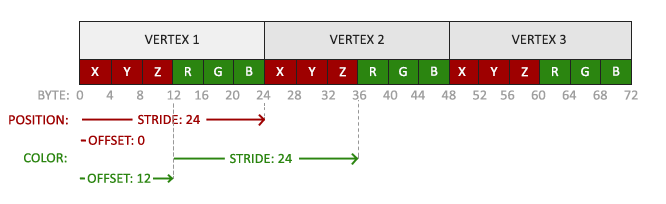
The input layout gets a second element to match:
semantic_position byte "POSITION", 0
semantic_color byte "COLOR", 0
align 8
vertex_layout D3D11_INPUT_ELEMENT_DESC <offset semantic_position, 0, DXGI_FORMAT_R32G32B32_FLOAT, 0, 0, D3D11_INPUT_PER_VERTEX_DATA, 0>
              D3D11_INPUT_ELEMENT_DESC <offset semantic_color, 0, DXGI_FORMAT_R32G32B32_FLOAT, 0, 12, D3D11_INPUT_PER_VERTEX_DATA, 0>
Both attributes are three floats. The fifth field, AlignedByteOffset, says where each starts within a vertex: the position at byte 0, the colour 12 bytes in, right after the position's three floats. The semantic names match the ones in vs_in. The second element is written under the first, without a name of its own, so the two sit one after the other in memory and vertex_layout is an array of two. The distance from one vertex to the next, the
stride dword 24
offset_ dword 0
offset is a MASM operator, as in offset semantic_color above, so the variable gets an underscore.
With the layout, the buffers and the shaders in place, this is what the program shows:
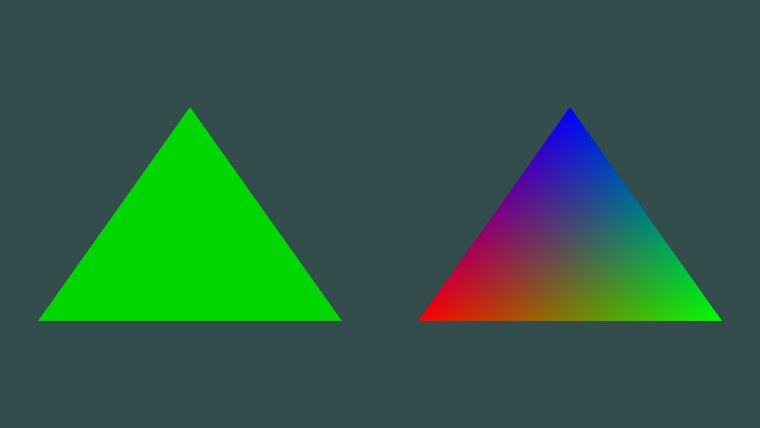
The left triangle's green rises and falls over time. The right one deserves a closer look: we gave it three colours, one per corner, and it shows a smooth blend of them across its whole surface. That is SV_Position is interpolated this way before the pixel shader sees it, which is why the comment on vs_out says so.
The triangle has three vertices, but tens of thousands of pixels, and every one of them got its own colour without us doing anything per pixel. This is the basic economy of the GPU: compute what you can per vertex and let interpolation spread it.
nointerpolation gives every pixel the value of one vertex, with no blending, which is what integer outputs such as an index need. noperspective blends linearly in screen space instead of correcting for perspective. The default, which we always use, is perspective-correct blending.
Our own shader helper
Hello Triangle compiled its two shaders and created its input layout by hand: read the file, call includes/learn/shader.asm, just as LearnOpenGL writes its Shader class at this point. (The same goes for the window: everything Hello Window and Hello Triangle wrote out, from the window class to the swap chain, the rasterizer state and the viewport, is learn/window.asm from this lesson on, and the frame loop is .hlsl file turns into:
shader struct
    vertex qword ?      ; ID3D11VertexShader
    geometry qword ?    ; ID3D11GeometryShader, 0 unless the file has a gs_main
    pixel qword ?       ; ID3D11PixelShader
    layout qword ?      ; ID3D11InputLayout, 0 for shaders that make their own vertices
shader ends
A vertex shader, a pixel shader, an optional geometry shader for a later chapter, and the input layout. Since Direct3D has no program object, this structure is the nearest thing: four objects that belong together, four pointers of 8 bytes each.
Reading and compiling
learn/filesystem.asm, then compiles each entry point and creates its object. It fills in a shader that the caller owns, passed by address:
; rcx: &shader, rdx: path relative to the repository root, r8: input layout (D3D11_INPUT_ELEMENT_DESC
; array, or 0), r9: how many elements it has
align 16
shader_create proc out_ref:qword, relative:qword, layout:qword, layout_count:qword
    local path:qword, source:qword, source_size:qword, blob:qword
    USING rbx, rsi
    SaveRegs

    invoke filesystem_path, relative
    mov path, rax
    invoke filesystem_read, path, ADDR source_size
    test rax, rax
    jnz have_source
        print "shader: cannot read %s\n", path
        invoke ExitProcess, 1
    have_source:
    mov source, rax
    mov rbx, out_ref
    invoke mem_zero, rbx, sizeof shader

    invoke shader_compile, path, source, source_size, "vs_main", "vs_5_0"
    mov blob, rax
    vcall blob, ID3D10Blob_GetBufferPointer
    mov rsi, rax
    vcall blob, ID3D10Blob_GetBufferSize
    mov rbx, rax
    mov rax, out_ref
    lea rax, [rax].shader.vertex
    vcall device, ID3D11Device_CreateVertexShader, rsi, rbx, 0, rax
    cmp layout_count, 0
    je no_layout
        mov rax, out_ref
        lea rax, [rax].shader.layout
        vcall device, ID3D11Device_CreateInputLayout, layout, layout_count, rsi, rbx, rax
        test eax, eax
        jns no_layout
            print "shader: the input layout does not match vs_main in %s\n", path
            invoke ExitProcess, 1
    no_layout:
    release blob
    ; ...
    invoke shader_compile, path, source, source_size, "ps_main", "ps_5_0"
    mov blob, rax
    vcall blob, ID3D10Blob_GetBufferPointer
    mov rsi, rax
    vcall blob, ID3D10Blob_GetBufferSize
    mov rbx, rax
    mov rax, out_ref
    lea rax, [rax].shader.pixel
    vcall device, ID3D11Device_CreatePixelShader, rsi, rbx, 0, rax
    release blob

    RestoreRegs
    ret
shader_create endp
The layout is passed as two arguments, the address of the array and its number of elements. A count of 0 means the shader reads no vertex buffers (some later shaders make their vertices up from SV_VertexID), and then no layout is created. Creating the layout is where Direct3D checks it against the vertex shader's inputs, as Hello Triangle explained, so a mismatch stops the program here with a message naming the file. The bytecode blobs are released once their shader objects exist, since nothing needs them after that. The part cut out in the middle does the same for gs_main if the file contains one, found by searching the source text for the name.
Each object is written straight into the caller's structure: lea rax, [rax].shader.vertex computes the address of the vertex field of the structure rax points to, and that address is the method's last argument. It goes through rax rather than an argument register because rcx to r9 in order and would overwrite it on the way. The bytecode's address and size are kept in rsi and rbx, which survive calls; USING and SaveRegs save them for the caller, and RestoreRegs puts them back.
The compile step itself is Hello Triangle's, with three additions:
; rcx: path, rdx: source, r8: size, r9: entry point, [rsp+32]: target -> rax: ID3DBlob
align 16
shader_compile proc path:qword, source:qword, source_size:qword, entry:qword, target:qword
    local bytecode:qword, errors:qword
    mov bytecode, 0
    mov errors, 0
    invoke D3DCompile, source, source_size, path, 0, D3D_COMPILE_STANDARD_FILE_INCLUDE, entry, target, \
                       D3DCOMPILE_ENABLE_STRICTNESS or D3DCOMPILE_DEBUG, 0, ADDR bytecode, ADDR errors
    test eax, eax
    jns compiled
        cmp errors, 0
        je no_message
            vcall errors, ID3D10Blob_GetBufferPointer
            print "shader: %s\n", rax
            invoke ExitProcess, 1
        no_message:
        print "shader: %s\n", path
        invoke ExitProcess, 1
    compiled:
    cmp errors, 0
    je done
        release errors
    done:
    mov rax, bytecode
    ret
shader_compile endp- D3D_COMPILE_STANDARD_FILE_INCLUDE lets a shader use
#include, with paths relative to the file being compiled. It stands for a special pointer value, 1, whichshader.asmdefines itself asD3D_COMPILE_STANDARD_FILE_INCLUDE equ 1. - D3DCOMPILE_ENABLE_STRICTNESS rejects old, deprecated syntax, and D3DCOMPILE_DEBUG keeps debug information in the bytecode so that graphics debuggers such as PIX or RenderDoc can show the HLSL source.
- The errors blob can be filled even when compilation succeeds, with warnings, so it is released either way, with the
release macro, which callsIUnknown::Release throughvcall .
On failure, the compiler's message already starts with the file name and line, so it is printed as it is and the program exits.
Using it
Binding a shader is four calls, wrapped in one:
; rcx: &shader. Binds its stages and input layout.
align 16
shader_use proc s:qword
    USING rbx
    SaveRegs
    mov rbx, s
    vcall context, ID3D11DeviceContext_IASetInputLayout, qword ptr [rbx].shader.layout
    vcall context, ID3D11DeviceContext_VSSetShader, qword ptr [rbx].shader.vertex, 0, 0
    vcall context, ID3D11DeviceContext_GSSetShader, qword ptr [rbx].shader.geometry, 0, 0
    vcall context, ID3D11DeviceContext_PSSetShader, qword ptr [rbx].shader.pixel, 0, 0
    RestoreRegs
    ret
shader_use endp
Binding a null geometry shader is not a mistake: it switches that stage off, so a shader without gs_main also clears out one that an earlier draw left bound. [rbx].shader.layout reads a field of the structure rbx points at, where C would write s->layout; through a register, MASM needs to be told the size of what it reads, hence qword ptr. Unlike LearnOpenGL's class, ours has no setters for uniforms: constant buffers are written as whole structs and bound by slot, as we just did, which needs no help from the shader.
The lesson then needs only two lines, one at startup and one each frame:
invoke shader_create, ADDR s, "src/1.getting_started/3.1.shaders/shaders.hlsl", ADDR vertex_layout, 2invoke shader_use, ADDR s
where s is a global, s shader <>.
The full program is here, and its shaders here.
Additional resources
- HLSL reference: Microsoft's language reference, including every intrinsic function.
- Semantics: the system values and how inputs and outputs are matched.
- Packing rules for constant variables: the 16-byte register rules, with examples.
- How to use dynamic resources:
Map with WRITE_DISCARD and its relatives. - LearnOpenGL's Shaders: the same chapter in GLSL.
Exercises
- Change the vertex shader so that both triangles are drawn upside down.
- Add a
float offsetto theframeconstant buffer and use it in the vertex shader to move the left triangle sideways. You will need to growframe_constantsto match (areal4member, then padding, such aspad real4 3 dup(?), so its size stays a multiple of 16 bytes), and bind the buffer to the vertex shader stage as well, withVSSetConstantBuffers orgpu.asm'sbind_constants . - Output the vertex position from the vertex shader under its own semantic and use it as the pixel colour. Both triangles turn into gradients. Why is the left triangle's bottom-left corner black?