Specular IBL
In the previous chapter we lit our spheres with the diffuse light of an environment, by precomputing an irradiance map. Now for the other half of the reflectance equation, the specular part, which is what will finally make the metals look like metals:
\[ L_o(p,\omega_o) = \int\limits_{\Omega} \left( k_d\frac{c}{\pi} + k_s\frac{D\,F\,G}{4(\omega_o \cdot n)(\omega_i \cdot n)} \right) L_i(p,\omega_i)\, (n \cdot \omega_i)\, d\omega_i \]
The diffuse half was manageable because, apart from the light, everything in it was constant over the integral. The Cook-Torrance specular term is not: it depends on the incoming direction \(\omega_i\), and also on the view direction \(\omega_o\). Precomputing an integral for every combination of normal and view direction is far too much data, and evaluating it per pixel is far too slow. Epic Games found a way around this that needs only a few reasonable compromises, the
The idea is to split the specular integral into two parts that can each be precomputed separately, and combine them in the PBR shader. Like the irradiance map, it starts from an HDR environment. Here is the specular part on its own, with the whole BRDF written as \(f_r\):
\[ L_o(p,\omega_o) = \int\limits_{\Omega} \left(k_s\frac{D\,F\,G}{4(\omega_o \cdot n)(\omega_i \cdot n)}\right) L_i(p,\omega_i)\, (n \cdot \omega_i)\, d\omega_i = \int\limits_{\Omega} f_r(p, \omega_i, \omega_o)\, L_i(p,\omega_i)\, (n \cdot \omega_i)\, d\omega_i \]We would love to precompute this into a cubemap and look it up by the normal, as we did for irradiance. But the irradiance integral depended only on the direction of the hemisphere; this one depends on \(\omega_o\) as well, through the BRDF:
\[ f_r(p, \omega_i, \omega_o) = \frac{D\,F\,G}{4(\omega_o \cdot n)(\omega_i \cdot n)} \]A cubemap can't be indexed by two directions. (The position \(p\) we ignore, as in the last chapter.) The split sum approximation separates the integral into a product of two integrals:
\[ L_o(p,\omega_o) \approx \int\limits_{\Omega} L_i(p,\omega_i)\, d\omega_i \;\cdot\; \int\limits_{\Omega} f_r(p, \omega_i, \omega_o)\, (n \cdot \omega_i)\, d\omega_i \]This is an approximation, not an identity: an integral of a product is not in general the product of the integrals. It is close when one of the two factors is nearly constant over the region where the other is large, and the light reflected by a specular lobe comes from a small enough region of the environment that it holds up well in practice. (In the real thing, the first integral is weighted by the shape of the lobe, as we will see.)
The first part, convolved, is the
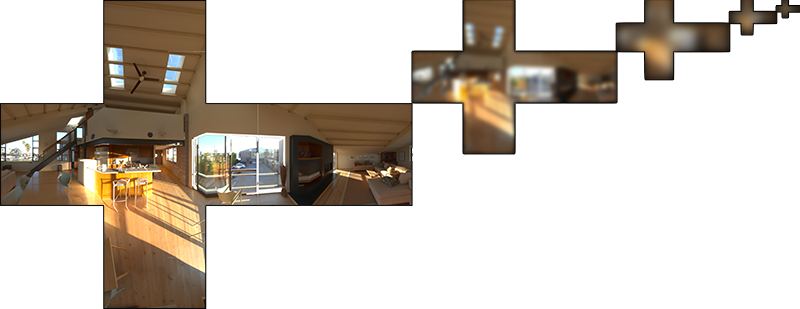
The blur follows the Cook-Torrance normal distribution function, which needs a view direction as well as a normal, and the view direction is precisely what we don't know while precomputing. So Epic makes one more approximation: assume the view direction is the same as the normal, and therefore the same as the mirror reflection direction. For each output direction, \(n = v = r\). The cost of this shows at grazing angles: a real rough surface seen from a low angle has a long, stretched reflection, and with this assumption it gets a round one instead. Here is the difference, in an image from Moving Frostbite to PBR by way of LearnOpenGL:
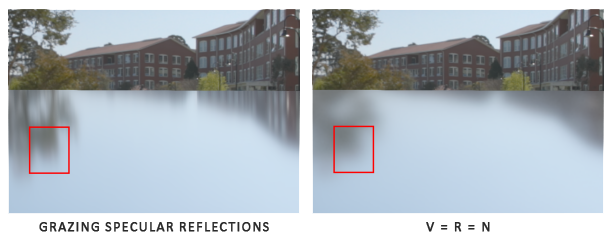
It is widely considered an acceptable trade.
The second part is the BRDF integral on its own, as though every direction of the environment were pure white (\(L_i = 1\)). It depends on the roughness, on the angle between \(n\) and \(\omega_o\), and on \(F_0\), and with a little algebra, which we will go through later, \(F_0\) can be pulled out of it. What's left is a function of two numbers, \(n \cdot \omega_o\) and roughness, which fits in a 2D texture: the

brdf.hlsl.LearnOpenGL shows the same table with roughness increasing upwards, because OpenGL's texture coordinates start at the bottom of an image. Direct3D's start at the top, and our lesson both writes and reads the table with v as roughness, so in our texture roughness grows downwards. The values are identical.
With the two parts in hand, the specular light at a pixel is the prefiltered colour along the reflection vector, at the mip of the pixel's roughness, times \(F_0\) scaled and biased by the table:
prefiltered = prefilter_map.SampleLevel(sampler, r, mip_for(roughness))
brdf        = brdf_lut.Sample(sampler, float2(n_dot_v, roughness))
specular    = prefiltered * (f0 * brdf.x + brdf.y)
That is the plan. Now let's build the two parts.
Pre-filtering an HDR environment map
Prefiltering works much like the irradiance convolution, with two differences: the sampling follows the specular lobe of a given roughness instead of the cosine, and the results for increasing roughness go into increasing mip levels.
The cube that holds it is made by the same
invoke create_cube_target, ADDR prefilter_map, 128, 5, 0
In OpenGL the mip chain has to be allocated by calling s1 filters linearly between texels and between mip levels, which is what we need to sample at fractional roughness levels.
invoke create_sampler, D3D11_FILTER_MIN_MAG_MIP_LINEAR, D3D11_TEXTURE_ADDRESS_CLAMP
mov clamp_sampler, rax
vcall context, ID3D11DeviceContext_PSSetSamplers, 1, 1, ADDR clamp_sampler
128 texels per face at the base level is enough for most reflections. Scenes with many large, very smooth surfaces (a car's paint, a polished floor) might want more.
For irradiance we spread the samples evenly over the hemisphere. That works for diffuse light, which really does gather from the whole hemisphere, but it is wasteful for specular light. A specular reflection gathers mostly from directions near the mirror reflection vector \(r\), in a region whose size depends on the roughness:

That cluster of directions is the
Monte Carlo integration and importance sampling
Monte Carlo integration estimates an integral the same way. Instead of evaluating a function everywhere, evaluate it at \(N\) randomly chosen points and average:
\[ O = \int\limits_{a}^{b} f(x)\, dx \;\approx\; \frac{1}{N} \sum_{i=0}^{N-1} \frac{f(x_i)}{pdf(x_i)} \]
The \(pdf\) is the
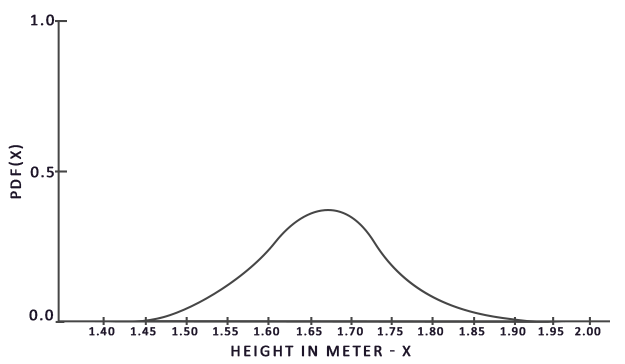
Dividing each sample by its probability is what keeps the estimate fair when samples aren't uniform. A value that is picked often gets divided by a large density and counts for less each time; a value that is rarely picked counts for more when it is. With uniform samples over the interval, the \(pdf\) is just \(1 / (b - a)\), which is the case our Riemann sums have quietly been using. Because of that division we are free to pick samples any way we like, so long as we know their density: the estimate still converges to the true integral. And if the samples are concentrated where \(f\) is large, the estimate converges much faster, because few samples are wasted where \(f\) contributes nothing. Choosing the sampling density to resemble the integrand is importance sampling.
How the random points are generated matters too. Pseudo-random numbers clump and leave gaps, purely by chance. A
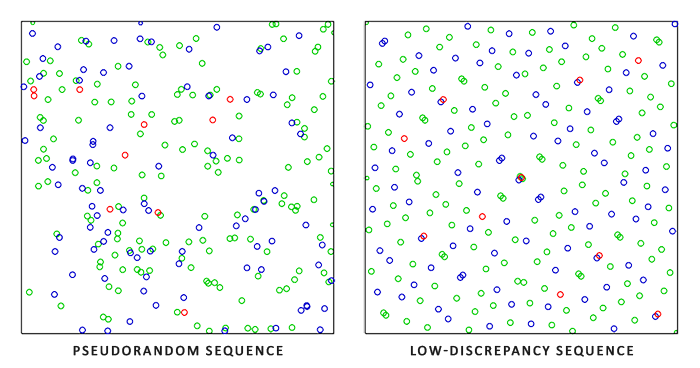
Monte Carlo integration with a low-discrepancy sequence is called
A low-discrepancy sequence
We use the
Mirroring the bits of a 32-bit integer is exactly a bit reversal, and Shader Model 5 has an intrinsic for it,
// The Hammersley sequence: well spread points in the unit square.
float2 hammersley(uint i, uint count)
{
    return float2(float(i) / float(count), float(reversebits(i)) * 2.3283064365386963e-10);
}
The reversed bits are a 32-bit integer; multiplying by \(2^{-32}\) (the long constant) turns it into the fraction it represents.
GGX importance sampling
Each Hammersley point is two numbers between 0 and 1. To turn one into a sample direction distributed like the GGX lobe, we use it to choose a halfway vector: the first number picks the angle \(\phi\) around the normal uniformly, and the second picks the angle \(\theta\) from the normal through the inverse of GGX's cumulative distribution, so that values of \(\theta\) come out exactly as often as the distribution of microfacet normals says they should. This is the formula from Epic's notes:
// A halfway vector around `n`, distributed as GGX of `roughness` prefers.
float3 importance_sample_ggx(float2 xi, float3 n, float roughness)
{
    float a = roughness * roughness;
    float phi = 2.0 * PI * xi.x;
    float cos_theta = sqrt((1.0 - xi.y) / (1.0 + (a * a - 1.0) * xi.y));
    float sin_theta = sqrt(1.0 - cos_theta * cos_theta);
    float3 h = float3(cos(phi) * sin_theta, sin(phi) * sin_theta, cos_theta);
    float3 up = abs(n.z) < 0.999 ? float3(0.0, 0.0, 1.0) : float3(1.0, 0.0, 0.0);
    float3 tangent = normalize(cross(up, n));
    float3 bitangent = cross(n, tangent);
    return normalize(tangent * h.x + bitangent * h.y + n * h.z);
}
At low roughness, cos_theta stays near 1 for nearly every input, and the halfway vectors hug the normal; at high roughness it ranges widely. As in
With these, the prefilter shader is short. Its constant buffer carries the roughness for the mip being drawn and the size of the environment:
// The specular prefilter: the environment as seen in a mirror of the given
// roughness, assuming the view direction equals the normal (the split sum
// approximation). One mip per roughness step.
cbuffer prefilter : register(b1)
{
    float roughness;
    float env_size;   // of the environment's top mip, per face
};
float4 ps_main(sky_vertex p) : SV_Target
{
float3 n = normalize(p.direction);
float3 v = n;
float3 sum = 0.0;
float weight = 0.0;
const uint count = 1024;
for (uint i = 0; i < count; i++)
{
float3 h = importance_sample_ggx(hammersley(i, count), n, roughness);
float3 l = normalize(2.0 * dot(v, h) * h - v);
float n_dot_l = dot(n, l);
if (n_dot_l > 0.0)
{
...
sum += env.SampleLevel(linear_clamp, l, mip).rgb * n_dot_l;
weight += n_dot_l;
}
}
return float4(sum / weight, 1.0);
}The texel's direction is the normal, and by the split sum assumption also the view direction. For each of 1024 samples we pick a halfway vector, reflect the view direction about it to get the direction light would arrive from, l, and, if that direction is above the surface, sample the environment there. (LearnOpenGL takes 4096 samples here; with the mip trick described below, 1024 are enough.) The samples are weighted by \(n \cdot l\) and the total divided by the sum of the weights. This weighting is not the strict Monte Carlo estimator: it is the practical recipe from Epic's notes, which they found gives better results with few samples, so directions close to the normal count for more than directions near the horizon.
Capturing pre-filter mipmap levels
All that's left is to run the shader once per mip level with the matching roughness. Our
prefilter_constants struct
    roughness real4 ?
    env_size real4 ?        ; of the environment's top mip, per face
    pad real4 2 dup(?)
prefilter_constants ends
settings prefilter_constants <0.0, 512.0, {0.0, 0.0}>invoke create_constant_buffer, sizeof prefilter_constants
mov prefilter_buffer, rax
invoke shader_use, ADDR prefilter_shader
invoke bind_constants, 1, prefilter_buffer
invoke bind_texture, 0, env_cubemap.srv
xor ebx, ebx ; mip
prefilter_mips:
; roughness = mip / 4
cvtsi2ss xmm0, ebx
movf xmm1, 0.25
mulss xmm0, xmm1
movss settings.roughness, xmm0
invoke update_buffer, prefilter_buffer, ADDR settings, sizeof prefilter_constants
invoke render_to_cube, ADDR prefilter_map, rbx, transforms_buffer, cube_vb
inc ebx
cmp ebx, 5
jb prefilter_mips
call unbind_textures
The struct is padded to 16 bytes, a constant buffer's minimum. env_size is fixed at 512 in the initializer (the array of the two pad floats takes braces), so only the roughness changes per mip, and it goes 0, 0.25, 0.5, 0.75, 1 over the five levels. Inside
The result should be the environment at increasing levels of blur. Drawing the background from the prefiltered map at a mip a little above 1 instead of from the environment shows a convincingly blurred room; that is one of the exercises.
Pre-filter convolution artifacts
This works well for most environments, but two artifacts are worth knowing about, with their fixes.
Cubemap seams at high roughness
Rough surfaces read the prefiltered map from its small, heavily blurred mips, where each texel covers a large part of a face. In OpenGL, by default, filtering doesn't cross from one face of a cube to the next, so the edges of the faces show up as visible seams on rough surfaces, until GL_TEXTURE_CUBE_MAP_SEAMLESS is enabled. In Direct3D there is nothing to enable: since Direct3D 10, hardware is required to filter across cube faces, and our rough spheres show no seams.
Bright dots in the pre-filter convolution
HDR environments contain small areas that are enormously brighter than their surroundings, such as the sun through a window or a lamp. At the higher roughness levels, where the samples spread over a large part of the sphere, a few of them land on such a spot and many don't, and neighbouring texels disagree wildly about how bright it is. The result is a pattern of bright dots around bright areas:
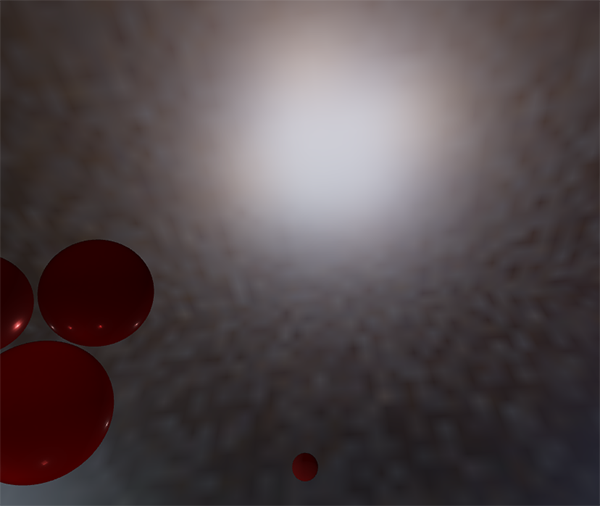
More samples help, but some environments would need a great many. A better fix, described by Chetan Jags, is to have each sample read not a single texel of the environment but an average over the area it stands for. When samples are sparse, each one represents a large solid angle, so it should read a correspondingly blurrier mip of the environment. That is the part elided from the shader above:
// sample a blurrier mip where samples are sparse: each covers
// more of the sphere, so it should average more of it
float n_dot_h = max(dot(n, h), 0.0);
float pdf = distribution_ggx(n, h, roughness) * n_dot_h / (4.0 * n_dot_h) + 0.0001;
float texel_solid_angle = 4.0 * PI / (6.0 * env_size * env_size);
float sample_solid_angle = 1.0 / (float(count) * pdf + 0.0001);
float mip = roughness == 0.0 ? 0.0 : 0.5 * log2(sample_solid_angle / texel_solid_angle);
The density of light directions produced from GGX halfway vectors is \(D\,(n \cdot h) / (4\,(v \cdot h))\). Because we assume \(v = n\), \(v \cdot h\) is \(n \cdot h\), which is why the shader divides by n_dot_h where LearnOpenGL writes HdotV; the two are the same here. A texel of the 512 by 512 environment covers \(4\pi\) divided by its \(6 \cdot 512^2\) texels; a sample, on average, covers \(1 / (N \cdot pdf)\). Each mip level up halves a texel's width and so quadruples its solid angle, so the mip that matches the sample's footprint is \(\log_4\) of the ratio, \(\frac{1}{2}\log_2\). At roughness 0 the lobe is a single direction, and we read the top level.
For this the environment needs its mip chain, which is why the previous chapter created it with mips and had the hardware generate them after the conversion:
invoke create_cube_target, ADDR env_cubemap, 512, 0, 1
invoke shader_use, ADDR equirect_shader
invoke bind_texture, 0, hdr_texture
invoke render_to_cube, ADDR env_cubemap, 0, transforms_buffer, cube_vb
call unbind_textures
vcall context, ID3D11DeviceContext_GenerateMips, env_cubemap.srv
Pre-computing the BRDF
With the prefiltered environment done, the other half of the split sum is the BRDF integral:
\[ \int\limits_{\Omega} f_r(p, \omega_i, \omega_o)\, (n \cdot \omega_i)\, d\omega_i \]This is the response of the specular BRDF to a uniformly white environment. It depends on the angle \(n \cdot \omega_o\), on the roughness, and on \(F_0\), three variables, which is one more than a 2D texture can hold. \(F_0\) can be taken out, though. The only place it appears is Fresnel, inside \(f_r\). Divide \(f_r\) by \(F\) and multiply by \(F\) again:
\[ \int\limits_{\Omega} \frac{f_r(p, \omega_i, \omega_o)}{F(\omega_o, h)}\, F(\omega_o, h)\, (n \cdot \omega_i)\, d\omega_i \]\(f_r / F\) is the BRDF without its Fresnel factor, \(\frac{D\,G}{4(\omega_o \cdot n)(\omega_i \cdot n)}\), which doesn't involve \(F_0\). Now expand the remaining \(F\) with Schlick's formula and collect the \(F_0\) terms. Writing \(\beta\) for \((1 - \omega_o \cdot h)^5\),
\[ F = F_0 + (1 - F_0)\,\beta = F_0\,(1 - \beta) + \beta \]so the integral splits into an \(F_0\) part and a part without it:
\[ F_0 \int\limits_{\Omega} \frac{f_r}{F} \left(1 - (1 - \omega_o \cdot h)^5\right) (n \cdot \omega_i)\, d\omega_i \;+\; \int\limits_{\Omega} \frac{f_r}{F} (1 - \omega_o \cdot h)^5\, (n \cdot \omega_i)\, d\omega_i \]\(F_0\) is constant over the integral, so it comes out in front. The two remaining integrals depend only on \(n \cdot \omega_o\) and roughness: they are the scale and the bias of the table, and the specular response for any \(F_0\) is \(F_0 \cdot \text{scale} + \text{bias}\).
We compute both with the same importance sampling as the prefilter, but now with a real view direction, since \(n \cdot v\) is one of the table's inputs. Divide each sample's value by its density, and something pleasant happens. The integrand without Fresnel is \(D\,G\,(n \cdot l) / (4\,(n \cdot v)(n \cdot l))\), and the density of our light directions is \(D\,(n \cdot h) / (4\,(v \cdot h))\). \(D\) cancels, the 4 cancels, \(n \cdot l\) cancels, and each sample contributes just
\[ \frac{G\,(v \cdot h)}{(n \cdot h)(n \cdot v)} \]
times \(1 - \beta\) for the scale or \(\beta\) for the bias. That is the whole of
// The BRDF table: for n.v across and roughness down, how much of F0 the
// specular integral keeps (r) and how much it adds regardless of F0 (g).
float2 integrate_brdf(float n_dot_v, float roughness)
{
    float3 v = float3(sqrt(1.0 - n_dot_v * n_dot_v), 0.0, n_dot_v);
    float3 n = float3(0.0, 0.0, 1.0);
    float scale = 0.0;
    float bias = 0.0;
    const uint count = 1024;
    for (uint i = 0; i < count; i++)
    {
        float3 h = importance_sample_ggx(hammersley(i, count), n, roughness);
        float3 l = normalize(2.0 * dot(v, h) * h - v);
        float n_dot_l = max(l.z, 0.0);
        float n_dot_h = max(h.z, 0.0);
        float v_dot_h = max(dot(v, h), 0.0);
        if (n_dot_l > 0.0)
        {
            float g = geometry_smith(n_dot_v, n_dot_l, roughness, true);
            float g_vis = g * v_dot_h / (n_dot_h * n_dot_v);
            float fc = pow(1.0 - v_dot_h, 5.0);
            scale += (1.0 - fc) * g_vis;
            bias += fc * g_vis;
        }
    }
    return float2(scale, bias) / float(count);
}
The integral doesn't depend on which way the surface faces, only on the angle between \(n\) and \(v\), so the shader picks the simplest setup: the normal along z, and a view direction in the xz plane at the required angle. With \(n = (0, 0, 1)\), every dot product with \(n\) is just a z component.
The geometry term is called with ibl set to true, so it uses the image based lighting remap from the theory chapter:
\[ k_{IBL} = \frac{r^2}{2} \]float r = roughness + 1.0;
float k = ibl ? roughness * roughness / 2.0 : r * r / 8.0;As LearnOpenGL points out, this uses roughness squared, where the direct remap uses roughness plus one. It is what Epic's notes specify, and with it the table matches Epic's published one.
The table is a 512 by 512 texture of two 16-bit floats, which is all the precision it needs, as Epic recommend:
invoke mem_zero, ADDR lut_desc, sizeof D3D11_TEXTURE2D_DESC
mov lut_desc._Width, 512
mov lut_desc.Height, 512
mov lut_desc.MipLevels, 1
mov lut_desc.ArraySize, 1
mov lut_desc.Format, DXGI_FORMAT_R16G16_FLOAT
mov lut_desc.SampleDesc.Count, 1
mov lut_desc.BindFlags, D3D11_BIND_RENDER_TARGET or D3D11_BIND_SHADER_RESOURCE
vcall device, ID3D11Device_CreateTexture2D, ADDR lut_desc, 0, ADDR lut_texture
AssertHr
vcall device, ID3D11Device_CreateRenderTargetView, lut_texture, 0, ADDR lut_rtv
vcall device, ID3D11Device_CreateShaderResourceView, lut_texture, 0, ADDR ibl_views[16]
Its shader resource view goes straight into the third slot of ibl_views, an array of three qwords that the PBR shader will read from below; ibl_views[16] is a byte offset, as every index is in MASM, so it is the third pointer.
To fill it we run
// One triangle covering the screen, made from SV_VertexID alone: no
// vertex buffer, no input layout. uv runs 0..1 across and down the screen,
// and the parts of the triangle past the edges are clipped away.
struct fullscreen_vertex
{
    float4 position : SV_Position;
    float2 uv : TEXCOORD;
};

fullscreen_vertex vs_main(uint id : SV_VertexID)
{
    fullscreen_vertex o;
    o.uv = float2((id << 1) & 2, id & 2);
    o.position = float4(o.uv * float2(2.0, -2.0) + float2(-1.0, 1.0), 0.0, 1.0);
    return o;
}
SV_VertexID is a system value: the index of the vertex being processed, 0, 1 or 2 here. The bit tricks turn those into uv coordinates (0, 0), (2, 0) and (0, 2), and the position follows from the uv, with y negated because uv runs down the screen while clip space y runs up. The result is a triangle twice the width and height of the screen, with its right angle at the top left corner. The rasterizer clips away the parts outside, and what remains covers the target exactly, with uv running from 0 to 1 across the visible part. One triangle instead of two also avoids the work GPUs waste on the 2 by 2 pixel blocks that straddle a quad's diagonal.
Since nothing comes from a vertex buffer, there is nothing for an input layout to describe. The shader is created with no layout (a null pointer and a count of 0), and
; the BRDF table's shader makes its own triangle: no input layout
invoke shader_create, ADDR brdf_shader, "src/6.pbr/2.2.ibl_specular/brdf.hlsl", 0, 0
vcall context, ID3D11DeviceContext_OMSetRenderTargets, 1, ADDR lut_rtv, 0
invoke set_viewport, 512, 512
invoke shader_use, ADDR brdf_shader
vcall context, ID3D11DeviceContext_Draw, 3, 0
The viewport this leaves behind is the table's, 512 by 512; the frame loop's
The pixel shader feeds the uv straight into the integration, u as \(n \cdot v\) and v as roughness, and returns a float2, which lands in the red and green channels of the target:
float2 ps_main(fullscreen_vertex p) : SV_Target
{
    // the same mapping the lookup uses: u = n.v, v = roughness
    return integrate_brdf(max(p.uv.x, 0.001), p.uv.y);
}
The
Completing the IBL reflectance
Now to put the two halves of the split sum together in the PBR shader. Its new inputs are the prefiltered map and the table, beside the irradiance map, in slots t5 to t7 (the first five slots are the material maps, which this program uses again):
TextureCube irradiance_map : register(t5);
TextureCube prefilter_map : register(t6);
Texture2D brdf_lut : register(t7);
SamplerState linear_clamp : register(s1);

static const float prefilter_mips = 4.0;   // highest mip of the prefilter map
ibl_views qword 3 dup(0) ; irradiance, prefiltered, BRDF table: t5, t6, t7mov rax, irradiance_map.srv
mov ibl_views[0], rax
mov rax, prefilter_map.srv
mov ibl_views[8], raxvcall context, ID3D11DeviceContext_PSSetShaderResources, 5, 3, ADDR ibl_viewsThe specular light comes from the prefiltered map, sampled along the reflection of the view direction about the normal. Roughness picks the mip: 0 reads the sharp top level, and 1 reads level 4, the last we filled. Trilinear filtering blends between levels for anything in between. prefilter_mips keeps us from reading past level 4, where there is nothing. Then the table, looked up by \(n \cdot v\) and roughness, gives the scale and bias:
// the split sum: the blurred environment along the reflection, times
// the table's scale and bias for this surface's F0
float3 r = reflect(-v, n);
float3 prefiltered = prefilter_map.SampleLevel(linear_clamp, r, roughness * prefilter_mips).rgb;
float2 brdf = brdf_lut.Sample(linear_clamp, float2(n_dot_v, roughness)).rg;
float3 specular = prefiltered * (f * brdf.x + brdf.y);
Note that the scale and bias are applied to f, the roughness-aware Fresnel of the previous chapter, rather than to plain \(F_0\). That is what LearnOpenGL does too; at normal incidence the two agree, and towards grazing angles it brightens the edges of smooth surfaces a little, in the spirit of Fresnel. Together with the diffuse half, the ambient part of the shader now reads:
float n_dot_v = max(dot(n, v), 0.0);
float3 f0 = lerp(0.04.xxx, albedo, metallic);
float3 f = fresnel_schlick_roughness(n_dot_v, f0, roughness);
float3 kd = (1.0 - f) * (1.0 - metallic);
float3 diffuse = irradiance_map.Sample(linear_clamp, n).rgb * albedo;

// the split sum: the blurred environment along the reflection, times
// the table's scale and bias for this surface's F0
float3 r = reflect(-v, n);
float3 prefiltered = prefilter_map.SampleLevel(linear_clamp, r, roughness * prefilter_mips).rgb;
float2 brdf = brdf_lut.Sample(linear_clamp, float2(n_dot_v, roughness)).rg;
float3 specular = prefiltered * (f * brdf.x + brdf.y);

float3 color = (kd * diffuse + specular) * ao + lo;
return float4(color / (color + 1.0), 1.0);
The specular term isn't multiplied by \(k_s\), as it already contains Fresnel. Ambient occlusion now darkens both halves of the environment's light. And the four point lights, lo, are still added on top.
Here is the grid of spheres, varying in metallic upwards and roughness to the right, with the complete model:
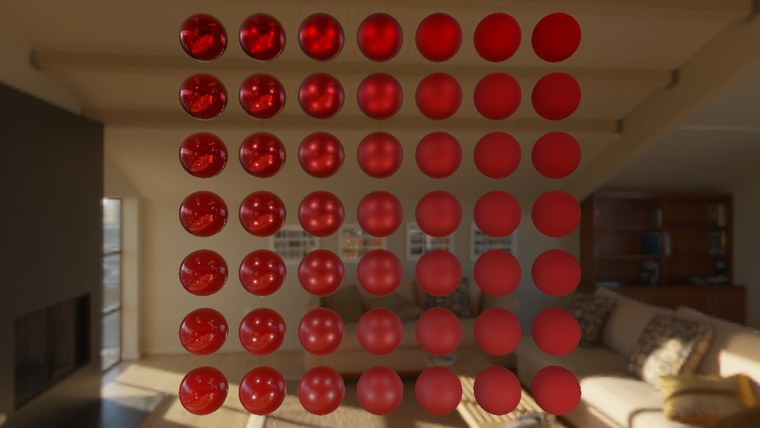
Now the spheres show what they are. The smooth metals at the top left are red mirrors of the room; moving right, the reflection blurs into a soft sheen; moving down, the metal gives way to red plastic with a faint, uncoloured reflection that strengthens towards the edges. The top rows are no longer black, because a metal finally has something to reflect.
Press Tab and the program shows five textured materials instead, one sphere each, with the camera moved closer: rusted iron, gold, grass, plastic and brick. Each is drawn with its own five maps:
cmp material.textured, 0
je grid
    ; one sphere per material, in a row: ((i - 2) * 2.5, 0, 0)
    xor ebx, ebx
    lea rsi, materials
    row_of_five:
        vcall context, ID3D11DeviceContext_PSSetShaderResources, 0, 5, rsi
        invoke update_buffer, material_buffer, ADDR material, sizeof material_constants
        lea eax, [ebx - 2]
        cvtsi2ss xmm0, eax
        movf xmm1, 2.5
        mulss xmm0, xmm1
        movss sphere_position.x, xmm0
        mov dword ptr sphere_position.y, 0
        mov dword ptr sphere_position.z, 0
        invoke m4_translate, ADDR model_matrix, ADDR sphere_position
        invoke draw_sphere, transforms_buffer, ADDR t, ADDR ball, ADDR model_matrix
        add rsi, 5 * 8
        inc ebx
        cmp ebx, 5
        jb row_of_five
    jmp drawn
grid:
materials holds 25 views, five per material in register order, filled at startup by calling rsi walks through it five pointers (40 bytes) at a time, so each sphere binds its own five maps to t0 to t4 with one call. Writing 0 to a float with mov dword ptr works because the bits of 0.0 are all zero.
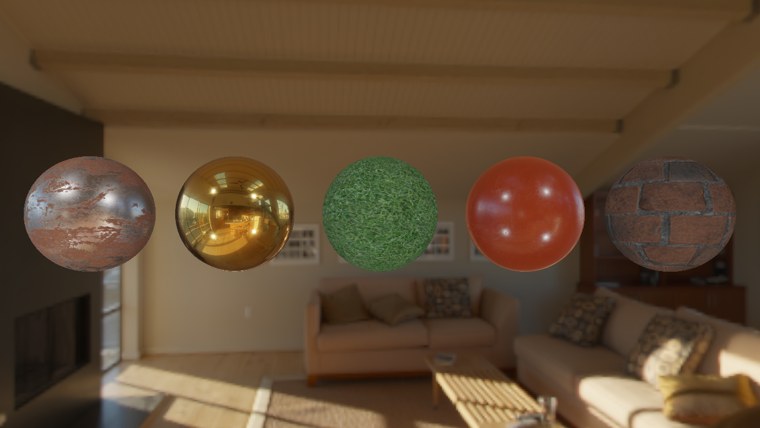
The gold mirrors the whole room in its own colour, the plastic shows a white highlight from each lamp over its red, the rusted iron mixes bright bare metal with matte rust, and the grass and brick are rough enough that their reflections all but disappear. None of these materials needed any tuning for this room. Put them in a different environment and they would look right there too, which is the promise PBR makes. (LearnOpenGL's final images also show a textured model and several other environments; we only ship the one HDR file, but another equirectangular .hdr can take its place, so long as it uses the run-length encoding our reader expects.)
That has been a long road, with a lot of steps where something can go wrong. If your own version doesn't look like this, compare it with ours one stage at a time: the program is here, and its new shaders are prefilter.hlsl, brdf.hlsl and pbr.hlsl.
What's next?
We now have a complete PBR renderer, and hopefully a clear idea of what each piece does. For teaching, it has done all its precomputation at startup, every time it runs. A real application wouldn't. The irradiance and prefiltered maps depend only on the environment, so they are usually computed once, offline, and stored on disk; the BRDF table doesn't even depend on the environment. That needs a file format that can hold HDR cubemaps with their mip chains, and .dds, Direct3D's own texture format, does exactly that: with a small loader (Microsoft's DDSTextureLoader is one) a .dds file goes straight into a texture with all its faces and levels. Tools such as cmftStudio and IBLBaker will generate the maps for you.
The other thing we skipped is
Additional resources
- Real Shading in Unreal Engine 4, Brian Karis: the split sum approximation and the shader code ours is based on.
- Physically Based Shading and Image Based Lighting, Trent Reed: putting specular IBL into a real-time PBR renderer.
- Image Based Lighting, Chetan Jags: a thorough write-up of specular IBL and its pitfalls, including the mip trick against bright dots and light probe interpolation.
- Moving Frostbite to PBR, Sébastien Lagarde and Charles de Rousiers: a deep account of bringing PBR into a AAA engine.
- Runtime Environment Map Filtering for Image Based Lighting, Padraic Hennessy: prefiltering environments fast enough to do at run time.
- Hammersley Points on the Hemisphere, Holger Dammertz: the sequence we use, and the bit reversal behind it.
- reversebits and semantics in the HLSL reference: the intrinsic behind
hammersley , and SV_VertexID with the other system values. - LearnOpenGL's Specular IBL: the OpenGL original of this chapter.
Exercises
- Draw the background from the prefiltered map instead of the environment: bind prefilter_map for the skybox and sample it with
SampleLevel at mip 1.2 inbackground.hlsl. Then try each mip from 0 to 4, to see what each roughness sees. - Turn off the mip trick in
prefilter.hlslby sampling level 0 always, and look at the rough metal spheres towards the top right of the grid. Then raise count to 4096 and see how much of the speckle that fixes on its own. - Replace f with f0 in the line that computes specular, and compare the rims of the smooth plastic spheres.
- Make the BRDF table visible: draw a full-screen triangle with
brdf.hlsl's vertex shader and a pixel shader that samples brdf_lut, and check that it looks like the table at the top of this chapter.