Advanced HLSL
This chapter has no dramatic new effect to show. It collects a handful of HLSL features that the previous chapters used without much comment, or that will make later shaders easier to write: values the pipeline hands our shaders without being asked, structs for passing data from stage to stage, and the constant buffers that every shader since Transformations has been reading, looked at properly this time.
System values
A shader is a function, and its inputs and outputs are tied to the rest of the pipeline by POSITION, NORMAL, WORLD), matched by name between the input layout and the vertex shader, or between one stage and the next. A few, starting with SV_, are gl_ variables. We have met two already: SV_Position, the vertex shader's clip-space output (GLSL's gl_Position), and SV_Target, the pixel shader's colour. Here are some more. Microsoft's documentation lists them all.
Vertex shader values
Returning an SV_Position is the one thing a vertex shader must do before anything can be drawn, as with gl_Position. There is nothing new to say about it here, but it comes back in the pixel shader below with a different meaning.
GLSL lets a vertex shader set the size of a point primitive, in pixels, through gl_PointSize, which is useful for particles. Direct3D 11 has no such thing: a point list always rasterizes as one pixel per point. Points of any size are instead made by expanding each point into a small quad in a geometry shader, which is the subject of the next chapter.
An input the vertex shader can ask for is SV_VertexID (GLSL's gl_VertexID), the number of the vertex being processed: counting up from the first vertex for a plain
fullscreen_vertex vs_main(uint id : SV_VertexID)
{
    fullscreen_vertex o;
    o.uv = float2((id << 1) & 2, id & 2);
    o.position = float4(o.uv * float2(2.0, -2.0) + float2(-1.0, 1.0), 0.0, 1.0);
    return o;
}
Its sibling SV_InstanceID (gl_InstanceID) numbers the copies made by an instanced draw, and comes up in Instancing.
SV_Position in a pixel shader
The pixel shader has system values of its own. Our lesson for this chapter draws four cubes and uses the first two of them; here is what it looks like:
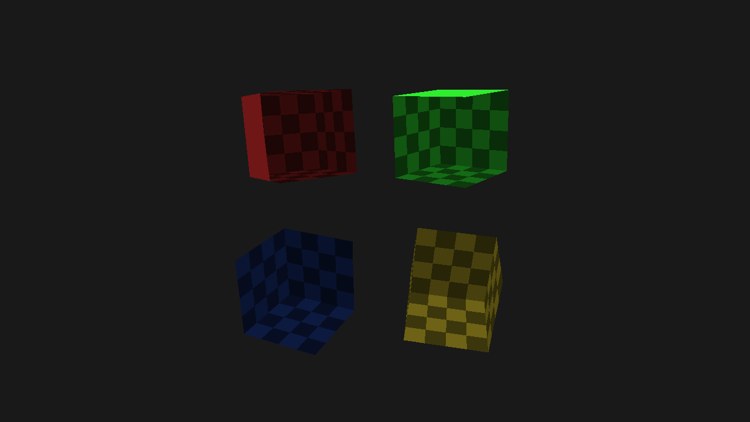
Declare a pixel shader input as SV_Position and it does not contain the clip-space position the vertex shader wrote. By the time the pixel shader runs, the rasterizer has divided by w and applied the viewport, and the value holds the pixel's position in the render target: x and y in pixels, and z the depth that will be tested, 0 to 1. It is GLSL's gl_FragCoord, with one difference: the origin is the top-left corner of the window, with y growing downward, where OpenGL's is the bottom-left. x and y fall on pixel centres, so the top-left pixel is at (0.5, 0.5).
Our shaders share one struct between the vertex shader's output and the pixel shader's input, so the same field, position, is clip space on one side and pixel coordinates on the other. A common use for pixel coordinates is to compare two versions of an effect side by side, splitting the window down the middle. Our lesson does a simpler version: it darkens everything in the left half of its 1280-pixel window.
// SV_Position.x is in pixels: darken the left half of the window
if (p.position.x < 640.0) c *= 0.6;
Look at the screenshot again: the red and blue cubes on the left are drawn darker than the green and yellow ones on the right, even though nothing else about them differs.
SV_IsFrontFace
In Face culling we saw that the rasterizer decides whether a triangle faces us from the order its corners appear on screen. A pixel shader can ask for that verdict as a bool marked SV_IsFrontFace, GLSL's gl_FrontFacing. It follows the rasterizer state, and ours declares counter-clockwise triangles to be the front (FrontCounterClockwise), so for a cube built counter-clockwise from outside, the outside is the front and the inside the back. A natural use is to give a closed object a different look inside from outside.
Normally we never see the inside of a cube, so the lesson cuts the faces nearest the camera away. HLSL's discard, and here the argument is negative wherever a face's normal points too directly at the camera. Through the hole, the back faces show, and those are drawn as a dark checkerboard. All four pixel shaders do this through a shared function:
// Shared by all four pixel shaders. Faces whose normal points towards
// the camera are cut away (clip), so the inside of each cube shows.
float4 shade(vs_out p, bool front, float3 color)
{
    float3 n = normalize(p.normal);
    float3 to_eye = normalize(view_position - p.world);
    clip(0.35 - dot(n, to_eye));
    // a little shading per face, so the walls can be told apart
    float3 c = color * (0.55 + 0.45 * abs(dot(n, normalize(float3(0.5, 0.8, 0.3)))));
    // SV_IsFrontFace: the cube's outside is its front, its inside the back
    if (!front)
    {
        float2 cell = floor(p.uv * 4.0);
        c *= fmod(cell.x + cell.y, 2.0) < 1.0 ? 0.25 : 0.45;
    }
    // SV_Position.x is in pixels: darken the left half of the window
    if (p.position.x < 640.0) c *= 0.6;
    return float4(c, 1.0);
}
front is a parameter of the pixel shader's entry point, beside the struct coming from the vertex shader:
float4 ps_main(vs_out p, bool front : SV_IsFrontFace) : SV_Target { return shade(p, front, float3(1.0, 0.2, 0.2)); }The vertex shader does not output it; the rasterizer supplies it for every pixel. Notice that the cut-away faces are the front faces that point at us, and the walls of the inside, which we see from behind, take the checkered branch. Had culling been on, the back faces would never reach the pixel shader and the test would be pointless.
SV_Depth
SV_Position.z can be read but not changed. A pixel shader can, however, write its own depth, by returning a value marked SV_Depth, as GLSL writes gl_FragDepth. The depth test then uses that instead of the rasterized depth. Point Shadows uses it to store the distance to the light as the depth:
// distance to the light, 0..1 over the far plane, written as the depth
float ps_main(face_vertex p) : SV_Depth
{
    return length(p.world - light_position) / far_plane;
}
It has a cost. Normally the GPU tests depth before running the pixel shader, and skips the shader for pixels that are hidden (early depth testing, from Depth testing). A shader that writes its own depth cannot be tested until it has run, so early depth testing is off for it. Shader model 5 offers a compromise, matching OpenGL 4.2's depth_greater and depth_less: return the depth as SV_DepthGreaterEqual or SV_DepthLessEqual, a promise to only push the depth farther than, or nearer than, the rasterized value. The hardware can then still reject some pixels early, the ones the promise guarantees will fail.
Structs between stages
GLSL passes values from one stage to the next with matching out and in variables, and offers
// Position and normal in world space, where the lighting is done.
struct vs_out
{
    float4 position : SV_Position;
    float3 world : WORLD;
    float3 normal : NORMAL;
    float2 uv : TEXCOORD;
};
and the pixel shaders take the very same struct as their input. That is the easiest way to keep the two sides in agreement, and one reason our shaders keep both stages in one file. The rule Direct3D enforces is that the pixel shader's inputs line up with the vertex shader's outputs, semantic for semantic, in the same order; it may leave off ones at the end that it does not need, but it cannot pick and choose. When a geometry shader sits in between, it receives an array of these structs, one per vertex of the primitive, as we will see in the next chapter.
Constant buffers
OpenGL's plain uniforms belong to one program: switch programs and every uniform has to be set again, even the projection and view matrices that are the same for everything in the frame. OpenGL's answer is the
Direct3D 11 has nothing but that. There are no loose uniforms; every value a shader reads from the application lives in a cbuffer and backed on the CPU side by an ordinary buffer with D3D11_BIND_CONSTANT_BUFFER. Every lesson has one called transforms:
cbuffer transforms : register(b0)
{
    float4x4 model;
    float4x4 normal_matrix;
    float4x4 view;
    float4x4 projection;
    float3 view_position;
};
Its members are used by name, as globals, with no prefix. To fill it correctly from the CPU, we need to know where in the buffer each member lives.
Constant buffer packing
A buffer is only bytes. Nothing in it says which bytes are model and which are view_position; the shader compiler decides, and we have to lay out our CPU struct the same way. OpenGL has several layouts for uniform blocks, and LearnOpenGL picks std140, the one with fixed, documented rules. HLSL has one set of rules for every cbuffer, and they are fixed and documented too. They all follow from one idea: the buffer is an array of 16-byte
- Scalars (
float,int,uint, andbool, which is 4 bytes here) take 4 bytes, and pack together into a register. - A vector takes 4 bytes per component, and packs after earlier values as long as it does not cross into the next register. A
float3can follow afloatin the same register; afloat3followed by anotherfloat3cannot share one, so the second starts a new register. - A matrix starts on a new register and takes one register per row (or column), so a
float4x4is four registers. - Each element of an array starts on a new register, so
float values[3]takes the start of three registers. The space after the last element is free for what follows. - Structs start on a new register.
- The buffer as a whole is a whole number of registers: its size must be a multiple of 16 bytes.
The difference from std140 is mostly that HLSL packs more tightly. Here is LearnOpenGL's example block written as a cbuffer (with two members renamed, since vector and matrix are HLSL keywords), and the offsets the HLSL compiler gives it. We checked them with fxc /Fc, which prints a compiled shader's constant buffer layout:
cbuffer example
{                        // offset   size
    float value;         //   0        4
    float3 direction;    //   4       12   fits in the rest of register 0
    float4x4 transform;  //  16       64   registers 1 to 4
    float values[3];     //  80       36   registers 5, 6 and the start of 7
    bool boolean;        // 116        4   packs after values[2]
    int integer;         // 120        4
};                       // 124 bytes, so the buffer is 128
Under std140 the same members sit at 0, 16, 32, 96, 144 and 148, for 152 bytes. If a CPU struct gets the layout wrong, nothing reports an error; the shader just reads the wrong numbers. The habit that avoids trouble is to arrange members so that the padding is obvious, and write it out in the CPU struct. Our transforms is four matrices, 256 bytes, then a float3 at 256, which leaves 4 bytes of its register unused. The rin struct mirrors it with an explicit pad, so its size, 272 bytes, is a whole number of registers:
// Mirrors `cbuffer transforms` in the shaders, register for register.
transforms: struct = {
    model: mat4;
    normal_matrix: mat4;     // inverse transpose of model, for normals
    view: mat4;
    projection: mat4;
    view_position: vec3;     // the eye, in world space
    pad: f32;
}
HLSL also has packoffset for placing a member at a register of our choosing, should the automatic rules ever be in the way.
#pragma pack_matrix(row_major) at the top of our shader files is part of the layout too: it tells the compiler that each 16-byte register of a matrix holds a row, as rin's mat4 stores it, rather than a column, HLSL's default. Leave it out and every matrix reads transposed.
Using constant buffers
How does a shader's cbuffer find the right buffer? OpenGL connects uniform blocks and uniform buffers through numbered layout(binding = 2) in GLSL 4.2), a buffer is attached to the same point with
Direct3D's binding points are the constant buffer registers, b0 to b13, and the shader names its register in the declaration: register(b0). The application binds a buffer to a register with b0 and the pixel shader's b0 are two different slots. Our lessons bind the same buffer to all the stages they use in one helper:
// The same buffer in the same register for the vertex, geometry and pixel stages.
bind_constants: proc(context: *ID3D11DeviceContext, slot: UINT, buffer: *ID3D11Buffer) -> void = {
    buffers: [1]*ID3D11Buffer = { buffer };
    ID3D11DeviceContext_VSSetConstantBuffers(context, slot, 1, buffers[0]&);
    ID3D11DeviceContext_GSSetConstantBuffers(context, slot, 1, buffers[0]&);
    ID3D11DeviceContext_PSSetConstantBuffers(context, slot, 1, buffers[0]&);
}
Any shader of any stage that declares a cbuffer at b0 reads whatever is bound there, however many shaders that is. Each stage has 14 registers, and a single constant buffer holds up to 4096 registers, 64 KB. (Direct3D 11.1 adds
A simple example
LearnOpenGL demonstrates uniform buffers with four cubes, each drawn by a different shader program, all reading their matrices from one shared buffer. Our lesson does the same with four pixel shaders, one per colour, compiled from the same file by entry point name. Each is a one-line wrapper around
float4 ps_main(vs_out p, bool front : SV_IsFrontFace) : SV_Target { return shade(p, front, float3(1.0, 0.2, 0.2)); }
float4 ps_green(vs_out p, bool front : SV_IsFrontFace) : SV_Target { return shade(p, front, float3(0.2, 1.0, 0.2)); }
float4 ps_blue(vs_out p, bool front : SV_IsFrontFace) : SV_Target { return shade(p, front, float3(0.2, 0.4, 1.0)); }
float4 ps_yellow(vs_out p, bool front : SV_IsFrontFace) : SV_Target { return shade(p, front, float3(1.0, 0.9, 0.2)); }
The shader class compiles the file as usual, which gives us the vertex shader and its input layout. Then all four pixel shaders, ps_main included, are compiled by hand, with the same
path: [*]const char = filesystem_path("src/4.advanced_d3d11/8.advanced_hlsl/advanced_hlsl.hlsl");
base: shader = shader_create(device, path, vertex_layout);
size: u64 = 0;
source: [*]u8 = filesystem_read(path, size&);
entries: [4][*]const char = { "ps_main", "ps_green", "ps_blue", "ps_yellow" };
pixel_shaders: [4]*ID3D11PixelShader = {};
for (i: u32 = 0; i < 4; i += 1) {
    code: *ID3DBlob = shader_compile(path, source, size, entries[i], "ps_5_0");
    ID3D11Device_CreatePixelShader(device, ID3D10Blob_GetBufferPointer(code), ID3D10Blob_GetBufferSize(code), null, pixel_shaders[i]&);
    ID3D10Blob_Release(code);
}
Without a program object to tie them together, a vertex shader and a pixel shader are combined just by binding both, so the four "programs" are one vertex shader and four pixel shaders bound in turn. In the frame, the transforms buffer is bound once to b0, and then each cube swaps in its pixel shader and is drawn at its corner:
bind_constants(context, 0, transforms_buffer);
t: transforms = {
    .view = camera_view(cam&),
    .projection = m4_perspective(radians(cam.zoom), cast(scr_width, f32) / cast(scr_height, f32), 0.1, 100.0),
    .view_position = cam.position,
};
shader_use(context, base&);
for (i: u32 = 0; i < 4; i += 1) {
    ID3D11DeviceContext_PSSetShader(context, pixel_shaders[i], null, 0);
    model: mat4 = m4_mul(m4_translate(corners[i]), m4_mul(m4_rotate(0.6 + 0.3 * cast(i, f32), v3(0.3, 1.0, 0.2)), m4_scale(v3(0.8, 0.8, 0.8))));
    draw_vertices(context, transforms_buffer, t&, cube_vb, 36, model);
}
None of the pixel shaders is given the camera position. They read view_position from the buffer at b0, because that is where they declared it, and so does the vertex shader with its matrices.
There is one way in which our version is simpler than LearnOpenGL's. LearnOpenGL puts only the projection and view in the shared buffer and keeps the model matrix as a separate uniform, so the shared buffer is written once per frame. Ours keeps everything, model included, in one buffer, and
Constant buffers give us a few things at once: one update instead of one call per value, one place to change a value that many shaders use, and in general far more room than individual uniforms. The full program is here, and its shaders here.
Additional resources
- Semantics: every system value, which stages can use it, and what it means.
- Packing rules for constant variables: the constant buffer layout rules, with examples.
- Shader constants:
cbuffer,registerandpackoffset. - LearnOpenGL's Advanced GLSL: the OpenGL version of this chapter.
Exercises
- Work out the offsets of this constant buffer by hand, then check them by compiling it with
fxc /T ps_5_0 /Fc out.txt:float2 a; float3 b; float c; float4x4 d; float e[2]; float2 f; - Split the lesson's constants in two: a per-frame buffer at
b0with the view, projection and camera position, written once per frame, and a per-object buffer atb1with the model and normal matrices. Change the shader to match. - Replace the fixed
640.0with a split that follows the mouse: pass the cursor's x position in a constant buffer and darken everything to its left.