Instancing
Imagine a scene with a great many copies of the same mesh: a meadow of grass blades, a forest, a crowd, a field of rocks. Each copy is the same vertex data, only placed, turned and scaled differently. The obvious way to draw them is a loop:
for each rock:
    write its model matrix into the constant buffer
    Draw(rock's vertex count)
It works, and for a few hundred objects it works fine. But with tens of thousands it grinds to a halt, and not because the GPU is short of power. Each draw call costs CPU time: the runtime and the driver check state, update the constant buffer, and package the work up for the GPU. For a small mesh of a few hundred triangles, that overhead is far larger than the time the GPU needs to actually draw it, so the GPU spends most of the frame waiting for the next instruction. The fix is to hand the GPU all the copies in one go.
That is
DrawInstanced(vertex count per instance, instance count, first vertex, first instance)
On its own, that draws the same mesh a thousand times in the same place, which looks exactly like drawing it once. Each copy needs to know which copy it is. HLSL provides that as a system value, SV_InstanceID (GLSL's gl_InstanceID): an unsigned integer the vertex shader can take as an input, counting from 0 for the first instance up to the instance count minus one.
With it, a vertex shader can look up per-copy data in an array. LearnOpenGL starts with a grid of a hundred small coloured quads, each moved by an offset from a uniform array. In HLSL that would be a constant buffer (this is a sketch, not part of our lesson):
cbuffer grid : register(b1)
{
    float4 offsets[100];   // only xy used; each array element takes a register anyway
};

quad_vertex vs_main(float2 position : POSITION, float3 color : COLOR, uint instance : SV_InstanceID)
{
    quad_vertex o;
    o.position = float4(position + offsets[instance].xy, 0.0, 1.0);
    o.color = color;
    return o;
}
and one DrawInstanced(6, 100, 0, 0) draws all hundred quads. Note the float4: as Advanced HLSL explained, every element of a constant buffer array starts a new 16-byte register, so a float2 offsets[100] would take nearly as much space, with a gap after every element, and the CPU side would have to match the gaps.
Instanced vertex data
The array approach has a limit: a constant buffer holds at most 64 KB, 4096 registers. That is 1024 model matrices, and real scenes want more. The more flexible tool, which LearnOpenGL calls
In OpenGL that is an ordinary vertex attribute with
- InputSlotClass: D3D11_INPUT_PER_VERTEX_DATA (the default, zero) or D3D11_INPUT_PER_INSTANCE_DATA.
- InstanceDataStepRate: for per-instance data, how many instances draw with one element before moving to the next. 1 means a new element for every instance, like a divisor of 1; 2 would share each element between two instances.
Per-instance and per-vertex data cannot share a slot, since a slot has one stride and one rate of stepping, so per-instance data lives in its own buffer, in its own slot. This is the multi-slot binding from Advanced Data, put to a new use. Within the vertex shader, a per-instance input looks like any other; the shader does not know how often it changes.
An asteroid field
Instancing really shows its worth with large numbers, so our lesson goes straight to LearnOpenGL's main example: a planet in the middle of a ring of rocks. Our ring has twenty thousand of them.
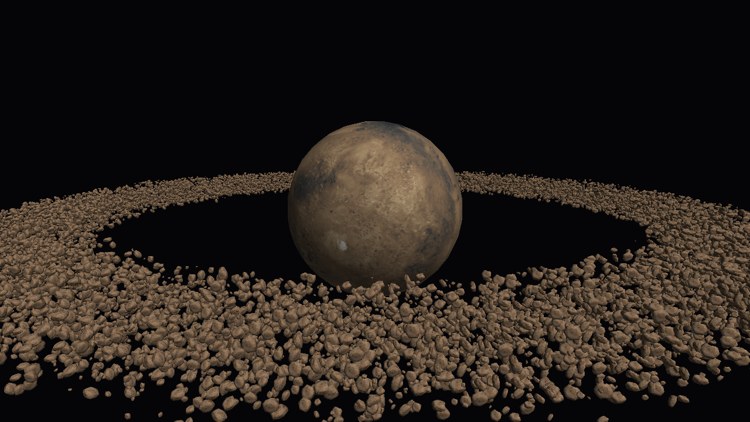
Both meshes are loaded with the model loader from Model. The last argument flips their texture coordinates, since these two .obj files assume v grows upward, as OpenGL's does:
planet: model = model_load(device, context, "resources/objects/planet/", "planet.obj", 1);
rock: model = model_load(device, context, "resources/objects/rock/", "rock.obj", 1);
Placing the rocks
Each rock gets a model matrix, made once at startup. The rocks are spread evenly by angle around a circle of radius 45, then nudged off the circle by a random amount up to 6 units in x and z, and less in y, so that the ring is wide and flat. Each gets a random size and a random spin around a tilted axis:
srand(7);
matrices: [*]mat4 = cast(memops_arena_push(arena&, cast(amount, u64) * sizeof(mat4), 16), [*]mat4);
for (i: u32 = 0; i < amount; i += 1) {
    angle: f32 = cast(i, f32) / cast(amount, f32) * 2.0 * pi;
    radius: f32 = 45.0;
    offset: f32 = 6.0;
    x: f32 = sinf(angle) * radius + (random01() * 2.0 - 1.0) * offset;
    y: f32 = (random01() * 2.0 - 1.0) * offset * 0.3;
    z: f32 = cosf(angle) * radius + (random01() * 2.0 - 1.0) * offset;
    scale: f32 = 0.05 + random01() * 0.2;
    spin: mat4 = m4_rotate(random01() * 2.0 * pi, v3(0.4, 0.6, 0.8));
    matrices[i] = m4_mul(m4_translate(v3(x, y, z)), m4_mul(spin, m4_scale(v3(scale, scale, scale))));
}
amount is a global, set to 20000. The random numbers come from the C runtime's
LearnOpenGL first draws this ring the slow way, with one draw call per rock, to show how quickly the frame rate collapses as the count rises. Our lesson skips straight to the instanced version, but you can feel the difference yourself in the exercises.
The instance buffer
All twenty thousand matrices go into one more vertex buffer, 64 bytes each, 1.28 MB in all. They never change, so it is immutable:
instance_buffer: *ID3D11Buffer = create_buffer(device, D3D11_BIND_VERTEX_BUFFER, matrices, cast(amount, u64) * sizeof(mat4));
Now the input layout. The first three elements are the model's usual vertex format, from slot 0. Then comes the matrix. One input element can hold at most four 32-bit components, a float4, so a 4x4 matrix does not fit in one. As in OpenGL, where a mat4 attribute occupies four consecutive locations, we send it as four float4 elements, each 16 bytes further into the instance's 64:
instance_layout: [7]D3D11_INPUT_ELEMENT_DESC = {
    { .SemanticName = "POSITION", .Format = DXGI_FORMAT.DXGI_FORMAT_R32G32B32_FLOAT, .AlignedByteOffset = 0 },
    { .SemanticName = "NORMAL", .Format = DXGI_FORMAT.DXGI_FORMAT_R32G32B32_FLOAT, .AlignedByteOffset = 12 },
    { .SemanticName = "TEXCOORD", .Format = DXGI_FORMAT.DXGI_FORMAT_R32G32_FLOAT, .AlignedByteOffset = 24 },
    { .SemanticName = "INSTANCE", .SemanticIndex = 0, .Format = DXGI_FORMAT.DXGI_FORMAT_R32G32B32A32_FLOAT, .InputSlot = 1, .AlignedByteOffset = 0, .InputSlotClass = D3D11_INPUT_CLASSIFICATION.D3D11_INPUT_PER_INSTANCE_DATA, .InstanceDataStepRate = 1 },
    { .SemanticName = "INSTANCE", .SemanticIndex = 1, .Format = DXGI_FORMAT.DXGI_FORMAT_R32G32B32A32_FLOAT, .InputSlot = 1, .AlignedByteOffset = 16, .InputSlotClass = D3D11_INPUT_CLASSIFICATION.D3D11_INPUT_PER_INSTANCE_DATA, .InstanceDataStepRate = 1 },
    { .SemanticName = "INSTANCE", .SemanticIndex = 2, .Format = DXGI_FORMAT.DXGI_FORMAT_R32G32B32A32_FLOAT, .InputSlot = 1, .AlignedByteOffset = 32, .InputSlotClass = D3D11_INPUT_CLASSIFICATION.D3D11_INPUT_PER_INSTANCE_DATA, .InstanceDataStepRate = 1 },
    { .SemanticName = "INSTANCE", .SemanticIndex = 3, .Format = DXGI_FORMAT.DXGI_FORMAT_R32G32B32A32_FLOAT, .InputSlot = 1, .AlignedByteOffset = 48, .InputSlotClass = D3D11_INPUT_CLASSIFICATION.D3D11_INPUT_PER_INSTANCE_DATA, .InstanceDataStepRate = 1 },
};
This is the first time we have used a INSTANCE0 to INSTANCE3 in the shader. (TEXCOORD is really TEXCOORD0; a second set of texture coordinates would be TEXCOORD1.) Each of the four reads slot 1, per instance, advancing by one element every instance.
The shader
The rock's vertex shader takes the four rows and puts the matrix back together:
struct rock_in
{
    float3 position : POSITION;     // per vertex, slot 0
    float3 normal : NORMAL;
    float2 uv : TEXCOORD;
    float4 row0 : INSTANCE0;        // per instance, slot 1
    float4 row1 : INSTANCE1;
    float4 row2 : INSTANCE2;
    float4 row3 : INSTANCE3;
};
...
vs_out vs_main(rock_in v)
{
    float4x4 placement = float4x4(v.row0, v.row1, v.row2, v.row3);
    float4x4 m = mul(model, placement);
    vs_out o;
    o.position = mul(projection, mul(view, mul(m, float4(v.position, 1.0))));
    // only rotations and uniform scales here, so the model matrix itself
    // keeps normals pointing the right way
    o.normal = mul((float3x3)m, v.normal);
    o.uv = v.uv;
    return o;
}
They are rows because rin's mat4 stores its sixteen floats row by row, so the first 16 bytes of each instance are the first row, and HLSL's float4x4 constructor takes its vectors as rows. (The pack_matrix pragma does not come into it: it applies to matrices read from constant buffers, and this one is assembled from vertex inputs.)
The model matrix from the constant buffer is still there, and applies to the whole ring at once: multiplying it in front of each rock's own placement turns the entire ring slowly around the planet with one matrix per frame. LearnOpenGL's rocks hold still; ours drift.
The normal is transformed by the 3x3 part of the combined model matrix rather than by a proper normal matrix. That is only correct because every matrix here is made of rotations, translations and uniform scales, which leave angles alone; a rock stretched along one axis would need the inverse transpose, as in Basic Lighting. Computing an inverse per vertex would be costly, which is one more reason to keep instance scales uniform, or to store a normal matrix per instance as well.
Drawing
The planet is an ordinary model, drawn the ordinary way, with its own shader. Then the rocks: the ring's rotation goes into the constant buffer, the rock shader is bound, and we bind two vertex buffers at once, the rock's mesh in slot 0 with its per-vertex stride, and the matrices in slot 1 with a stride of one mat4:
// draw meteorites: slot 0 is the rock, slot 1 the matrices, one draw
t.model = m4_rotate(current_frame * 0.02, v3(0.0, 1.0, 0.0));
update_buffer(context, transforms_buffer, t&, sizeof(transforms));
shader_use(context, rock_shader&);
// rock.mtl lists its colour map as map_Bump, so it is in the normal slot
views: [1]*ID3D11ShaderResourceView = { rock.normal };
ID3D11DeviceContext_PSSetShaderResources(context, 0, 1, views[0]&);
buffers: [2]*ID3D11Buffer = { rock.vertices, instance_buffer };
strides: [2]UINT = { sizeof(model_vertex), sizeof(mat4) };
offsets: [2]UINT = { 0, 0 };
ID3D11DeviceContext_IASetVertexBuffers(context, 0, 2, buffers[0]&, strides[0]&, offsets[0]&);
ID3D11DeviceContext_DrawInstanced(context, rock.vertex_count, amount, 0, 0);
One call, and twenty thousand rocks. For every instance the input assembler walks through all of the rock's vertices in slot 0, while slot 1 stays on that instance's matrix. The draw is written out by hand rather than going through the model's own helper, which would bind the model's diffuse texture into t0: the rock's material file happens to list its only image, the colour, as a bump map (map_Bump), so the loader filed it under normal, and the lesson binds that instead.
The camera starts high and far back, at (0, 12, 70), and moves at 15 units a second rather than the usual 2.5, since the ring is about a hundred units across. The far plane is at 500 for the same reason. Fly through the ring and around it.
How far this goes depends on the hardware, but the shape of the result is always the same: the per-draw cost on the CPU is paid once instead of twenty thousand times, and what remains is the GPU's actual work of drawing triangles, which it is very good at. The same technique scales to grass, foliage, crowds and particles. The instance data does not have to be static, either: put it in a dynamic buffer and rewrite it each frame with
The full program is here, the rock shader here and the planet's here.
Additional resources
- D3D11_INPUT_ELEMENT_DESC: the input element fields, including the per-instance ones.
- DrawInstanced and DrawIndexedInstanced.
- LearnOpenGL's Instancing: the OpenGL version, with the grid of quads and the non-instanced asteroid field.
Exercises
- Draw the rocks the slow way: a loop of twenty thousand ordinary draws, each writing its matrix into the constant buffer, with a shader that reads the model matrix from there. Compare the frame rate, then try smaller and larger values of amount in both versions.
- Use
SV_InstanceIDin the rock's vertex shader to tint the rocks: for example, a slightly different shade for every fifth rock. - Make the rocks orbit at different speeds, faster near the inner edge: move the matrix construction into a dynamic instance buffer rewritten every frame, or compute the angle in the vertex shader from a per-instance radius and phase.