Model
Every shape so far has been typed in by hand: a triangle, a rectangle, a cube of 36 vertices. That is fine for a cube, and hopeless for anything an artist would make. Characters, buildings and props are built in modelling tools such as Blender, Maya or 3ds Max, where the artist shapes the mesh, unwraps it onto texture images (
There are a great many model formats. Some are tiny and only describe geometry with a few material hints; others, like Collada or glTF, can carry whole scenes with cameras, lights, skeletons and animation. LearnOpenGL handles the variety by using Mesh class and a Model class that walk that tree.
We do something smaller. Our models are all in one format, the Wavefront .obj, which is plain text and simple enough to read ourselves. The reader lives in includes/learn/model.rin, about three hundred lines of rin with no library behind it, and it covers in one place what Assimp, the Mesh class and the Model class cover in LearnOpenGL. This chapter walks through it, and then loads a backpack.
The Wavefront .obj format
An .obj file is a list of lines, each starting with a short keyword that says what the rest of the line is. Here are a few lines of the backpack we will load, one or two of each kind we care about:
mtllib backpack.mtl
o Cube.028__0
v -0.556751 -0.023763 -0.141540
v -0.556645 0.003057 -0.140628
vt 0.283512 0.401314
vn 0.0001 0.9989 0.0473
f 55/1/1 57/2/2 58/3/2vis a position, three floats.vtis a texture coordinate, u and v.vnis a normal.fis a face. Each corner is writtena/b/c: the index of its position, of its texture coordinate and of its normal, counting from 1 in the order the lines appeared. Parts may be missing (a//c,a/b, or a barea), and a face may have more than three corners.mtllibnames amaterial library , a second text file (.mtl) next to the model that describes its materials.
Other keywords exist (o and g name objects and groups, usemtl switches material, s sets smoothing groups), and our reader skips every line it does not recognise. The material file is in the same style. The backpack's has one material, and the lines we read are the ones that name texture images:
newmtl Scene_-_Root
Kd 0.800000 0.800000 0.800000
map_Kd diffuse.jpg
map_Bump normal.png
map_Ks specular.jpg
map_Kd is the diffuse texture, map_Ks the specular map and map_Bump a normal map, which we will need in Normal Mapping. These are exactly the diffuse and specular maps from Lighting maps, so the lighting we already have will work on the model unchanged.
One feature of the format shapes the whole reader. A face indexes positions, texture coordinates and normals separately: corner 55/1/1 takes position 55, uv 1 and normal 1, and the next face may pair position 55 with a different uv. A GPU vertex is not like that. The input assembler reads one vertex as one record, with its position, normal and uv side by side, all fetched with the same index. So whatever the file says, every distinct corner has to become a complete vertex of its own.
A vertex, and a model
LearnOpenGL's Mesh chapter starts by defining what one vertex is. Ours is the same three attributes, in a struct:
model_vertex: struct = {
    position: vec3;
    normal: vec3;
    uv: vec2;
}

model_vertex_layout: [3]D3D11_INPUT_ELEMENT_DESC = {
    { .SemanticName = "POSITION", .Format = DXGI_FORMAT.DXGI_FORMAT_R32G32B32_FLOAT, .AlignedByteOffset = 0 },
    { .SemanticName = "NORMAL", .Format = DXGI_FORMAT.DXGI_FORMAT_R32G32B32_FLOAT, .AlignedByteOffset = 12 },
    { .SemanticName = "TEXCOORD", .Format = DXGI_FORMAT.DXGI_FORMAT_R32G32_FLOAT, .AlignedByteOffset = 24 },
};
A struct's fields sit in memory one after another, in the order they are declared, so an array of model_vertex is exactly the interleaved stream of floats a vertex buffer wants: 3 + 3 + 2 floats, 32 bytes per vertex. The input layout beside it says where each attribute starts inside that record. LearnOpenGL computes those offsets with C's offsetof; here they are written out, 0, 12 and 24 bytes, and the stride of 32 comes from sizeof(model_vertex) when drawing. Because the layout ships with the loader, any shader that reads POSITION, NORMAL and TEXCOORD can draw any model.
What the loader hands back is just as small:
model: struct = {
    vertices: *ID3D11Buffer;
    vertex_count: UINT;
    diffuse: *ID3D11ShaderResourceView;    // map_Kd
    specular: *ID3D11ShaderResourceView;   // map_Ks
    normal: *ID3D11ShaderResourceView;     // map_Bump
}
One vertex buffer and up to three textures. LearnOpenGL's Model holds a list of Meshes, each with its own buffers and its own list of textures, because Assimp hands models over as many meshes. Every model in these lessons uses a single material, so one buffer and one set of textures describes the whole thing, and drawing it is one draw call. A loader for bigger scenes would split the vertices by usemtl into several such ranges, one per material; we come back to that in the exercises.
Reading the file
The whole file is read into memory as one string, and a small cursor walks along it:
obj_reader: struct = {
    text: [*]char;
    at: u64;
}
The helpers that move it are what you would expect: skip spaces, skip to the next line, read a word. Numbers are parsed with the C library's
obj_starts: proc(r: *const obj_reader, word: [*]const char) -> b32 = {
    n: u64 = cstr_length(word);
    return cstr_equals_n(r[0].text[r[0].at]&, word, n) &&
           (r[0].text[r[0].at + n] == ' ' || r[0].text[r[0].at + n] == '\t');
}
The check that a space or tab follows the keyword matters, since v is a prefix of vt and vn. (In rin, r[0] is the struct a pointer points at, what C writes *r or r->.)
Two passes
We do not know in advance how many positions or faces the file holds, and these lessons avoid growing arrays: memory comes from an
// First pass: count, so every array is allocated once at its final size.
positions: u64 = 0;
uvs: u64 = 0;
normals: u64 = 0;
corners: u64 = 0;
while (r.text[r.at] != 0) {
    if (obj_starts(r&, "v")) { positions += 1; }
    if (obj_starts(r&, "vt")) { uvs += 1; }
    if (obj_starts(r&, "vn")) { normals += 1; }
    if (obj_starts(r&, "f")) {
        r.at += 1;
        n: u64 = 0;
        while (obj_at_corner(r&)) {
            obj_read_corner(r&);
            n += 1;
        }
        if (n >= 3) { corners += (n - 2) * 3; }
    }
    obj_next_line(r&);
}
A face with n corners becomes n - 2 triangles, as we will see in a moment, so it contributes three times that many vertices. With the totals known, each array is allocated once, at its final size:
p: [*]vec3 = cast(memops_arena_push(model_arena&, (positions + 1) * sizeof(vec3), 16), [*]vec3);
t: [*]vec2 = cast(memops_arena_push(model_arena&, (uvs + 1) * sizeof(vec2), 16), [*]vec2);
n: [*]vec3 = cast(memops_arena_push(model_arena&, (normals + 1) * sizeof(vec3), 16), [*]vec3);
vertices: [*]model_vertex = cast(memops_arena_push(model_arena&, corners * sizeof(model_vertex), 16), [*]model_vertex);
// Index 0 is the "missing" entry, so 1-based indices need no adjusting.
p[0] = v3(0.0, 0.0, 0.0);
t[0] = v2(0.0, 0.0);
n[0] = v3(0.0, 1.0, 0.0);
Each array has one extra slot at the front. The file counts from 1, so entry i of the file lands at index i of the array with no subtraction, and index 0 is free to act as the default for a corner that leaves a part out. A face written 12//7, with no uv, reads uv index 0 and gets (0, 0); a face with no normal gets one pointing straight up. That is less clever than Assimp's aiProcess_GenNormals, which computes missing normals, but it means a sloppy file still loads.
The second pass rewinds the cursor and fills the arrays. Positions and normals are three floats each:
if (obj_starts(r&, "v")) {
    r.at += 1;
    x: f32 = obj_float(r&);
    y: f32 = obj_float(r&);
    z: f32 = obj_float(r&);
    p[np] = v3(x, y, z);
    np += 1;
...
Faces
A corner is read one part at a time, stopping early when a slash is missing:
// Missing parts (`a//c`, `a/b`, `a`) come back as 0.
obj_read_corner: proc(r: *obj_reader) -> obj_corner = {
    c: obj_corner = {};
    obj_skip_spaces(r);
    c.position = obj_int(r);
    if (r[0].text[r[0].at] != '/') { return c; }
    r[0].at += 1;
    if (r[0].text[r[0].at] != '/') { c.uv = obj_int(r); }
    if (r[0].text[r[0].at] != '/') { return c; }
    r[0].at += 1;
    c.normal = obj_int(r);
    return c;
}
Faces with more than three corners have to be cut into triangles, which is what Assimp's aiProcess_Triangulate does for LearnOpenGL. The simplest cut is a
} else if (obj_starts(r&, "f")) {
    r.at += 1;
    first: obj_corner = {};
    previous: obj_corner = {};
    count: u64 = 0;
    while (obj_at_corner(r&)) {
        corner: obj_corner = obj_read_corner(r&);
        if (count == 0) { first = corner; }
        if (count >= 2) {
            fan: [3]obj_corner = { first, previous, corner };
            for (k: u64 = 0; k < 3; k += 1) {
                c: obj_corner = fan[k];
                vertices[nv] = { .position = p[c.position], .normal = n[c.normal], .uv = t[c.uv] };
                nv += 1;
            }
        }
        previous = corner;
        count += 1;
    }
This is the moment the three separate index streams are joined. For every corner of every triangle we look up its position, normal and uv, and write the three side by side as one model_vertex.
Notice what we did not do: there is no index buffer. LearnOpenGL's Mesh stores unique vertices plus indices and draws with .obj we would have to notice when two corners name the same a/b/c triple and share one vertex between them, which means a hash table. Our reader just emits every corner. The backpack has 67,907 triangles, so it becomes 203,721 vertices of 32 bytes, about 6.5 MB of vertex buffer. That is more memory than an indexed mesh would take, and it also means the GPU cannot reuse an already-transformed vertex, but nothing draws differently. For these lessons the simplicity wins.
Flipping v
One line in the second pass is there because of Direct3D:
} else if (obj_starts(r&, "vt")) {
    r.at += 2;
    u: f32 = obj_float(r&);
    v: f32 = obj_float(r&);
    t[nt] = v2(u, flip_v ? 1.0 - v : v);
    nt += 1;
As we saw in Textures, Direct3D puts texture coordinate (0, 0) at the top-left of an image, with v growing downwards. The .obj convention comes from OpenGL, where v grows upwards. LearnOpenGL deals with this by flipping images as they load and asking Assimp for aiProcess_FlipUVs; we never flip images, so the place to fix it is the coordinates, \(v' = 1 - v\). Whether a model needs that depends on how its textures were saved, and the honest test is to load it and look. The backpack's textures already suit top-down v, so it is loaded with flip_v off; the planet and rock in Instancing need it on.
Materials
When the second pass meets mtllib, it reads the file name and loads the material library from the model's own directory:
} else if (obj_starts(r&, "mtllib")) {
    obj_word(r&, word);
    obj_word(r&, word);
    obj_load_material(device, context, dir, word[0]&, result&);
}
The first .mtl the same way, looking for the three texture keywords:
while (r.text[r.at] != 0) {
    obj_skip_spaces(r&);
    is_diffuse: b32 = obj_starts(r&, "map_Kd");
    is_specular: b32 = obj_starts(r&, "map_Ks");
    is_normal: b32 = obj_starts(r&, "map_Bump");
    if (is_diffuse || is_specular || is_normal) {
        obj_word(r&, word);
        obj_word(r&, word);
        cstr_copy(path, dir);
        cstr_append(path, word[0]&);
        t: *ID3D11ShaderResourceView = model_texture(device, context, path[0]&);
        if (is_diffuse) { out[0].diffuse = t; }
        if (is_specular) { out[0].specular = t; }
        if (is_normal) { out[0].normal = t; }
    }
    obj_next_line(r&);
}
Texture paths are taken as relative to the model's directory, just as LearnOpenGL assumes. Models downloaded from the internet sometimes carry absolute paths from the artist's machine (C:\Users\someone\...); those have to be edited in the .mtl by hand, which is easy, because it is a text file.
desc: D3D11_TEXTURE2D_DESC = {
    .Width = cast(img.width, UINT),
    .Height = cast(img.height, UINT),
    .ArraySize = 1,
    // Colours are drawn as stored, as LearnOpenGL's model loader does; the
    // normal map is data either way.
    .Format = DXGI_FORMAT.DXGI_FORMAT_R8G8B8A8_UNORM,
    .SampleDesc = { .Count = 1 },
    .BindFlags = D3D11_BIND_SHADER_RESOURCE | D3D11_BIND_RENDER_TARGET,
    .MiscFlags = D3D11_RESOURCE_MISC_GENERATE_MIPS,
};
The format is plain UNORM, not UNORM_SRGB: colours are used exactly as stored, which is what LearnOpenGL's model loader does too. Whether that is right is a question for Gamma Correction. For a normal map it is right in any case, since a normal map holds directions, not colours.
LearnOpenGL's Model chapter ends with an optimisation: remember which texture files have been loaded already, so that meshes sharing a texture do not load it twice. With one material per model our loader never loads a file twice, so it has no such cache. A scene format with dozens of materials sharing a few images would want one.
When both passes are done, the vertices go into an immutable vertex buffer, created exactly like the cube's:
desc: D3D11_BUFFER_DESC = {
    .ByteWidth = cast(nv * sizeof(model_vertex), UINT),
    .Usage = D3D11_USAGE.D3D11_USAGE_IMMUTABLE,
    .BindFlags = D3D11_BIND_VERTEX_BUFFER,
};
init: D3D11_SUBRESOURCE_DATA = { .pSysMem = vertices };
ID3D11Device_CreateBuffer(device, desc&, init&, result.vertices&);
result.vertex_count = cast(nv, UINT);
return result;
Drawing
LearnOpenGL's Mesh::Draw has a puzzle to solve: a mesh may have any number of diffuse and specular textures, and the shader has to know which sampler is which, so it adopts a naming convention (texture_diffuse1, texture_specular1, ...) and looks each uniform up by name. Direct3D has no uniforms to look up. A shader declares its textures in registers, t0, t1 and so on, and the program binds views to those slots by number. So we only need a convention about numbers, and ours is fixed: diffuse in t0, specular in t1, normal map in t2.
model_draw_instanced: proc(context: *ID3D11DeviceContext, m: *const model, instances: UINT) -> void = {
    stride: UINT = sizeof(model_vertex);
    offset: UINT = 0;
    views: [3]*ID3D11ShaderResourceView = { m[0].diffuse, m[0].specular, m[0].normal };
    ID3D11DeviceContext_PSSetShaderResources(context, 0, 3, views[0]&);
    ID3D11DeviceContext_IASetPrimitiveTopology(context, D3D11_PRIMITIVE_TOPOLOGY.D3D11_PRIMITIVE_TOPOLOGY_TRIANGLELIST);
    ID3D11DeviceContext_IASetVertexBuffers(context, 0, 1, m[0].vertices&, stride&, offset&);
    ID3D11DeviceContext_DrawInstanced(context, m[0].vertex_count, instances, 0, 0);
}

model_draw: proc(context: *ID3D11DeviceContext, m: *const model) -> void = {
    model_draw_instanced(context, m, 1);
}
All three views are bound with one call. A model without a normal map simply binds null to t2, which a shader that never reads t2 does not notice; a shader that does read it gets zeros. The instanced form will matter in Instancing; for now we always draw one copy.
Notice what
No more cubes!
Time to use it. The lesson's shader is compiled with the loader's layout, and the model loaded with one call:
s: shader = shader_create(device, filesystem_path("src/3.model_loading/1.model_loading/model_loading.hlsl"), model_vertex_layout);backpack: model = model_load(device, context, "resources/objects/backpack/", "backpack.obj", 0);
The backpack is the Survival Guitar Backpack by Berk Gedik, in the version LearnOpenGL prepared: textures renamed to diffuse.jpg and specular.jpg and paths made relative, so that it loads with a reader as simple as ours. The directory is relative to the repository root, like every resource path, and the last argument is flip_v, off for this model.
The pixel shader is the lighting from the Lighting chapter, reduced to one point light, with the diffuse colour and the specular strength both read from the model's maps:
Texture2D diffuse_map : register(t0);
Texture2D specular_map : register(t1);
SamplerState linear_wrap : register(s0);

float4 ps_main(vs_out p) : SV_Target
{
    float3 albedo = diffuse_map.Sample(linear_wrap, p.uv).rgb;
    float3 shine = specular_map.Sample(linear_wrap, p.uv).rgb;
    float3 n = normalize(p.normal);
    float3 to_light = normalize(light_position - p.world);
    float3 to_eye = normalize(view_position - p.world);

    float3 ambient = 0.15 * albedo;
    float3 diffuse = 0.9 * max(dot(n, to_light), 0.0) * albedo;
    float3 specular = pow(max(dot(to_eye, reflect(-to_light, n)), 0.0), 32.0) * shine;
    return float4(ambient + diffuse + specular, 1.0);
}
The registers t0 and t1 are the convention
light: light_constants = {
    .position = v3(3.0 * cosf(current_frame * 0.5), 2.0, 3.0 * sinf(current_frame * 0.5) + 2.0),
};
and drawing the model, after the shader and constant buffers are bound, is one line:
shader_use(context, s&);
bind_constants(context, 0, transforms_buffer);
bind_constants(context, 1, light_buffer);
model_draw(context, backpack&);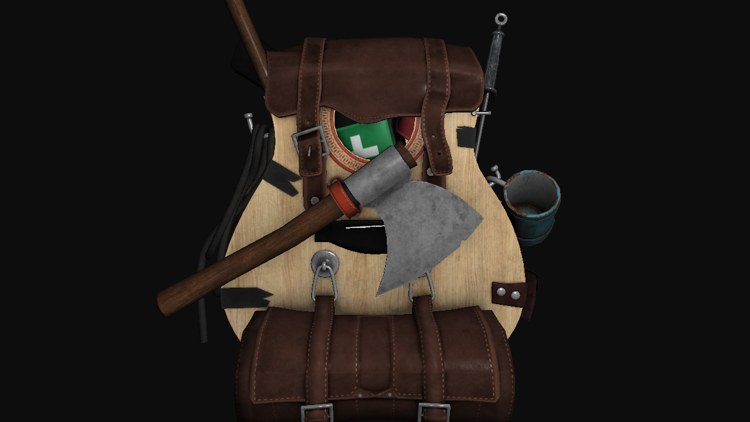
That is a great deal more interesting to look at than a marble cube. Fly around it (WASD, Space and Shift, right mouse button to look) and watch the specular map at work: the metal of the axe head and the buckles catches the light, while the leather and wood stay matte. The model matrix is the identity, so the normal matrix is too; a model that is moved or scaled would need
Our reader handles the subset of .obj that these lessons' models use. Files from the internet will sometimes trip it up: faces with negative (relative) indices, several materials, absolute texture paths, or a format other than .obj altogether. Exporting from Blender with materials written and the path mode set to relative is the quickest way to get a file it reads. The full lesson is here, its shader here, and the loader here.
Additional resources
- Object Files (.obj) and MTL material format: Paul Bourke's copies of the format descriptions, including the parts we skip.
- Wavefront .obj file on Wikipedia: a shorter overview with examples.
- LearnOpenGL's Assimp, Mesh and Model chapters: the library route, with Assimp's scene and node structure.
- Survival Guitar Backpack by Berk Gedik, the model used here.
Exercises
- Count how many vertices a deduplicating loader would produce for the backpack: make a key of each corner's
a/b/ctriple, and count the distinct keys. Compare with the 203,721 vertices loaded now. - Use that count to build an index buffer: give each distinct triple one vertex, write a
u32index per corner, and draw withDrawIndexed . The picture should not change. - Load the backpack with
flip_vset to 1 and look at what happens to its textures. Then loadresources/objects/planet/planet.obj(directoryresources/objects/planet/) both ways and decide which one it needs. - Support several materials: note the vertex count at each
usemtlline, keep a range of vertices and a set of textures per material, and draw each range withDraw 's start-vertex argument.