Point Shadows
The shadow map of the previous chapter looks in one direction. That suits a sun, whose light all travels the same way, and a spotlight, which only lights a cone. It does not suit a point light, a bare bulb hanging in a room, which shines in every direction and so casts shadows in every direction too. One map in one direction cannot cover that, which is why the previous technique is sometimes called
This chapter extends it to all directions at once. The technique goes by the name of
What changes is the shadow map itself. To store depth in every direction around a point we need something that is indexed by direction, and we already have one: the cubemap. Six square faces, one along each axis, together cover every direction from the centre. Render the scene's depth into each face from the light's position, and the cubemap records, for any direction, how far the light can see before it hits something.
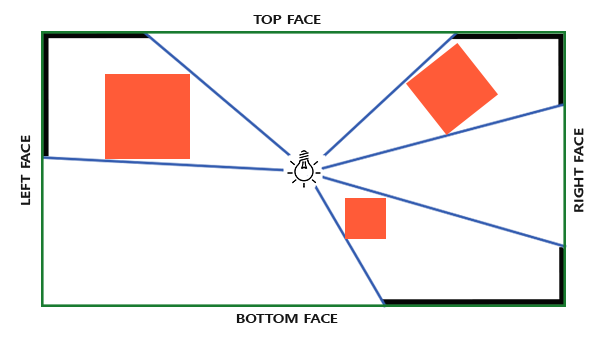
In the second pass, each pixel looks up the cubemap in the direction from the light to itself and compares what it finds with its own distance from the light. Most of that is already familiar. The new work is in filling the depth cubemap.
Generating the depth cubemap
The obvious way is to draw the scene six times, once per face, each time with that face as the depth target and the light looking along that face's axis. It works, but it is six passes over all the geometry, and six sets of draw calls. A geometry shader lets us do it in one: draw the scene once, and have the geometry shader send a copy of every triangle to each of the six faces.
First the texture. A cubemap in Direct3D is a 2D texture array of six slices with the D3D11_RESOURCE_MISC_TEXTURECUBE flag, as in Cubemaps. This one holds depth, so, as with the 2D shadow map, its format is DXGI_FORMAT_R32_TYPELESS, and the views give it meaning:
// A cubemap of depth: one typeless texture, drawn into as six depth slices
// and read as a cube of floats.
depth_cube: struct = {
    dsv: *ID3D11DepthStencilView;
    srv: *ID3D11ShaderResourceView;
}

create_depth_cube: proc(device: *ID3D11Device, size: i32) -> depth_cube = {
    d: depth_cube = {};
    desc: D3D11_TEXTURE2D_DESC = {
        .Width = cast(size, UINT),
        .Height = cast(size, UINT),
        .MipLevels = 1,
        .ArraySize = 6,
        .Format = DXGI_FORMAT.DXGI_FORMAT_R32_TYPELESS,
        .SampleDesc = { .Count = 1 },
        .BindFlags = D3D11_BIND_DEPTH_STENCIL | D3D11_BIND_SHADER_RESOURCE,
        .MiscFlags = D3D11_RESOURCE_MISC_TEXTURECUBE,
    };
    texture: *ID3D11Texture2D = null;
    ID3D11Device_CreateTexture2D(device, desc&, null, texture&);
    dsv: D3D11_DEPTH_STENCIL_VIEW_DESC = {
        .Format = DXGI_FORMAT.DXGI_FORMAT_D32_FLOAT,
        .ViewDimension = D3D11_DSV_DIMENSION.D3D11_DSV_DIMENSION_TEXTURE2DARRAY,
        .Texture2DArray = { .ArraySize = 6 },
    };
    ID3D11Device_CreateDepthStencilView(device, cast(texture, *ID3D11Resource), dsv&, d.dsv&);
    srv: D3D11_SHADER_RESOURCE_VIEW_DESC = {
        .Format = DXGI_FORMAT.DXGI_FORMAT_R32_FLOAT,
        .ViewDimension = D3D11_SRV_DIMENSION.D3D11_SRV_DIMENSION_TEXTURECUBE,
        .TextureCube = { .MipLevels = 1 },
    };
    ID3D11Device_CreateShaderResourceView(device, cast(texture, *ID3D11Resource), srv&, d.srv&);
    return d;
}
The two views see the same six slices in two different shapes, and that is the heart of the method.
- The depth-stencil view is a
texture array view covering all six slices. Bound as the depth target, it lets a single draw write into any of the slices: each primitive says which one, as we will see. - The shader resource view is a cube view. Read through it, the six slices become one texture sampled by direction, and the hardware picks the face and the texel for us.
OpenGL does the first with
// 1. render scene to depth cubemap: all six faces in one pass
// -----------------------------------------------------------
unbind_textures(context);
ID3D11DeviceContext_OMSetRenderTargets(context, 0, null, depth_map.dsv);
ID3D11DeviceContext_ClearDepthStencilView(context, depth_map.dsv, D3D11_CLEAR_DEPTH, 1.0, 0);
ID3D11DeviceContext_RSSetViewports(context, 1, shadow_viewport&);
One clear of the array view clears all six slices.
Light space transform
Each face needs its own light-space transform, a view and a projection. The projection is a perspective one this time, since the light is a point and its rays spread out from it, and the same projection serves all six faces. Its field of view is exactly 90 degrees, and its aspect ratio is 1: a face of a cube, seen from the cube's centre, spans 90 degrees each way, so this makes the six frusta meet edge to edge with no gaps and no overlaps.
The views look from the light along each axis, in the cubemap's slice order: +x, -x, +y, -y, +z, -z. Here are all six, built every frame because the light moves:
// The view-projection of each cube face from `center`, in the order of the
// cubemap's slices: +x, -x, +y, -y, +z, -z.
cube_face_matrices: proc(center: vec3, z_near: f32, z_far: f32, out: [*]mat4) -> void = {
    targets: [6]vec3 = { v3(1.0, 0.0, 0.0), v3(-1.0, 0.0, 0.0), v3(0.0, 1.0, 0.0), v3(0.0, -1.0, 0.0), v3(0.0, 0.0, 1.0), v3(0.0, 0.0, -1.0) };
    ups: [6]vec3 = { v3(0.0, -1.0, 0.0), v3(0.0, -1.0, 0.0), v3(0.0, 0.0, 1.0), v3(0.0, 0.0, -1.0), v3(0.0, -1.0, 0.0), v3(0.0, -1.0, 0.0) };
    projection: mat4 = m4_mul(m4_scale(v3(1.0, -1.0, 1.0)), m4_perspective(radians(90.0), 1.0, z_near, z_far));
    for (i: u32 = 0; i < 6; i += 1) {
        out[i] = m4_mul(projection, m4_look_at(center, v3_add(center, targets[i]), ups[i]));
    }
}
The targets and up vectors are LearnOpenGL's. The up vectors look odd, mostly pointing down, because they follow the cubemap's own convention for how each face's image is oriented, a convention inherited from RenderMan that both APIs share. The odd one out is the projection, which is flipped in y by the m4_scale(v3(1.0, -1.0, 1.0)) in front of it, and that flip is specific to Direct3D.
The reason is that a cubemap's faces are laid out left-handed: for each face, the direction in which u grows and the direction in which v grows, together with the face's axis, make a left-handed frame. A right-handed look-at matrix can never produce such a frame; whatever up vector we choose, it can get either the face's right or its up direction correct, never both. OpenGL's framebuffer happens to rescue it. GL stores rendered images bottom row first, which flips every image vertically relative to the texture's rows, and for cubemap faces that flip is exactly the correction needed. Direct3D stores rendered images top row first, as textures are read, so the rescue does not happen and we have to flip ourselves. Negating y in the projection mirrors each face's image vertically, after which right and up both match the face's layout.
A mirror image also reverses the order in which a triangle's corners appear on screen, so every triangle that was counter-clockwise becomes clockwise. If culling were on, the shadow pass would cull the wrong faces. These lessons draw with culling off, so it does not matter here, but it is worth remembering whenever you render into cube faces.
The six matrices go into a constant buffer, along with the light's position and the far plane that the depth shaders need:
cbuffer shadow : register(b1)
{
    float4x4 faces[6];
    float3 light_position;
    float far_plane;
};
// move light position over time
light_position: vec3 = v3(0.0, 0.0, 3.0 * sinf(current_frame * 0.5));
sh: shadow_constants = {};
cube_face_matrices(light_position, 0.1, 25.0, sh.faces[0]&);
sh.light_position = light_position;
sh.far_plane = 25.0;
update_buffer(context, shadow_buffer, sh&, sizeof(shadow_constants));
The light drifts back and forth along z, three units each way, so the shadows move around the room. The near plane is 0.1 and the far plane 25, comfortably beyond the room's farthest corner. Notice that the buffer fits the cbuffer's layout with no padding: the float3 and the float share the last register.
Depth shaders
The depth pass now has three stages. The vertex shader only takes each vertex to world space, since which light-space transform to apply depends on the face, and that is the geometry shader's decision:
float4 vs_main(float3 position : POSITION) : WORLD
{
    return mul(model, float4(position, 1.0));
}
Its output is not marked SV_Position. A vertex shader feeding a geometry shader can output whatever it likes; only the last stage before the rasterizer has to provide SV_Position. Here that is the geometry shader:
struct face_vertex
{
    float4 position : SV_Position;
    float3 world : WORLD;
    uint face : SV_RenderTargetArrayIndex;   // which slice of the cubemap
};
// every triangle, six times: once into each face, through that face's view
[maxvertexcount(18)]
void gs_main(triangle float4 world[3] : WORLD, inout TriangleStream<face_vertex> output)
{
for (uint face = 0; face < 6; face++)
{
for (int i = 0; i < 3; i++)
{
face_vertex v;
v.world = world[i].xyz;
v.position = mul(faces[face], world[i]);
v.face = face;
output.Append(v);
}
output.RestartStrip();
}
}
For each incoming triangle it emits six, one per face, so the most it ever writes is 18 vertices, which [maxvertexcount(18)] declares. Each copy's vertices go through that face's matrix into its clip space, and carry the face's number in a uint marked SV_RenderTargetArrayIndex. That system value, GLSL's gl_Layer, picks which slice of the bound array view the triangle is rasterized into. It only has an effect when the bound view is an array, which is why the depth view was made as one.
A copy that falls outside its face's frustum costs little: it is clipped away before rasterization. Most triangles land in one or two faces, and the other copies vanish.
Last, the pixel shader. In the previous chapter the pixel shader was empty and the hardware wrote the projected depth. Here we write our own depth: the straight-line distance from the light, divided by the far plane so that it fits the 0 to 1 a depth buffer stores.
// distance to the light, 0..1 over the far plane, written as the depth
float ps_main(face_vertex p) : SV_Depth
{
    return length(p.world - light_position) / far_plane;
}
Returning a value marked SV_Depth replaces the depth the rasterizer computed, as assigning gl_FragDepth does in GLSL. The depth test then compares these distances, so the nearest surface in each direction still wins. Why bother? Each face's projected depth is measured along that face's own axis, so the same point would get different values in different faces, and comparing them would need to know which face a lookup came from. A distance from the light means the same thing in every face, so the second pass can compare it without caring which face the hardware picked. It is also linear in distance, which makes the bias easier to reason about.
Then the scene is drawn once, room and cubes, and all six faces fill at once:
t: transforms = {};
shader_use(context, depth_shader&);
draw_vertices(context, transforms_buffer, t&, cube_vb, 36, room);
for (i: u32 = 0; i < 5; i += 1) { draw_vertices(context, transforms_buffer, t&, cube_vb, 36, cubes[i]); }
gs_main, and unbinds it again for shaders without one, so the second pass needs nothing special to switch it off.
Omnidirectional shadow maps
The scene is a room, a large cube scaled by 10, with five wooden cubes scattered around the light. We see the room from inside, so its faces' normals point the wrong way, outward. The lighting shader multiplies normals by a constant from a third small buffer before using them:
o.normal = mul((float3x3)normal_matrix, v.normal * flip_normals);surface: surface_constants = { .flip_normals = -1.0 };
update_buffer(context, surface_buffer, surface&, sizeof(surface_constants));
draw_vertices(context, transforms_buffer, t&, cube_vb, 36, room);
surface.flip_normals = 1.0;
update_buffer(context, surface_buffer, surface&, sizeof(surface_constants));
for (i: u32 = 0; i < 5; i += 1) { draw_vertices(context, transforms_buffer, t&, cube_vb, 36, cubes[i]); }The room's faces are also seen from their back sides, which is fine since culling is off. The lighting itself is the Blinn-Phong of the previous chapter, now with a point light, so the direction to the light is computed per pixel:
float4 ps_main(vs_out p) : SV_Target
{
    float3 color = albedo.Sample(linear_wrap, p.uv).rgb;
    float3 n = normalize(p.normal);
    float3 to_light = normalize(light_position - p.world);
    float3 to_eye = normalize(view_position - p.world);
    float3 halfway = normalize(to_light + to_eye);

    float diffuse = max(dot(n, to_light), 0.0);
    float spec = pow(max(dot(n, halfway), 0.0), 64.0);
    float lit = lit_fraction(p.world);
    return float4((0.15 + lit * (diffuse + 0.3 * spec)) * color, 1.0);
}
The shadow map is declared as a cube, and the comparison sampler comes back:
Texture2D albedo : register(t0);
TextureCube<float> shadow_map : register(t1);
SamplerState linear_wrap : register(s0);
SamplerComparisonState shadow_compare : register(s1);
The sampler is the one from the previous chapter with one change: its address mode is clamp rather than border. A cube lookup by direction never falls off the edge of the map, since every direction lands on some face, so there is no outside to give a border colour to.
Looking up the shadow is simpler than with a 2D map, because no projection is needed. The vector from the light to the pixel is the lookup direction. It need not be normalized; a cube lookup only cares about direction. Its length, divided by the far plane, is the pixel's own distance in the same units the map stores. So the basic test, before any softening, is:
float3 from_light = world - light_position;
float distance = length(from_light) / far_plane;
lit = shadow_map.SampleCmpLevelZero(shadow_compare, from_light, distance - bias);
TextureCube works just like on a Texture2D, taking a direction instead of a uv: the hardware picks the face, compares the reference with the texels around the lookup, and returns the filtered fraction that passed. LearnOpenGL compares in world units, multiplying the stored value back by the far plane; we compare in the stored units directly, which saves the multiplication, and scales the bias by the same factor: our 0.002 times the far plane of 25 is a twentieth of a unit, the 0.05 of LearnOpenGL's first version.
The previous chapter's rasterizer depth bias is not used here. It works on the depth the rasterizer interpolates, and our pixel shader replaces that depth with its own, so the bias is applied in the shader instead.
Visualizing the cubemap depth
When point shadows go wrong, the first thing to check is whether the cubemap holds what it should. A simple test is to sample it without comparing and show the stored distance as grey. A TextureCube<float> can be read with an ordinary sampler as well as a comparison one, so in the pixel shader:
return float4(shadow_map.Sample(linear_wrap, p.world - light_position).xxx, 1.0);The room then appears in shades of grey, darker near the light, with the cubes' shadows visible as darker shapes on the walls behind them: the map records the cube in that direction, not the wall. If the shapes on the walls are misplaced or mirrored compared with the cubes that cast them, the face matrices are wrong, which is exactly what the y flip above is for. The lesson does not have this mode built in; it makes a good first exercise.
PCF
A single hardware comparison already softens edges by about a texel, as before. For wider soft edges we take several lookups around the pixel and average them, but in three dimensions now, since the lookup is a direction. LearnOpenGL first tries a 4x4x4 grid of offsets, 64 lookups per pixel, and then points out that most of them are wasted: offsets along the lookup direction change nothing, and many of the rest are nearly the same as their neighbours. Better to take fewer offsets that point in clearly different directions. Twenty do well:
// directions to spread the shadow samples along
static const float3 disc[20] =
{
    float3(1, 1, 1), float3(1, -1, 1), float3(-1, -1, 1), float3(-1, 1, 1),
    float3(1, 1, -1), float3(1, -1, -1), float3(-1, -1, -1), float3(-1, 1, -1),
    float3(1, 1, 0), float3(1, -1, 0), float3(-1, -1, 0), float3(-1, 1, 0),
    float3(1, 0, 1), float3(-1, 0, 1), float3(1, 0, -1), float3(-1, 0, -1),
    float3(0, 1, 1), float3(0, -1, 1), float3(0, -1, -1), float3(0, 1, -1),
};
These are the eight corners of a cube and the twelve midpoints of its edges, as seen from its centre. And the complete shadow function:
float lit_fraction(float3 world)
{
    float3 from_light = world - light_position;
    float distance = length(from_light) / far_plane;
    float bias = 0.002;
    // farther from the eye, a wider disc: softer where detail is lost anyway
    float radius = (1.0 + length(view_position - world) / far_plane) / 25.0;
    float sum = 0.0;
    for (int i = 0; i < 20; i++)
    {
        sum += shadow_map.SampleCmpLevelZero(shadow_compare, from_light + disc[i] * radius * length(from_light), distance - bias);
    }
    return sum / 20.0;
}
Two details. The radius grows with the distance from the camera to the pixel, from 1/25 up close to twice that at the far plane, which is LearnOpenGL's trick: distant shadows get softer edges, where the eye would not see their detail anyway. And the offsets are scaled by the length of from_light. LearnOpenGL adds them to from_light as they are, so they are a fixed distance in world units, and the same offset bends the lookup through a large angle near the light and a tiny one far away. Scaling by the length makes the offset a fixed angle instead, so the edge covers roughly the same number of shadow map texels wherever the pixel is. The result is a soft edge that widens with distance from the light, which is also roughly what a real light of some size does.
Twenty lookups that each blend four comparisons: eighty depth tests per pixel, done mostly by the texture hardware. Here is the room, with the light, the small white cube, on the left:
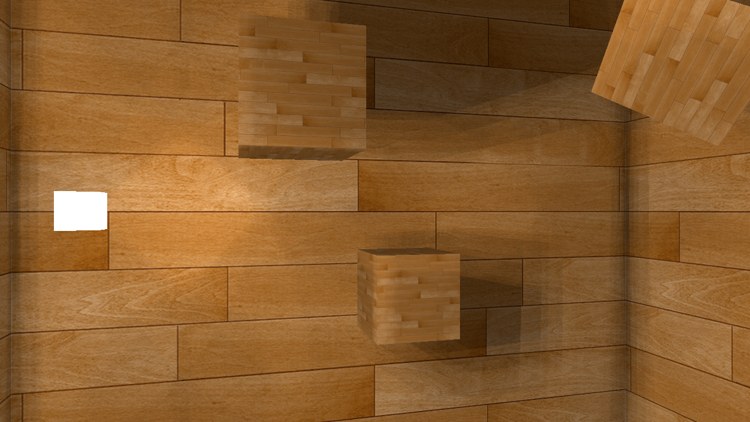
Every cube casts its shadow away from the light, onto whichever wall is behind it, and the shadows on the far wall slide as the light moves forward and back. Use the camera to look around the room, up and down too: all six directions are shadowed.
A word on speed, the same one LearnOpenGL gives. Drawing all six faces through a geometry shader saves draw calls, but geometry shaders that multiply their input are not especially fast on many GPUs, and six separate passes, or instancing with one instance per face, can be quicker. Which wins depends on the scene and the hardware; if it matters, measure both. The full program is here, and its shaders here and here.
Additional resources
- Multipass shadow mapping with point lights: ogldev's version, rendering the six faces in separate passes.
- Omni-directional shadows: slides by Peter Houska on the technique and its problems.
- Semantics: Microsoft's list of HLSL system values, including SV_RenderTargetArrayIndex and SV_Depth.
- LearnOpenGL's Point Shadows: the OpenGL version of this chapter, with gl_Layer and gl_FragDepth.
Exercises
- Add a key that shows the depth cubemap as grey, as described above, using
shadow_map.Sample(linear_wrap, ...)in the pixel shader. Compare the shapes on the walls with the cubes that cast them. - Remove the
m4_scale(v3(1.0, -1.0, 1.0))from the face projection and run it. Where do the shadows go wrong? Look in several directions, not just at one wall. - Replace the 20-sample loop with a single lookup along from_light, and compare the edges. Then go back to 20 and add the offsets without the
length(from_light)factor, as LearnOpenGL does; how do the shadows near and far from the light change? - Render the six faces with six draws of the scene instead of a geometry shader: create six depth views, each covering one slice (FirstArraySlice = face, ArraySize = 1), and draw with a vertex shader that applies one face's matrix.