Theory
It is still an approximation. We are not simulating photons; we are using equations that are based on physics, which is why the name is physically based rather than physical. In practice a lighting model earns the label when it meets three conditions, each of which gets its own section below:
- it is built on the
microfacet surface model, - it conserves energy,
- it uses a physically based BRDF.
The flavour of PBR we follow is the one Disney researched and Epic Games adapted for real-time use in Unreal Engine 4. It is built on the
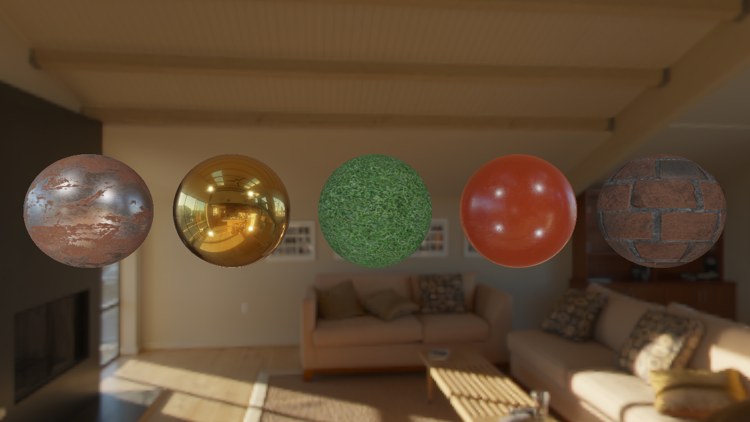
These chapters lean on much of what came before: render targets, cubemaps, gamma correction, HDR and normal mapping. There is also more mathematics than anywhere else in the book. None of it is hard once it is unpacked, and we will unpack it one term at a time. This chapter is all theory; the next one turns it into a shader.
The microfacet model
Look at any surface under a strong enough microscope and it stops being flat. It becomes a landscape of tiny facets, each one small and flat enough to act as a perfect mirror. These are

That alignment decides what reflections look like. Light arriving at a smooth surface bounces off facets that agree with each other, so the reflected rays leave together and we see a small, sharp highlight. On a rough surface each ray meets a facet tilted its own way, the reflected rays fan out, and the highlight spreads into a wide, dim glow:

Microfacets are far smaller than a pixel, so we never model them one by one. We describe them statistically, with a single
The more microfacets face along \(h\), the stronger and tighter the reflection. A low roughness packs many facets close to the surface normal, so when \(h\) lines up with the normal the reflection is intense, and when it doesn't there is almost nothing. A high roughness spreads them out, so some reflection happens over a wide range of angles but none of it is intense. We will see exactly how that looks when we reach the normal distribution function.
Energy conservation
The second rule is simple to state: a surface may not send out more light than it receives (light sources aside). It already explains something visible in the picture above. As roughness grows, the highlight gets bigger and dimmer. If it kept the same brightness while growing, the rough surface would be reflecting more energy than arrived, which is impossible. The same light is spread over a larger area, so each part of it is fainter.
To keep the books balanced we have to separate two things that happen when light hits a surface. Part of it is
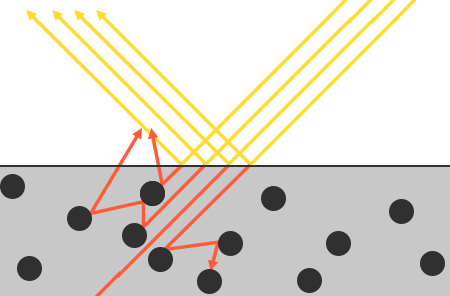
Refracted light doesn't simply vanish. Inside the material it bumps into particles, losing some energy at each collision (turned into heat) and changing direction each time. Some of it is absorbed completely. The rest eventually finds its way back out, in a more or less random direction, and that re-emerging light is the colour we see as the surface's diffuse colour. PBR makes a simplification here: it assumes the light comes back out very close to where it went in. Materials where light travels a noticeable distance under the surface, such as skin, marble, milk or wax, need
Metals are a special case. Light refracted into a metal is absorbed straight away, with no scattering, so a metal has no diffuse light at all: everything we see of it is reflection. Non-metals, called
Reflection and refraction also compete for the same light. Whatever fraction is reflected is not available to be refracted, and the other way round. So once we know the reflected fraction, which we will call \(k_s\), the refracted fraction follows directly:
ks = (fraction of light reflected, from Fresnel)
kd = 1.0 - ks        // whatever is left enters the surface
With the two fractions defined like this they can never add up to more than 1, which is exactly the guarantee we wanted. Our Phong shaders never had it: their diffuse and specular terms were added with no relation between them, so a bright specular colour on top of a bright diffuse colour simply created light.
The reflectance equation
The serious theory of light transport is the
It reads, roughly: the light leaving point \(p\) towards the viewer is the sum, over every direction light can arrive from, of the incoming light, weighted by the angle it arrives at and by how much of it this material sends in the viewer's direction. To make that precise we need a few terms from
Radiant flux
Solid angle
The
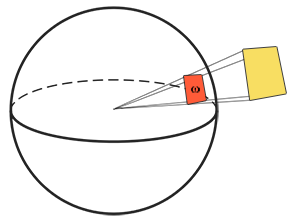
Radiant intensity
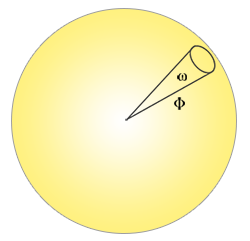 \[
I = \frac{d\Phi}{d\omega}
\]
\[
I = \frac{d\Phi}{d\omega}
\]
Radiance
Radiance combines all of these. It is the flux passing through a small area \(A\) within a small solid angle \(\omega\), corrected for the angle \(\theta\) between the light and the area's normal:
\[ L = \frac{d^2\Phi}{dA\, d\omega\, \cos\theta} \]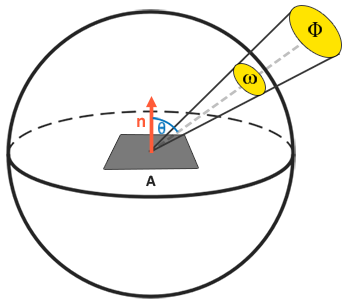
The \(\cos\theta\) is the same factor as in our very first diffuse lighting: light that strikes a surface at a glancing angle spreads its energy over more of the surface, so each point receives less. In a shader it is the dot product we have written many times:
cos_theta = dot(light_dir, n)Radiance is the quantity we want because it contains everything: an amount of energy, a direction, and a point. If we shrink the area and the solid angle to nothing, radiance describes a single ray of light arriving at a single point. The solid angle becomes a direction vector \(\omega\) and the area becomes a point \(p\), which is exactly what a pixel shader has to work with: one point on a surface and the directions light comes from.
Back to the equation
So \(L_i(p, \omega_i)\) is the radiance arriving at \(p\) from direction \(\omega_i\), and \(n \cdot \omega_i\) is the \(\cos\theta\) that weakens light arriving at an angle. \(L_o(p, \omega_o)\) is the radiance leaving \(p\) in the direction of the viewer, \(\omega_o\): the colour of our pixel. Summing radiance over all incoming directions gives the total light falling on the point, its
The directions to sum over are all those on the side of the surface facing outwards: a
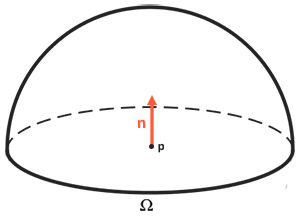
The integral sign \(\int\) is how mathematics writes "add up continuously over every direction \(d\omega_i\) in \(\Omega\)". There is no closed-form solution for it in general, so we compute it numerically: pick many directions, evaluate the expression for each, and add them up, each weighted by the small piece of the hemisphere it stands for. That is a
steps = 100
d_omega = 1.0 / steps            // the share of the hemisphere each step stands for
sum = 0
for i in 0 .. steps-1:
    wi = next_incoming_direction(i)
    sum += brdf(p, wi, wo) * radiance(p, wi) * dot(n, wi) * d_omega
The more steps, the closer the sum gets to the true integral. Keep this shape in mind: it is literally what the convolution shaders of the IBL chapters do. For a handful of point lights it is much simpler, because only a few directions carry any light at all, and the integral becomes a loop over the lights.
Where does the incoming radiance come from? It can be ordinary light sources, as in the next chapter, or it can be an entire photographed environment, in which every direction has some radiance; that is image based lighting. Either way, the one remaining unknown is \(f_r\).
BRDF
\(f_r\) is the
A BRDF counts as physically plausible if it conserves energy: over all outgoing directions, it never returns more than came in. Blinn-Phong is technically a BRDF, since it also takes a light and a view direction, but it doesn't conserve energy, so it isn't physically based. There are several physically based BRDFs; real-time renderers almost universally use the
\(k_d\) and \(k_s\) are the refracted and reflected fractions from the energy conservation section. The diffuse part is
\(c\) is the
This is the same diffuse lighting we have been doing since Basic Lighting, the colour times the cosine. The cosine hasn't gone anywhere: it is the \(n \cdot \omega_i\) at the end of the reflectance equation, outside the BRDF. More elaborate diffuse models exist and look a little more realistic, but Epic found Lambert good enough for real-time work, and so do we.
The specular part is where the microfacets come in:
\[ f_{cook\text{-}torrance} = \frac{D\, F\, G}{4\, (\omega_o \cdot n)(\omega_i \cdot n)} \]Three functions multiplied together, over a normalisation factor. Each answers one question about the microfacets:
- D, the
normal distribution function : what share of the microfacets faces along the halfway vector, given the roughness? This is the heart of the microfacet model. - G, the
geometry function : what share of those microfacets is actually visible to both the light and the viewer, rather than hidden behind other microfacets? - F, the
Fresnel equation : of the light hitting those microfacets, what fraction is reflected rather than refracted, at this angle?
Each of the three is itself an approximation, and the literature offers several versions of each, some more accurate and some cheaper. Brian Karis of Epic Games compared many of them; we use the ones Unreal Engine 4 settled on: Trowbridge-Reitz GGX for \(D\), Schlick's approximation for \(F\), and Smith's method with Schlick-GGX for \(G\). They are the functions at the top of every chapter 6 shader, under this comment:
// The Cook-Torrance BRDF used throughout chapter 6.
//
//   f = kd * albedo / pi + D * F * G / (4 (n.v) (n.l))
Normal distribution function
The normal distribution function \(D\) gives the relative concentration of microfacets whose normal is exactly \(h\). Trowbridge-Reitz GGX writes it as
\[ D_{GGX}(n, h, \alpha) = \frac{\alpha^2}{\pi \left( (n \cdot h)^2 (\alpha^2 - 1) + 1 \right)^2} \]where \(\alpha\) is the roughness parameter. Shading a sphere with \(D\) alone, lit from the viewer's side, shows what it does across roughness values from smooth to rough:
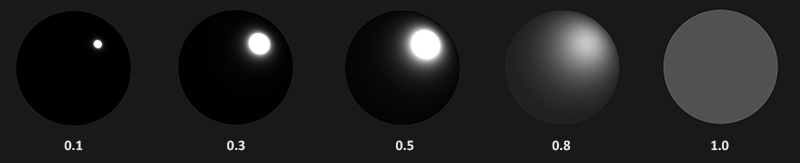
At low roughness the facets are packed tightly around the surface normal. Where \(h\) matches it the function is very large, and a little way off it falls to nearly nothing: a small, intensely bright spot. At high roughness the facets are spread over many orientations, so many more halfway vectors find some facets aligned with them, but never very many: a wide, grey area. The total stays the same; this is energy conservation built into \(D\).
In HLSL it is a direct transcription:
float distribution_ggx(float3 n, float3 h, float roughness)
{
    float a = roughness * roughness;
    float a2 = a * a;
    float n_dot_h = max(dot(n, h), 0.0);
    float d = n_dot_h * n_dot_h * (a2 - 1.0) + 1.0;
    return a2 / (PI * d * d);
}
Notice the first line: the function takes the roughness an artist would set and squares it to get \(\alpha\). Disney observed, and Epic adopted, that roughness feels much more even across its range when it is squared before use. With \(\alpha\) taken directly from the slider, most of the visible change crowds into the low end. The next chapter comes back to this.
Geometry function
The geometry function \(G\) estimates how much the microfacets get in each other's way. On a rough surface, a facet may be correctly aligned to reflect the light towards us and still contribute nothing, because a neighbouring bump blocks the light before it arrives (

Like \(D\), \(G\) depends on roughness: the rougher the surface, the more likely a facet is to be hidden. The function we use combines GGX with the Schlick-Beckmann approximation and is called
\(k\) is a remapping of roughness, and the right remapping depends on what kind of light we are computing. Writing \(r\) for the roughness an artist sets (before any squaring):
\[ k_{direct} = \frac{(r + 1)^2}{8} \qquad\qquad k_{IBL} = \frac{r^2}{2} \]The first is for light from point, directional and spot lights; the second for image based lighting. Both come from Epic's notes, and we will use each where it belongs.
Blocking can happen on either leg of the journey, so we need \(G\) for both the view direction and the light direction.
On spheres over the same range of roughness it looks like this; white means no microfacet shadowing at all and black means total shadowing:
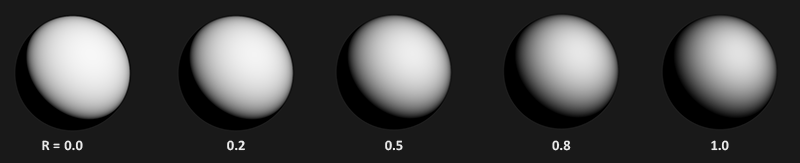
Smooth surfaces barely shadow themselves; rough ones darken, most of all near the silhouette where both light and view arrive at grazing angles. In our shaders the two functions are:
float geometry_schlick_ggx(float n_dot_x, float k)
{
    return n_dot_x / (n_dot_x * (1.0 - k) + k);
}

// k depends on the use: direct light remaps roughness one way, image based
// lighting (the `ibl` path) another.
float geometry_smith(float n_dot_v, float n_dot_l, float roughness, bool ibl)
{
    float r = roughness + 1.0;
    float k = ibl ? roughness * roughness / 2.0 : r * r / 8.0;
    return geometry_schlick_ggx(n_dot_v, k) * geometry_schlick_ggx(n_dot_l, k);
}
Our version takes the two dot products directly, since the caller has already computed them, and an ibl flag that picks between the two remappings. One function serves the direct lights of this chapter and the BRDF table of the specular IBL chapter.
Fresnel equation
The
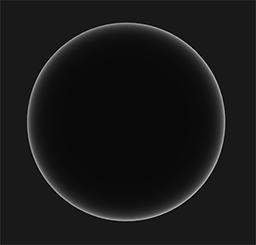
\(F_0\) is the base reflectivity, the reflectance at normal incidence. Here is Fresnel on a sphere: dark in the middle, where we look straight at the surface, brightening steeply towards the rim:
For dielectrics, \(F_0\) can be computed from the material's
| Material | \(F_0\) (linear) | \(F_0\) (sRGB) |
|---|---|---|
| Water | (0.02, 0.02, 0.02) | (0.15, 0.15, 0.15) |
| Plastic, glass (low) | (0.03, 0.03, 0.03) | (0.21, 0.21, 0.21) |
| Plastic (high) | (0.05, 0.05, 0.05) | (0.24, 0.24, 0.24) |
| Glass (high), ruby | (0.08, 0.08, 0.08) | (0.31, 0.31, 0.31) |
| Diamond | (0.17, 0.17, 0.17) | (0.45, 0.45, 0.45) |
| Iron | (0.56, 0.57, 0.58) | (0.77, 0.78, 0.78) |
| Copper | (0.95, 0.64, 0.54) | (0.98, 0.82, 0.76) |
| Gold | (1.00, 0.71, 0.29) | (1.00, 0.86, 0.57) |
| Aluminium | (0.91, 0.92, 0.92) | (0.96, 0.96, 0.97) |
| Silver | (0.95, 0.93, 0.88) | (0.98, 0.97, 0.95) |
Two patterns stand out. Dielectrics reflect very little head on: diamond's 0.17 is unusually high, and most sit between 0.02 and 0.05. Metals start far higher, mostly between 0.5 and 1.0. And only metals are tinted. A dielectric reflects all wavelengths about equally, so its reflections are white; a metal reflects some wavelengths more than others, which is why gold reflections are gold. That is why \(F_0\) is an RGB triple rather than one number.
This split is what the
With metalness in hand, \(F_0\) needs no separate parameter. For dielectrics we use 0.04, an average that looks right for most of them. For metals, \(F_0\) is the coloured reflectance, and since a metal has no diffuse colour, we can store it in the albedo. Metalness blends between the two:
// Dielectrics reflect about 4% head on; metals reflect their own colour.
float3 f0 = lerp(0.04.xxx, albedo, metallic);
0.04.xxx swizzles a scalar into a float3. The Fresnel function itself is one line:
float3 fresnel_schlick(float cos_theta, float3 f0)
{
    return f0 + (1.0 - f0) * pow(saturate(1.0 - cos_theta), 5.0);
}
cos_theta is the dot product of the halfway vector and the view direction (or, as we will see in the IBL chapters, of the normal and the view direction). 1.0 - cos_theta a hair below zero, and
Cook-Torrance reflectance equation
Put the Cook-Torrance BRDF into the reflectance equation and we have the complete model:
\[ L_o(p,\omega_o) = \int\limits_{\Omega} \left( k_d\frac{c}{\pi} + k_s\frac{D\,F\,G}{4(\omega_o \cdot n)(\omega_i \cdot n)} \right) L_i(p,\omega_i)\, (n \cdot \omega_i)\, d\omega_i \]There is one redundancy left. \(k_s\), the reflected fraction, is exactly what Fresnel computes, and \(F\) already appears in the specular term. Multiplying by \(k_s\) as well would count Fresnel twice. So \(k_s\) is dropped, and \(F\) inside the specular term does its job:
\[ L_o(p,\omega_o) = \int\limits_{\Omega} \left( k_d\frac{c}{\pi} + \frac{D\,F\,G}{4(\omega_o \cdot n)(\omega_i \cdot n)} \right) L_i(p,\omega_i)\, (n \cdot \omega_i)\, d\omega_i \]\(k_d\) is still derived from \(F\), as \(1 - F\), and one more factor goes in for metals: they refract nothing back out, so their diffuse share is zero however much light Fresnel leaves over. In our shaders that is a single line:
float3 kd = (1.0 - f) * (1.0 - metallic);This equation is what people generally mean when they say PBR. If it isn't yet clear how it becomes code, that is what the next three chapters are for: Lighting evaluates it for four point lights, and the two IBL chapters evaluate it for an entire environment.
Authoring PBR materials
The model takes a small set of physical inputs per surface point, and an artist provides them as textures, one per property, so each texel can be its own material. A typical PBR material is five maps:
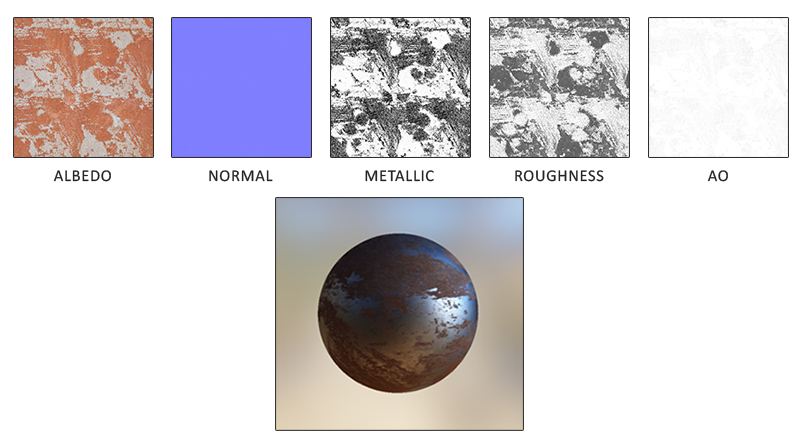
- Albedo gives the surface colour of each texel, or, where the texel is metallic, its \(F_0\). It resembles the diffuse textures we used in Lighting maps, with one important difference: it holds no lighting at all. Diffuse textures often have shading painted in (darker cracks, soft shadows), which an albedo map must not: the renderer computes all of that.
- Normal is the same normal map as in Normal Mapping, giving each texel its own normal so a flat surface looks bumpy.
- Metallic says, per texel, whether it is metal. Depending on the engine artists paint it as greyscale or as pure black and white.
- Roughness gives the roughness per texel, which sets the spread of the microfacets: sharp reflections where it is low, broad blurry ones where it is high. Some engines take a smoothness map instead, which is just one minus roughness.
- AO,
ambient occlusion , is an extra darkening for places that ambient light has trouble reaching, such as the mortar between bricks. It is how crevice shading gets back in without being baked into the albedo. It is usually generated by a modelling tool rather than painted by hand. We computed it per frame in SSAO; a baked map does the same job for detail too fine for that.
Our lessons read these five files from a folder per material (resources/textures/pbr/rusted_iron/ and so on), named albedo.png, normal.png, metallic.png, roughness.png and ao.png. Only the albedo holds colours; the other four hold data. That makes a difference on the GPU, as the next chapter shows: the albedo is decoded from sRGB to linear as it is sampled, and the rest are read as they are stored.
This is the real payoff of PBR for the people making content. The values describe what a material physically is, which doesn't change with the lighting, so a material authored once looks right in every scene and in every PBR renderer that uses the same conventions. Artists can base values on real measurements, and nobody has to retune specular exponents because a level got darker.
Additional resources
- Background: Physics and Math of Shading, Naty Hoffman: the physics behind all of this, far deeper than one chapter can go, and the source of the \(F_0\) table.
- Real Shading in Unreal Engine 4, Brian Karis: the model these chapters implement, including the choice of D, F and G and the roughness remappings.
- Physically Based Shading, Krzysztof Narkowicz: an interactive ShaderToy that shows each term of the BRDF on its own.
- PBR Theory, Marmoset: an introduction written for artists, and a good read for programmers too.
- Physically based rendering and Cook-Torrance at Coding Labs: the rendering equation and the Cook-Torrance BRDF, derived step by step.
- LearnOpenGL's PBR Theory: the OpenGL original of this chapter.
Exercises
- In
pbr.hlslof the next chapter's lesson, makeps_main return only the normal distribution term,distribution_ggx(n, h, roughness)for one light, as a grey value. Compare the spheres across the grid with the picture in the normal distribution section. - Do the same for
geometry_smith and forfresnel_schlick , so you have seen each of D, G and F on its own. Which of the three changes with metallic, and which with roughness? - Replace the constant 0.04 in the f0 line with water's 0.02 and with diamond's 0.17. Which rows of spheres change, and why do the top rows not change at all?