Deferred Shading
Every lesson so far has lit the scene the same way: draw an object, and while drawing it, run each covered pixel through the full lighting calculation for every light. This is
- The
geometry pass draws the whole scene once, with no lighting at all. Instead of a colour, each pixel shader writes out what lighting will need to know about that surface: its position, its normal, its albedo, its specular strength. These go into a set of screen-sized textures together called theG-buffer (geometry buffer). The depth test does its usual job, so when the pass is over the G-buffer holds, for every pixel, the nearest surface and nothing else. - The
lighting pass draws one full-screen triangle. Its pixel shader reads the G-buffer at its own pixel and runs the lighting there, exactly once per pixel, whatever the depth complexity of the scene was.
The lighting itself is the same Blinn-Phong as ever. All that changes is where its inputs come from: not from the vertex shader, but from textures.
The gains are real. Lighting runs once per visible pixel, no matter how many objects overlap. And with the lighting separated from the geometry, we can do something cleverer still: light each pixel only with the lights that can reach it, which is what lets deferred renderers handle hundreds or thousands of lights. We come to that at the end of the chapter.
The costs are real too. The G-buffer is big: several full-screen textures, some of them in high precision. Each pixel holds only one surface, so
The G-buffer
To decide what goes into the G-buffer, list what our forward pixel shaders used to light a pixel:
- the surface position, in world space, to work out the directions to the light and to the eye;
- the surface normal;
- the diffuse colour, the
albedo ; - the specular strength;
- the lights' positions and colours;
- the eye position.
The last two are the same for every pixel, so they can stay in constant buffers. The first four belong to the surface, and those are what the G-buffer must store, one value per pixel. Since the G-buffer textures are the size of the screen, and the lighting pass covers the screen with one pixel shader run per pixel, every run in the lighting pass finds exactly the data its pixel would have had in a forward renderer.
In outline, the render loop becomes:
every frame:
    geometry pass:  bind the G-buffer targets and their depth buffer, clear them
                    for each object: set its transforms, draw it with the G-buffer shader
    lighting pass:  bind the back buffer, bind the G-buffer textures as shader resources
                    set the light constants, draw one full-screen triangle
Our G-buffer has three colour targets and a depth buffer:
positions: render_target = create_render_target(device, scr_width, scr_height, DXGI_FORMAT.DXGI_FORMAT_R16G16B16A16_FLOAT, 1);
normals: render_target = create_render_target(device, scr_width, scr_height, DXGI_FORMAT.DXGI_FORMAT_R16G16B16A16_FLOAT, 1);
albedo: render_target = create_render_target(device, scr_width, scr_height, DXGI_FORMAT.DXGI_FORMAT_R8G8B8A8_UNORM_SRGB, 1);
g_depth: *ID3D11DepthStencilView = create_depth_buffer(device, scr_width, scr_height, 1);
Positions and normals are vectors with real ranges (a position might be at x = -4.3), so they need floats, and 16-bit floats are precise enough for a scene this size. The albedo is a colour from 0 to 1 and fits in 8 bits per channel; its alpha channel is free, so that is where the specular strength goes, saving a whole fourth target. As the G-buffer grows in a real renderer, this kind of packing becomes a craft of its own.
The albedo format is DXGI_FORMAT_R8G8B8A8_UNORM_SRGB. The colour we write is linear, and an sRGB target stores it with the sRGB curve applied, decoding it again when it is read. Nothing changes in the values we get back; what changes is where the 256 steps of each 8-bit channel are spent. Stored linearly, many of them would go to bright shades the eye can barely tell apart, and too few to dark ones, where 8 bits of linear values show visible banding. The sRGB curve puts them where the eye is sensitive, as in Gamma Correction. Only red, green and blue are encoded: alpha in an _SRGB format is always stored linearly, so the specular strength is untouched.
All three targets are bound together for the geometry pass, using multiple render targets as in Bloom:
targets: [3]*ID3D11RenderTargetView = { positions.rtv, normals.rtv, albedo.rtv };
unbind_textures(context);
zero: [4]f32 = { 0.0, 0.0, 0.0, 0.0 };
ID3D11DeviceContext_OMSetRenderTargets(context, 3, targets[0]&, g_depth);
for (i: u32 = 0; i < 3; i += 1) { ID3D11DeviceContext_ClearRenderTargetView(context, targets[i], zero[0]&); }
ID3D11DeviceContext_ClearDepthStencilView(context, g_depth, D3D11_CLEAR_DEPTH, 1.0, 0);
Everything is cleared to zero, alpha included. That matters for the position target: the shader writes a 1 into its w wherever something is drawn, so a 0 there later tells the lighting pass "nothing here, this is background".
The scene is nine copies of the backpack from Model, in a 3 by 3 grid. Each copy only needs its own model and normal matrices; t0 and t1:
shader_use(context, geometry_shader&);
for (z: i32 = -1; z <= 1; z += 1) {
    for (x: i32 = -1; x <= 1; x += 1) {
        t.model = m4_mul(m4_translate(v3(3.0 * cast(x, f32), 0.0, 3.0 * cast(z, f32))), m4_scale(v3(0.6, 0.6, 0.6)));
        t.normal_matrix = m4_normal_matrix(t.model);
        update_buffer(context, transforms_buffer, t&, sizeof(transforms));
        model_draw(context, backpack&);
    }
}
The vertex shader is the usual one that passes on the world position, normal and texture coordinate. The pixel shader does no lighting; it only fills in the three outputs:
// the geometry pass: no lighting, only what the lighting pass will need
Texture2D diffuse_map : register(t0);
Texture2D specular_map : register(t1);
SamplerState linear_wrap : register(s0);

struct g_buffer
{
    float4 position : SV_Target0;   // world space; w = 1 where something was drawn
    float4 normal : SV_Target1;     // world space
    float4 albedo : SV_Target2;     // rgb colour, a specular strength
};

g_buffer ps_main(vs_out p)
{
    g_buffer g;
    g.position = float4(p.world, 1.0);
    g.normal = float4(normalize(p.normal), 0.0);
    g.albedo = float4(diffuse_map.Sample(linear_wrap, p.uv).rgb, specular_map.Sample(linear_wrap, p.uv).r);
    return g;
}
It is important that everything in the G-buffer is in the same space, and that the lighting pass knows which. Here positions and normals are both in world space, like the light positions and the eye, so the lighting needs no transformations at all.
The lesson can show each G-buffer target on screen: press Tab to step through the lit image, the positions, the normals, the albedo and the specular strength.
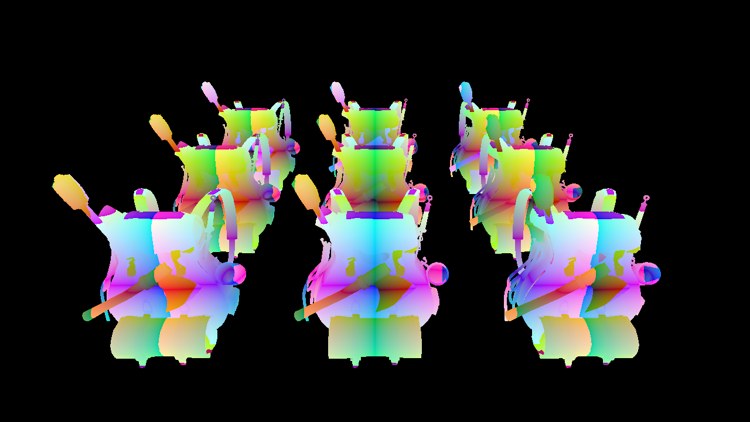
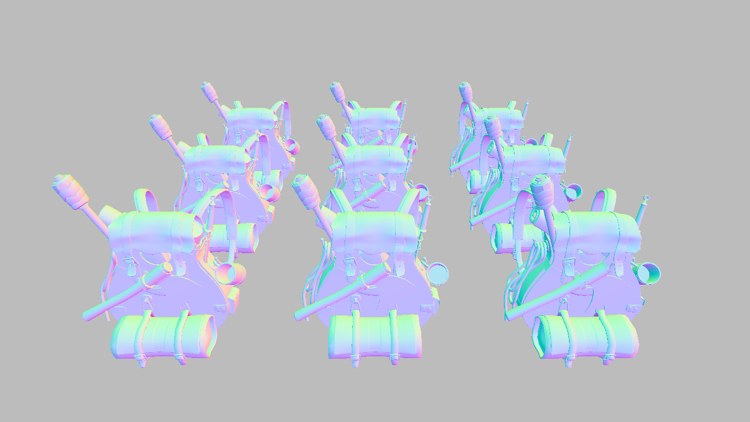
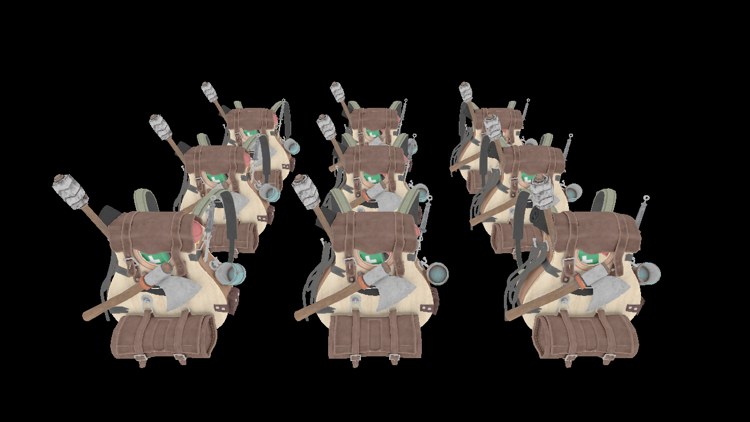
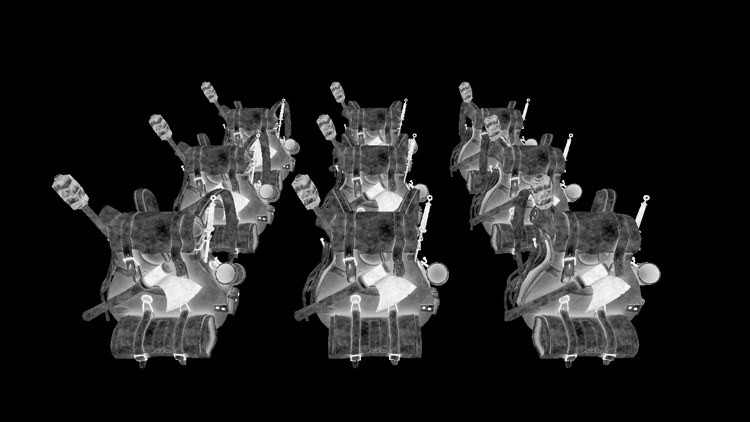
Positions are shown as frac(abs(position)), the fractional part of each coordinate, so the colours repeat every unit and the bands show how position changes over the surfaces; raw world positions would just be saturated blobs of colour, since most of them are far outside 0..1. Normals are shown as n * 0.5 + 0.5, mapping -1..1 to 0..1. Check that they make sense: surfaces facing the camera (+z) are blue-ish, the tops of the bags (+y) greener, faces pointing right (+x) pinker. Where nothing was drawn the normal is 0, which shows as plain grey. The albedo is the bare texture colour, and the specular view shows the alpha channel: bright where the metal buckles and the axe blade should shine, dark on cloth and leather.
The deferred lighting pass
The lighting pass draws into the back buffer. The three G-buffer textures, no longer render targets, are bound as shader resources, together with a constant buffer holding the lights:
shader_use(context, lighting_shader&);
bind_constants(context, 1, lights_buffer);
views: [3]*ID3D11ShaderResourceView = { positions.srv, normals.srv, albedo.srv };
ID3D11DeviceContext_PSSetShaderResources(context, 0, 3, views[0]&);
ID3D11DeviceContext_Draw(context, 3, 0);
As always, the
The light data mirrors the shader's constant buffer: 32 lights of two float4s each, then the debug view mode, padded to a full register.
point_light: struct = {
    position: vec4;
    color: vec4;
}

lights_constants: struct = {
    lights: [32]point_light;
    view_mode: i32;
    pad: [3]i32;
}
The lights are scattered at random among the backpacks when the program starts, with colours between half and full brightness. The random generator is seeded with a fixed number, so the scatter is the same each run:
srand(13);
lights: lights_constants = {};
for (i: u32 = 0; i < light_count; i += 1) {
    lights.lights[i].position = v4(random01() * 9.0 - 4.5, random01() * 3.0 - 0.5, random01() * 9.0 - 4.5, 0.0);
    lights.lights[i].color = v4(random01() * 0.5 + 0.5, random01() * 0.5 + 0.5, random01() * 0.5 + 0.5, 0.0);
}
To make the lighting visibly live, each frame the lights also drift a little, so every one slowly traces a small circle:
// the lights drift in small circles
lights.lights[i].position = v4(p.x + 0.6 * cosf(current_frame + cast(i, f32)) * delta_time, p.y, p.z + 0.6 * sinf(current_frame + cast(i, f32)) * delta_time, 0.0);
And here is the lighting pass's pixel shader:
float4 ps_main(fullscreen_vertex p) : SV_Target
{
    // one texel per pixel, so read it directly by its coordinates
    int3 pixel = int3(p.position.xy, 0);
    float4 position = positions.Load(pixel);
    float3 n = normals.Load(pixel).xyz;
    float4 surface = albedo_spec.Load(pixel);
    if (view_mode == 1) return float4(frac(abs(position.xyz)), 1.0);
    if (view_mode == 2) return float4(n * 0.5 + 0.5, 1.0);
    if (view_mode == 3) return float4(surface.rgb, 1.0);
    if (view_mode == 4) return float4(surface.aaa, 1.0);
    // nothing was drawn here: the background
    if (position.w == 0.0) return float4(0.0, 0.0, 0.0, 1.0);

    float3 to_eye = normalize(view_position - position.xyz);
    float3 color = 0.1 * surface.rgb;
    for (int i = 0; i < 32; i++)
    {
        float3 to_light = lights[i].position.xyz - position.xyz;
        float d = length(to_light);
        to_light /= d;
        float3 halfway = normalize(to_light + to_eye);
        float falloff = 1.0 / (1.0 + 0.7 * d + 1.8 * d * d);
        float3 diffuse = max(dot(n, to_light), 0.0) * surface.rgb;
        float3 specular = pow(max(dot(n, halfway), 0.0), 16.0) * surface.a;
        color += (diffuse + specular) * lights[i].color.rgb * falloff;
    }
    return float4(color, 1.0);
}
The first three lines are worth a closer look, because they differ from LearnOpenGL's texture(gPosition, TexCoords). The G-buffer has exactly one texel per screen pixel, so there is nothing to filter: we want texel (x, y) for pixel (x, y), exactly. HLSL's SV_Position, which in a pixel shader holds (as we saw in Advanced HLSL) the position of the pixel's centre in pixels, such as (640.5, 360.5); converting it to int drops the half and gives the texel index. The third component of the int3 is the mip level.
The debug views come next, and then the background test on w. After that it is the familiar Blinn-Phong loop, with every input read from the G-buffer: position and normal for the geometry, the albedo for diffuse, the alpha channel for the specular strength. The falloff uses the constant, linear and quadratic terms from Light casters, 1, 0.7 and 1.8, which keep each light's reach short. The eye position, view_position, comes from the transforms constant buffer at b0, which the lighting shader declares too; it still holds the camera from the geometry pass.
With 32 lights, the result looks like this:
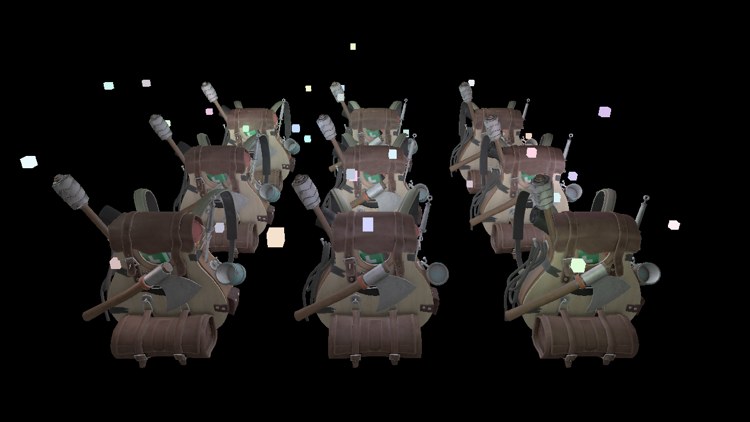
The small cubes are the lights themselves, and they are the subject of the next section, because they are not drawn by the deferred passes at all.
Combining deferred rendering with forward rendering
Some things do not fit in a deferred renderer. Transparent surfaces need blending, which the G-buffer's single surface per pixel cannot provide. Some objects want a completely different shader. Our light cubes are the simplest example: each should be a flat patch of its light's colour, never shaded. The usual answer is to run a forward pass after the deferred lighting, drawing these objects the old way on top of the lit image.
The catch is depth. The lighting pass is a single full-screen triangle, and the depth buffer bound with the back buffer knows nothing about the backpacks. With that buffer freshly cleared, every cube would be drawn over every backpack, including the ones that should be hidden behind them. (As the lesson stands it is worse: the full-screen triangle lies at depth 0 and has written 0 everywhere, so no cube would be drawn at all.) The cubes need to be tested against the scene's real depth, and that is in the G-buffer's depth buffer.
In OpenGL that depth lives in the G-buffer's framebuffer object, and the default framebuffer has its own; LearnOpenGL copies one into the other with
// 3. render lights on top of the scene, depth tested against the g-buffer's depth
// -------------------------------------------------------------------------------
if (lights.view_mode == 0) {
    ID3D11DeviceContext_OMSetRenderTargets(context, 1, backbuffer_rtv&, g_depth);
    shader_use(context, lamp_shader&);
    bind_constants(context, 1, lamp_buffer);
    for (i: u32 = 0; i < light_count; i += 1) {
        p: vec4 = lights.lights[i].position;
        lamp_color: vec4 = lights.lights[i].color;
        lamp_color.w = 1.0;
        update_buffer(context, lamp_buffer, lamp_color&, 16);
        draw_vertices(context, transforms_buffer, t&, cube_vb, 36, m4_mul(m4_translate(v3(p.x, p.y, p.z)), m4_scale(v3(0.12, 0.12, 0.12))));
    }
}
The depth buffer still holds the nearest backpack surface at every pixel, written in the geometry pass, so a cube behind a backpack fails the depth test and stays hidden, just as if the whole scene had been drawn forward. The cubes' shader is the lamp shader from the lighting chapters, which returns one flat colour. They are only drawn in the lit view; in the debug views they would cover up the buffers we want to see.
This is the general pattern for mixing the two: whatever needs blending or special shading is drawn after the deferred passes, forward, with the G-buffer's depth bound for testing.
The full program is here, with the geometry pass shader here, the lighting pass shader here and the light cubes' shader here.
A larger number of lights
What we have built lights each pixel once, but it still runs all 32 lights for every pixel. The loop has merely moved from the geometry to the screen. What really lets deferred renderers handle a great many lights is an observation about falloff: a small light only reaches a small part of the scene. Most of the 32 lights in our loop contribute next to nothing to most pixels, because they are several units away and their light has faded to almost zero.
So give each light a
Calculating a light's volume or radius
Our falloff is
\[ F = \frac{I}{K_c + K_l d + K_q d^2} \]where \(I\) is the light's strength. It never quite reaches 0, so we cannot ask where it ends. We can ask where it drops below a level too dark to see. With 8 bits per channel, the smallest step is \(1/256\); taking a few steps, say \(5/256\), as "dark enough" gives:
\[ \frac{I_{max}}{K_c + K_l d + K_q d^2} = \frac{5}{256} \]Here \(I_{max}\) is the light's brightest colour channel, since that channel is the last to fade. Rearranging,
\[ K_q d^2 + K_l d + K_c - \frac{256}{5} I_{max} = 0 \]which is a quadratic in \(d\), with the positive solution
\[ d = \frac{-K_l + \sqrt{K_l^2 - 4 K_q \left(K_c - \frac{256}{5} I_{max}\right)}}{2 K_q} \]For our lights, with \(K_c = 1\), \(K_l = 0.7\), \(K_q = 1.8\) and \(I_{max}\) at most 1, the radius comes out at about 5.1 units: a light in the middle of the grid reaches some of the backpacks, but not the far corners. In code, on the CPU, once per light:
light_max = fmaxf(fmaxf(color.x, color.y), color.z);
radius = (-0.7 + sqrtf(0.7 * 0.7 - 4.0 * 1.8 * (1.0 - (256.0 / 5.0) * light_max))) / (2.0 * 1.8);The obvious way to use the radius is a test in the lighting loop, skipping lights that are too far away:
for each light:
    d = length(light.position - position)
    if (d < light.radius)
        ... the lighting as before ...
The image would be the same, and on paper we would skip most of the work. In practice, much less is saved than it seems.
How we really use light volumes
GPUs run pixel shaders in groups of many pixels at once, all executing the same instruction together. When pixels in a group disagree about a branch, the group runs both sides, with the pixels that did not take a side simply ignoring its results. Neighbouring pixels on screen usually belong to the same group, and with 32 overlapping lights, almost every group will have some pixel inside almost every light's radius. So the group pays for nearly every light anyway, and the branch saves little.
The approach that works is to let the rasterizer do the selection. For each light, draw an actual sphere mesh, centred on the light and scaled to its radius, with the lighting shader. The rasterizer only produces pixels where the sphere covers the screen, so the shader only runs for pixels that the light might reach. Each run reads the G-buffer and computes that one light's contribution, and the results of all the spheres are summed with additive blending. LearnOpenGL's illustration shows two such spheres and what they light:
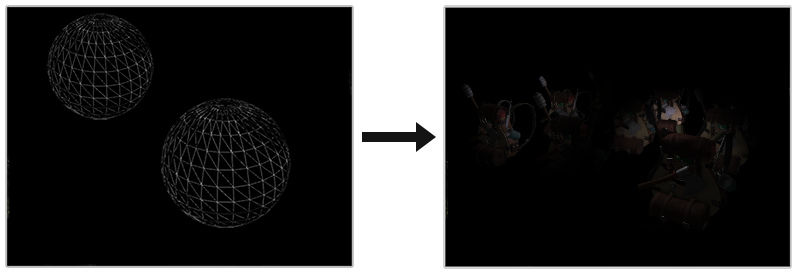
The work now grows with the number of lights plus the number of pixels they cover, not with lights times pixels, which is what makes thousands of small lights feasible. In Direct3D terms each sphere is drawn with a blend state set to add (D3D11_BLEND_ONE for both source and destination). One more detail: if the camera is inside a light's sphere, the sphere's front faces are behind the camera and get clipped. Drawing only the back faces instead, with the rasterizer state's CullMode set to D3D11_CULL_FRONT, avoids that, and also lights each pixel once per light rather than twice.
Light volumes are not the end of the story. Two well-known refinements are
Deferred rendering vs forward rendering
Even without light volumes, deferred shading guarantees one lighting calculation per pixel, where forward rendering may do several. Against that stand its costs: the memory and bandwidth of the G-buffer, no blending in the deferred part, and awkward multisampling.
For a small scene with few lights, deferred is not necessarily faster, and can be slower: writing and reading the G-buffer costs more than it saves. As scenes and light counts grow, the balance tips, and with light volumes or tiles it tips far. The G-buffer also pays off elsewhere: many screen-space effects need exactly the positions and normals it already holds. The next chapter, SSAO, is built on one.
Almost any forward technique can be made deferred with a little translation. Normal mapping, for instance, changes only the geometry pass: it writes the normal from the normal map, turned by the TBN matrix, instead of the vertex normal, and the lighting pass does not change at all. Parallax mapping shifts the texture coordinates in the geometry pass before sampling the textures. Once the split between "describe the surface" and "light the surface" is clear, the rest follows.
Additional resources
- Tutorial 35: Deferred Shading, part 1: the first of OGLDev's three-part deferred shading tutorial, which goes on to light volumes.
- Deferred Rendering for Current and Future Rendering Pipelines: Andrew Lauritzen's slides on tile-based deferred shading and deferred lighting, with a Direct3D 11 compute shader implementation.
- Load (DirectX HLSL Texture Object): fetching texels by integer coordinates.
- LearnOpenGL's Deferred Shading: the OpenGL version of this chapter.
Exercises
- Change light_count to 128 (the constant buffer struct and the shader's array both need to grow, and the shader's loop count too) and see how the frame rate and the image change.
- In the light-cube pass, bind the back buffer's own depth buffer, depth_dsv, instead of g_depth, and clear it to 1 just before drawing the cubes. Walk around: what goes wrong with cubes that are behind a backpack?
- Compute each light's radius on the CPU as described above, pass it in the light's position.w, and skip lights in the shader whose radius the pixel is outside. Add a debug view that shows, per pixel, how many lights passed the test.
- Shrink the G-buffer: store the normals in a DXGI_FORMAT_R10G10B10A2_UNORM target, half the size of the 16-bit float one, as
n * 0.5 + 0.5, and decode them in the lighting pass (the normals debug view needs adjusting too). Can you see any difference in the lit image?