Parallax Mapping
Normal mapping changes how a flat surface is lit, but not where its texture appears. Look at the normal-mapped wall of the previous chapter from the side and the illusion fades: the bricks catch the light as if they had depth, but they still lie flat, painted on, and the mortar between them is never hidden by the bricks in front of it.
Parallax mapping belongs to the family of
The direct way to use it is to build the wall from a fine grid of vertices and move each vertex up by the height under it. That works, and gives real geometry, but it takes a great many vertices to look good: a coarse grid makes blocky bricks, and a wall might need tens of thousands of vertices to look smooth. Parallax mapping gets a similar result from the two triangles we already have, by moving the texture instead of the vertices.
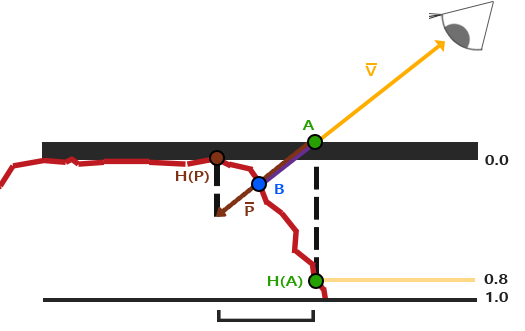
Here is the idea. Below, the red line is the surface the height map describes, and the flat line is the quad we actually draw. The eye looks at the quad at point A, along the vector \(\bar{V}\) from the surface to the eye:

If the surface really had that shape, the ray would have hit it earlier, at point B. So at pixel A we should show what is at B: sample the textures there, at B's texture coordinates, instead of A's. Do that for every pixel and bricks near the eye cover up the mortar behind them, the way real bricks do. The whole technique is about finding B's texture coordinates from A's.
The simplest estimate scales \(\bar{V}\) by the height sampled at A, \(H(A)\), and takes the part of that scaled vector that runs along the surface as the shift in texture coordinates:
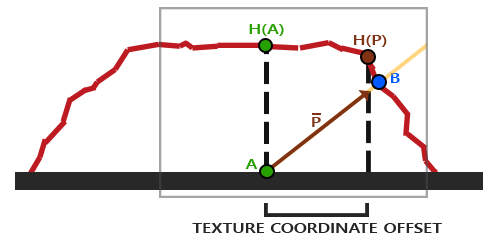
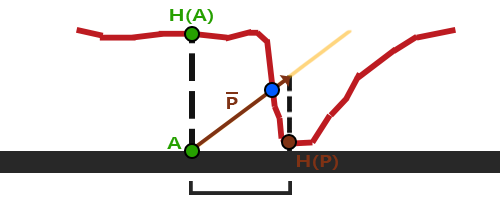
The higher the surface at A, the further the texture shifts, which is roughly right. It is only an estimate, though: it assumes the height is the same between A and B, and where the surface changes height quickly the estimate lands nowhere near B:
There is also the question of which way "along the surface" is, for a surface turned any way at all. That one we know how to answer: in tangent space, the surface is the xy plane, x runs along u and y along the map's other direction, so the x and y of \(\bar{V}\) in tangent space are directly a shift in texture coordinates, whatever the surface's orientation in the world.
Parallax mapping
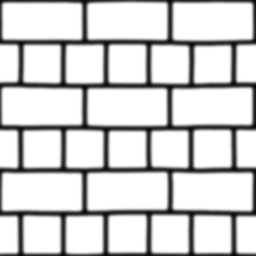
The lesson draws the same 2 by 2 wall as the normal mapping lesson, with its tangents, and three textures: the bricks' colour, their normal map, and a map of their shape. The colour is sRGB and the other two are data, so only the first gets the flag:
maps: [3]*ID3D11ShaderResourceView = {
    load_texture(device, context, filesystem_path("resources/textures/bricks2.jpg"), 1),
    load_texture(device, context, filesystem_path("resources/textures/bricks2_normal.jpg"), 0),
    load_texture(device, context, filesystem_path("resources/textures/bricks2_disp.jpg"), 0),
};
The normal map matters as much as the parallax. Shifting the texture makes the bricks look raised, and the illusion only holds if the lighting agrees, so the two maps describe the same shape; in practice normal maps are often generated from height maps.
The shape map, bricks2_disp.jpg, is not quite a height map. It is the inverse: black on the bricks' faces and white deep in the mortar. A
The work happens in the pixel shader, since the shift is different at every pixel. The vertex shader is the normal mapping one, passing T, B and N in world space. The pixel shader starts by building the TBN matrix and turning the eye vector into tangent space:
float4 ps_main(tangent_out p) : SV_Target
{
    float3x3 tbn = float3x3(normalize(p.t), normalize(p.b), normalize(p.n));
    // tbn's rows are the axes, so mul(tbn, v) projects onto them: world -> tangent
    float3 to_eye = normalize(mul(tbn, view_position - p.world));
    float2 uv = parallax(p.uv, to_eye);
This is the second use of the TBN matrix from the previous chapter. With T, B and N as its rows, mul(tbn, v) takes the dot product of v with each axis: the world-to-tangent transform, the transpose of the one we used for normals. LearnOpenGL transforms the eye and vertex positions into tangent space in the vertex shader and lets them interpolate; we transform per pixel, which is a little more arithmetic and keeps the vertex shader identical to the previous lesson's. In tangent space, z points out of the surface, so to_eye.z is the cosine of the angle between the eye and the surface's normal.
Then
float3 color = albedo.Sample(linear_wrap, uv).rgb;
float3 n = normalize(mul(normal_map.Sample(linear_wrap, uv).rgb * 2.0 - 1.0, tbn));
The lighting itself is unchanged from the previous chapter. Now the function, in its first and simplest form, which the lesson shows when you press 2:
static const float depth_scale = 0.1;// the whole shift that the deepest point (depth 1) would cause
// tangent space x and y run the way u and v do
float2 full_shift = to_eye.xy / to_eye.z * depth_scale;
if (mode == 2)
{
return uv - full_shift * depth_map.Sample(linear_wrap, uv).r;
}Follow the eye's ray backwards from A, into the surface. For every unit it sinks below the surface, it moves \(\text{xy}/z\) units sideways, so at a depth of 1 (scaled by depth_scale) it has moved full_shift. A depth map value \(D(A)\) between 0 and 1 gives that fraction of the shift, and we subtract it, since the ray runs away from the eye. depth_scale says how deep a depth of 1 is, compared with the size of the texture: a tenth of it here. Without a scale the effect is far too strong.
Two details are specific to our conventions.
- The shift is in tangent space, and is used as a texture-coordinate offset unchanged. That works because tangent x is our tangent, which runs along u, and tangent y is our bitangent, which runs along v, down the image, as Normal Mapping set it up. A bitangent pointing the other way would need y negated here.
- The division by
to_eye.zmakes the shift larger at grazing angles, where z is small and a ray really does travel far sideways for each unit of depth. That is geometrically right, but at very low angles the shift becomes huge and the result breaks up. A common variant leaves the division out, which caps the shift at depth_scale; it is calledparallax mapping with offset limiting , and which one looks better is largely a matter of taste.
Near the edges of the wall, the shifted coordinates can land outside the texture, below 0 or above 1, and the sampler wraps them around to the far side of the image. That puts slivers of the wrong bricks along the wall's edges. On a flat wall we can simply throw those pixels away:
// shifted off the edge of the wall: nothing there
if (mode != 1 && (uv.x < 0.0 || uv.x > 1.0 || uv.y < 0.0 || uv.y > 1.0)) discard;
With the edges cut away, the wall's outline itself looks uneven, as a real brick wall's would. The trick only makes sense for surfaces whose texture coordinates end where the surface does, like this wall; on a model with a texture atlas, it would cut holes in it.
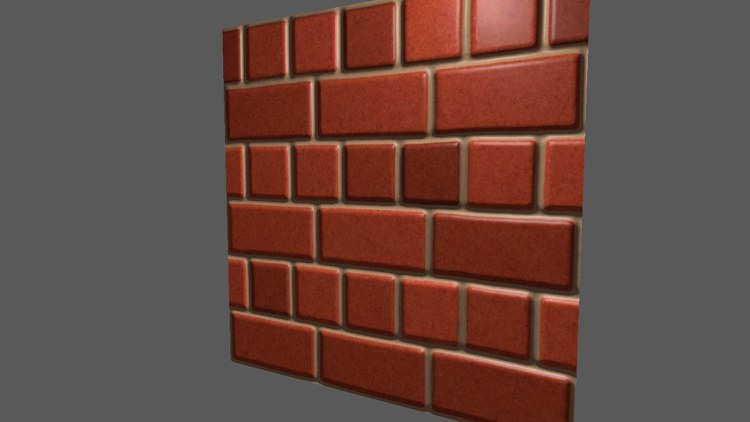
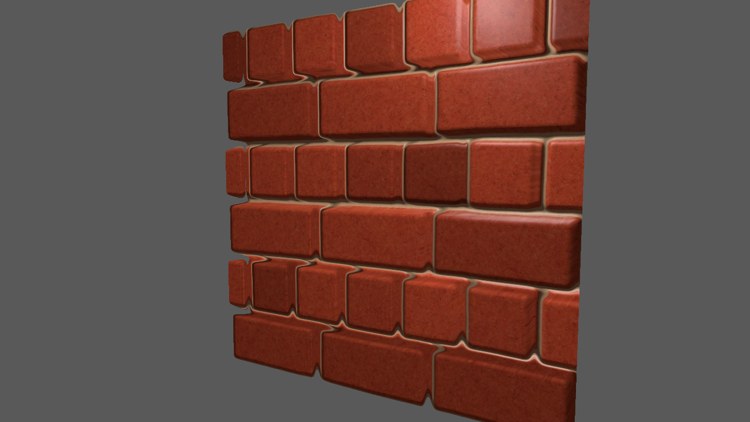
On the left, key 1: normal mapping alone, the bricks shaded but flat. On the right, key 2: with one parallax shift the bricks rise from the mortar, and the mortar on their far sides is partly hidden. Look at the edges of the bricks, though, especially at the bottom of the wall where we look at it most steeply: they are smeared, and the mortar seems to bend around them. That is the crude estimate failing where depth changes suddenly, as in the diagram above.
One texture lookup is all simple parallax costs, so it is very cheap, and on gently varying surfaces or ones seen mostly head on it is often good enough. For bricks, with their sharp drops into the mortar, we can do better.
Steep Parallax Mapping
Instead of one guess,
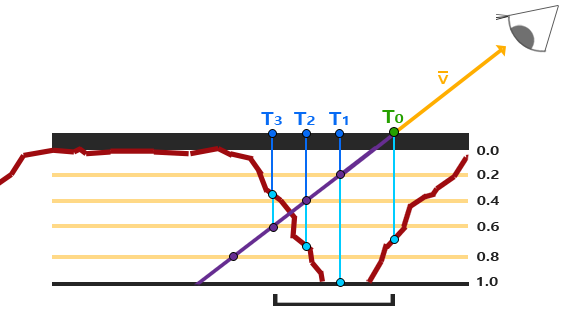
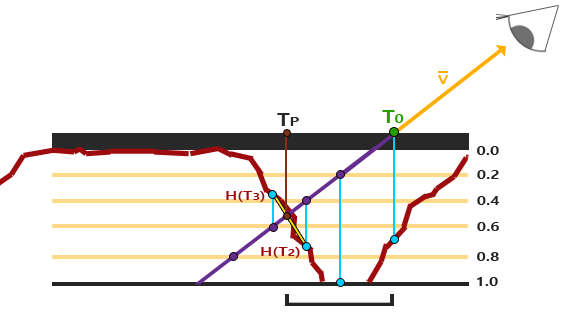
In LearnOpenGL's diagram, at the second layer, of depth 0.4, the depth map reads 0.73: the surface is still below the ray, so it continues. At the third layer, depth 0.6, the map reads 0.37: the ray has gone under the surface. The coordinates of that third step, \(T_3\), are the answer. With more layers the step is smaller and the answer more accurate. Here is the code:
// seen head on, few layers are needed; at a grazing angle, many
float layers = lerp(32.0, 8.0, abs(to_eye.z));
float layer_depth = 1.0 / layers;
float2 step = full_shift / layers;
float2 current_uv = uv;
float surface = depth_map.SampleLevel(linear_wrap, current_uv, 0).r;
float ray = 0.0;
[loop]
while (ray < surface)
{
    current_uv -= step;
    surface = depth_map.SampleLevel(linear_wrap, current_uv, 0).r;
    ray += layer_depth;
}
if (mode == 3) return current_uv;
ray is the ray's depth, starting at 0 on the surface of the quad, and surface the depth map's value at the current coordinates. The loop runs until the ray is no longer above the surface. The number of layers adapts to the angle: looking straight at the wall the shift is small and 8 layers will do, while at a grazing angle the ray crosses a lot of texture and gets up to 32. abs(to_eye.z) is the cosine of the angle from the normal, 1 head on and 0 at a graze, so the
Note that our steps use the same full_shift as simple parallax, divided by z. LearnOpenGL's steep version leaves out the division, offset limiting again, which shrinks the effect at grazing angles; ours follows the ray's real slope.
Texture lookups inside loops
The loop reads the depth map with
[loop] attribute in front of the while tells the compiler to keep it as a real loop rather than try to unroll it. The cost of always reading mip 0 is aliasing on distant or steeply seen walls, where many texels fall inside each pixel; a fancier version computes the gradients once, before the loop, with
Press 3 to see steep parallax mapping:
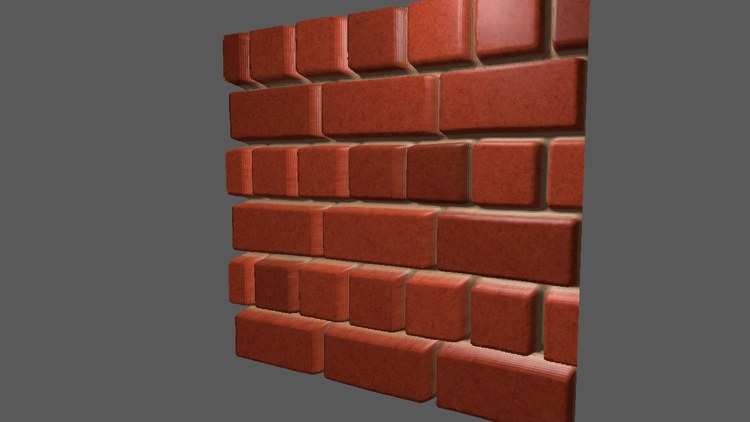
The bricks now have proper depth: their sides are visible where we look past them, and they hide the mortar convincingly, even at the bottom of the wall. But look closely at the sides of the bricks: they are striped, a band for each layer. Since the answer is always one of a fixed set of layers, the surface is effectively a staircase. More layers make the stairs finer, at a cost per pixel that soon adds up. Better is to stop picking a layer and to estimate where between the layers the ray really crossed the surface.
Parallax Occlusion Mapping
// the ray crossed the surface between the last two layers: find where
float2 previous_uv = current_uv + step;
float after = surface - ray;
float before = depth_map.SampleLevel(linear_wrap, previous_uv, 0).r - (ray - layer_depth);
float weight = after / (after - before);
return lerp(current_uv, previous_uv, weight);
after is the surface's depth minus the ray's at the last step: zero or negative, since the ray is at or below the surface there. before is the same at the previous step, one layer up and one step back: positive, the ray still above the surface. The fraction after / (after - before) is where between the two the difference crosses zero, measured from the last step, and
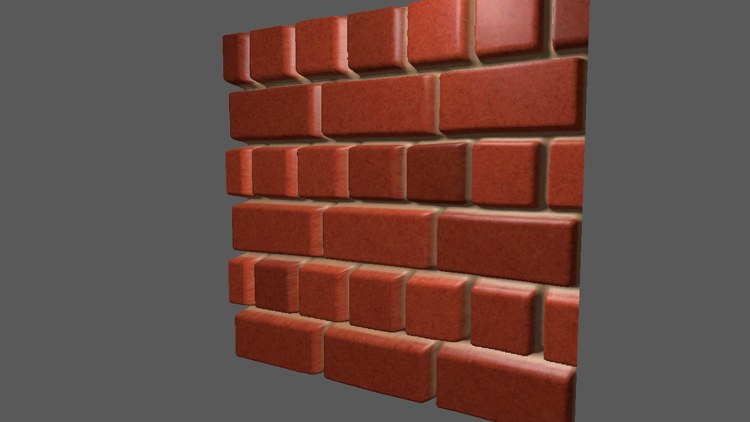
The bricks' sides are smooth, and at a normal viewing distance it is hard to believe the wall is two triangles. Look very closely, or along the wall from a steep angle, and some artefacts remain; a variant called
The lesson's camera starts off to the right of the wall, looking at it at an angle, and the light is fixed in front of the wall, level with its top edge. Keys 1 to 4 switch between the modes: 1 is normal mapping only, 2 simple parallax, 3 steep parallax and 4 parallax occlusion mapping.
for (key: i32 = '1'; key <= '4'; key += 1) {
    if (key_pressed(key)) { mode = key - '0'; }
}
Parallax mapping, in any of its forms, is a fine way to add depth to a surface cheaply. Its weak points are silhouettes, since the outline of the geometry does not change (apart from what discard can cut away), and very steep viewing angles. That is why it is used mostly on floors and walls, which are seen from a moderate angle and whose outlines are hidden by other geometry. The full program is here, and its shader here.
Additional resources
- How parallax displacement mapping works: a video explanation by TheBennyBox.
- SampleLevel and SampleGrad: Microsoft's reference for texture lookups that do not rely on implicit gradients.
- LearnOpenGL's Parallax Mapping: the OpenGL version of this chapter, with the wooden toy box textures as a second example.
Exercises
- Try depth_scale at 0.05 and at 0.2 in each of the modes 2 to 4. Which mode copes best with the deeper setting?
- Make mode 2 use offset limiting: drop the division by
to_eye.z. Compare the two at a grazing angle, by moving the camera far to one side. - Change the layer counts in
lerp to 4 and 8 and look at mode 3 and mode 4 side by side. How few layers can parallax occlusion mapping get away with? - Replace the
SampleLevel calls in the loop withSampleGrad , passing gradients computed withddx(uv)andddy(uv)before the loop. Look at the wall from far away in both versions.