Hello Triangle
Everything Direct3D draws starts out as points in 3D space, and everything it shows ends up as a grid of coloured pixels in a window. Turning one into the other is the job of the
Each stage does one narrow job, and does it for a great many vertices or pixels at once, which is why GPUs carry thousands of small cores. A few stages run programs we write ourselves. Those programs are
Here are Direct3D 11's stages in order. The ones in green run our shaders; the grey ones are fixed hardware we configure with state objects.
- The
input assembler reads our vertex data out of buffers and groups it intoprimitives : points, lines or triangles, as we ask. - The
vertex shader runs once per vertex. Its main duty is to say where that vertex lands, as a position inclip space . - Tessellation and the
geometry shader can add or reshape primitives. They are optional, and we leave them empty until the geometry shader chapter. - The
rasterizer clips primitives to the visible region and works out which pixels each one covers. - The
pixel shader runs once for every covered pixel and returns its colour. OpenGL calls this stage the fragment shader; it is where most of the interesting work in later chapters happens. - The
output merger does the depth and stencil tests and blending, then writes the result into the render target.
OpenGL ships default shaders for nothing in modern profiles, and neither does Direct3D: a vertex shader and a pixel shader are the minimum before anything is drawn. Let's write both.
Vertex input
The vertex shader has to say where each vertex lands, and it says it in
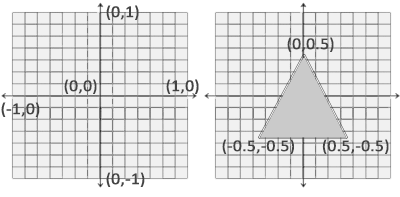
This picture is LearnOpenGL's and holds for Direct3D too, except in depth: Direct3D's z runs from 0 (near) to 1 (far), where OpenGL's runs from -1 to 1. That only starts to matter once we build a projection matrix in Coordinate Systems. The rasterizer then maps NDC to pixels with the
Three corners of a triangle, z left at 0, written as one flat array of floats:
triangle_vertices: [9]f32 = {
    -0.9, -0.5, 0.0,
    -0.1, -0.5, 0.0,
    -0.5,  0.5, 0.0,
};
This array lives in our program's memory. The GPU wants it in its own, so we copy it into a
// An immutable buffer: filled once at creation, never written by the CPU again.
create_buffer: proc(device: *ID3D11Device, bind: UINT, data: *const void, size: u64) -> *ID3D11Buffer = {
    desc: D3D11_BUFFER_DESC = {
        .ByteWidth = cast(size, UINT),
        .Usage = D3D11_USAGE.D3D11_USAGE_IMMUTABLE,
        .BindFlags = bind,
    };
    init: D3D11_SUBRESOURCE_DATA = { .pSysMem = data };
    buffer: *ID3D11Buffer = null;
    ID3D11Device_CreateBuffer(device, desc&, init&, buffer&);
    return buffer;
}
This is the pattern for nearly every Direct3D object: describe it in a _DESC struct, naming only the fields that matter and leaving the rest zero, call a
- BindFlags says what the buffer will be used for. D3D11_BIND_VERTEX_BUFFER here; the same function makes index buffers and, later, constant buffers.
- Usage says how often the data changes. It plays the part of OpenGL's GL_STATIC_DRAW and friends, but it is a promise the driver holds us to rather than a hint. D3D11_USAGE_IMMUTABLE means the data is given at creation and never written again, so the driver can put it wherever the GPU reads it fastest. Advanced Data uses D3D11_USAGE_DYNAMIC for a buffer rewritten every frame.
triangle_vb: *ID3D11Buffer = create_buffer(device, D3D11_BIND_VERTEX_BUFFER, triangle_vertices[0]&, sizeof(triangle_vertices));x& takes the address of x, so triangle_vertices[0]& is a pointer to the first float. The ID3D11Device_CreateBuffer(device, ...) spelling is how COM methods look from C: the object goes first, where C++ would write device->CreateBuffer(...).
Vertex shader
The smallest useful vertex shader takes the position and hands it on. Ours lives in hello_triangle.hlsl, next to the program:
float4 vs_main(float3 position : POSITION) : SV_Position
{
    return float4(position, 1.0);
}
An HLSL shader is an ordinary function, and we choose its name; vs_main is our convention for the vertex shader's entry point. The interesting parts are after the colons. These are
POSITIONis our own name for the input. Any name works; it only has to match the name we give the attribute when we describe the vertex layout below. It is how HLSL gets its inputs where GLSL writeslayout (location = 0) in vec3 aPos.SV_Positionis asystem value : a name the pipeline itself understands. Returning afloat4markedSV_Positionis what GLSL does by assigning gl_Position.
The fourth component, w, is set to 1. Why it exists, and what dividing by it does, comes with perspective in Coordinate Systems.
Compiling a shader
OpenGL compiles GLSL inside the driver while the program runs. Direct3D splits the job in two: a compiler that turns HLSL into bytecode, and the device, which turns bytecode into a shader object. The compiler is d3dcompiler.dll. It can also run ahead of time, as fxc does, but compiling at startup keeps each lesson to its source files and lets us edit a shader without a separate build step.
compile_shader: proc(path: [*]const char, source: [*]u8, size: u64, entry: [*]const char, target: [*]const char) -> *ID3DBlob = {
    code: *ID3DBlob = null;
    errors: *ID3DBlob = null;
    if (D3DCompile(source, size, path, null, null, entry, target, 0, 0, code&, errors&) < 0) {
        printf("ERROR::SHADER::COMPILATION_FAILED\n%s\n", cast(ID3D10Blob_GetBufferPointer(errors), [*]const char));
        exit(1);
    }
    return code;
}
We pass the source text, the file name (used only in error messages), the entry point and a vs_5_0 for a vertex shader at Direct3D 11's level. The result comes back in an ID3DBlob, a plain buffer of bytes. On failure the errors blob holds the compiler's messages, with file and line, which we print before giving up.
< 0 is what C's FAILED() macro does. These lessons check where failure is likely (shader compilation, device creation) and keep the rest uncluttered.
Pixel shader
The pixel shader decides the colour of each pixel the triangle covers. Colours are four floats, red, green, blue and alpha, each from 0 to 1. Ours returns one orange for everything:
float4 ps_main() : SV_Target
{
    return float4(1.0, 0.5, 0.2, 1.0);
}
SV_Target is the system value for "the colour written to render target 0". GLSL declares an out vec4 for this; HLSL marks the return value. Both entry points sit in the same file, so we compile it twice with different entry points and targets:
vs_code: *ID3DBlob = compile_shader(path, source, size, "vs_main", "vs_5_0");
ps_code: *ID3DBlob = compile_shader(path, source, size, "ps_main", "ps_5_0");
Shader objects
OpenGL links its shaders into one program object, and checks there that the outputs of one stage match the inputs of the next. Direct3D has no program object. Each stage is its own object, created from its bytecode, and bound to its own slot in the pipeline:
ID3D11Device_CreateVertexShader(device, ID3D10Blob_GetBufferPointer(vs_code), ID3D10Blob_GetBufferSize(vs_code), null, vertex_shader&);
ID3D11Device_CreatePixelShader(device, ID3D10Blob_GetBufferPointer(ps_code), ID3D10Blob_GetBufferSize(ps_code), null, pixel_shader&);
Mixing and matching is free: any vertex shader can be bound with any pixel shader, so long as what one outputs is what the other reads. Here the pixel shader reads nothing at all, so there is nothing to match yet.
Describing the vertices
The buffer is only bytes. The vertex shader wants a float3 called POSITION. Something has to say how one becomes the other: where each attribute starts in a vertex, what type it is, and which shader input it feeds. OpenGL says it with
// One attribute: three floats, read as POSITION by the vertex shader.
layout: [1]D3D11_INPUT_ELEMENT_DESC = {
    { .SemanticName = "POSITION", .Format = DXGI_FORMAT.DXGI_FORMAT_R32G32B32_FLOAT },
};
Each element names the semantic it feeds and the format of the data: DXGI_FORMAT_R32G32B32_FLOAT is three 32-bit floats. The fields left out are zero, which is what we want here: semantic index 0, vertex buffer slot 0, starting at byte 0 of the vertex, and per-vertex rather than per-instance data (that last one returns in Instancing).
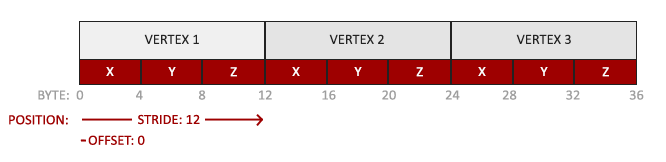
As in LearnOpenGL's picture, the positions are tightly packed: each vertex is 12 bytes, and the position is at offset 0. Where OpenGL puts the stride into the attribute pointer, Direct3D gives it when the buffer is bound, as we will see in the render loop.
The layout is created against the vertex shader's bytecode:
// The layout is created against the compiled vertex shader, which is the
// one place D3D checks that the two agree.
ID3D11Device_CreateInputLayout(device, layout[0]&, 1, ID3D10Blob_GetBufferPointer(vs_code), ID3D10Blob_GetBufferSize(vs_code), input_layout&);
That is the step OpenGL's linker did for us. Misspell POSITION on either side and creation fails here, at startup, rather than drawing garbage. The layout does not mention any buffer; it only describes vertices. Which buffer they come from is decided when drawing, so one layout serves every mesh with the same vertex format.
The triangle we've all been waiting for
Everything is created. What remains is, every frame, to tell the pipeline what to use and to ask it to draw. A Direct3D
ID3D11DeviceContext_IASetInputLayout(context, input_layout);
ID3D11DeviceContext_IASetPrimitiveTopology(context, D3D11_PRIMITIVE_TOPOLOGY.D3D11_PRIMITIVE_TOPOLOGY_TRIANGLELIST);
ID3D11DeviceContext_VSSetShader(context, vertex_shader, null, 0);
ID3D11DeviceContext_PSSetShader(context, pixel_shader, null, 0);

ID3D11DeviceContext_IASetVertexBuffers(context, 0, 1, triangle_vb&, stride&, offset&);
ID3D11DeviceContext_Draw(context, 3, 0);
The prefixes give the stage each call configures: IA the input assembler, VS the vertex shader, PS the pixel shader, and further on RS for the rasterizer and OM for the output merger. The
This sits in the render loop from Hello Window, between clearing the back buffer and presenting it. And there it is:

The rectangle to its right is the next section's.
Index buffers
A rectangle is two triangles. Listed as triangles that is six vertices, two of them stored twice, because the triangles share a diagonal. On a rectangle that is a small waste; on a model where every vertex is shared by about six triangles, it is most of the data. The fix is to store each vertex once, and draw from a second list that says which vertices make each triangle. Those are
rectangle_vertices: [12]f32 = {
    0.1, -0.5, 0.0,   // bottom left
    0.9, -0.5, 0.0,   // bottom right
    0.9,  0.5, 0.0,   // top right
    0.1,  0.5, 0.0,   // top left
};

rectangle_indices: [6]u32 = { 0, 1, 2, 0, 2, 3 };
Four vertices, six indices: triangle 0-1-2 is the bottom right half, 0-2-3 the top left. The index buffer is made by the same function with a different bind flag, and drawing swaps
rectangle_ib: *ID3D11Buffer = create_buffer(device, D3D11_BIND_INDEX_BUFFER, rectangle_indices[0]&, sizeof(rectangle_indices));ID3D11DeviceContext_IASetVertexBuffers(context, 0, 1, rectangle_vb&, stride&, offset&);
ID3D11DeviceContext_IASetIndexBuffer(context, rectangle_ib, DXGI_FORMAT.DXGI_FORMAT_R32_UINT, 0);
ID3D11DeviceContext_DrawIndexed(context, 6, 0, 0);
DXGI_FORMAT_R32_UINT says each index is a 32-bit unsigned integer, matching the u32 array; 16-bit indices would use DXGI_FORMAT_R16_UINT and take half the space.
The input layout is reused unchanged, since the rectangle's vertices have the same format as the triangle's. In OpenGL each shape would get its own VAO, recording its buffers alongside its layout. In Direct3D the layout and the buffers are bound separately, so switching shapes is just binding the other buffers.
Wireframe mode
To see the two triangles, draw only their edges. OpenGL has
wire_desc: D3D11_RASTERIZER_DESC = raster_desc;
wire_desc.FillMode = D3D11_FILL_MODE.D3D11_FILL_WIREFRAME;
wire_state: *ID3D11RasterizerState = null;
ID3D11Device_CreateRasterizerState(device, wire_desc&, wire_state&);
and Tab chooses which one to bind each frame:
ID3D11DeviceContext_RSSetState(context, wireframe ? wire_state : raster_state);
The diagonal across the rectangle is where its two triangles meet. Making state objects once and only binding them in the loop is the Direct3D way throughout: the expensive checking happens at creation, and switching between states is cheap.
If you got here with both shapes on screen, you have done the hardest part of graphics programming: the first triangle. Everything from here on adds to this, one piece at a time. The full program is here, and its shaders here.
Additional resources
- Graphics pipeline: Microsoft's overview of every Direct3D 11 stage.
- Getting started with the input-assembler stage: buffers, input layouts and topologies in more depth.
- LearnOpenGL's Hello Triangle: the OpenGL version of this chapter, with its VBOs, VAOs and EBOs.
Exercises
- Draw two triangles side by side with a single
Draw call, by adding three more vertices to the array. - Draw the same two triangles from two separate vertex buffers, binding each in turn.
- Add a second pixel shader entry point,
ps_yellow, to the same.hlslfile, and draw one of the triangles with it. Only one morecompile_shader and one moreCreatePixelShader are needed.