Anti Aliasing
Look closely at the edges of anything we have drawn so far and you will find them jagged: not a clean line, but a staircase of pixels. From a distance it reads as a slight roughness, and on a moving object as a shimmer crawling along the edges. Here is the cube of this chapter's lesson, drawn the way every lesson so far has drawn things:
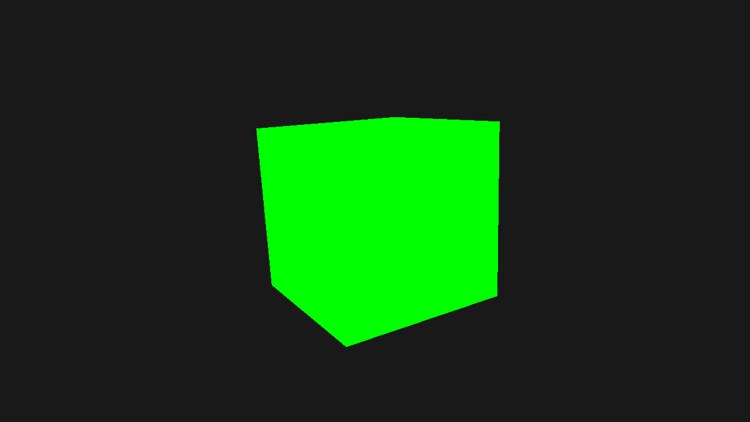
At this size the steps are hard to see, but magnify part of the lower left edge and they are plain (the left half of the figure further down shows it). Each pixel is either the cube's green or the background's grey, with nothing in between. This effect is called
The earliest was
Multisampling
To see where aliasing comes from, we need to look at what the rasterizer does. It receives a triangle's vertices, in screen coordinates that may fall anywhere, and has to decide which pixels the triangle covers. A pixel is a small square, so there is no perfect answer for a pixel the triangle's edge passes through. The rasterizer settles it by testing a single point in each pixel, its centre: if the centre is inside the triangle, the pixel is covered and its pixel shader runs.
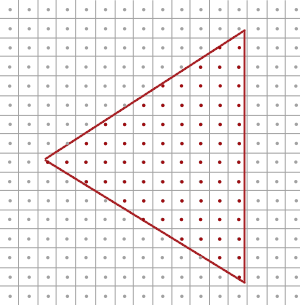
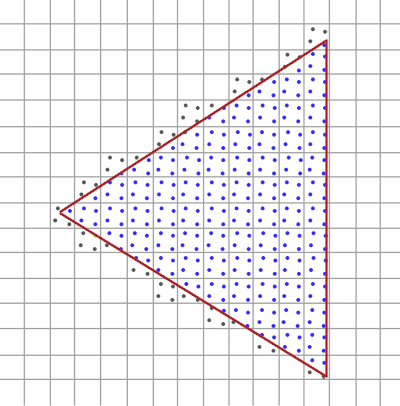
In LearnOpenGL's diagram, the red sample points are inside the triangle. Some pixels are partly covered, yet their centre is not, and they get nothing. Fill in the covered pixels and this is what reaches the screen:
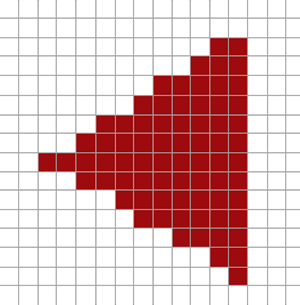
With a limited number of pixels, every edge comes out as steps, and that is all aliasing is. Multisampling changes one thing: instead of a single sample point per pixel, it tests several, called
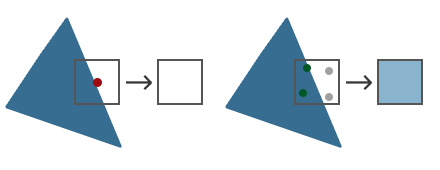
With one sample (left), this pixel is simply not covered. With four (right), two of them are, so the triangle covers about half of it. More samples measure coverage more finely; four is the common choice, and 8 is widely supported too.
The obvious next step would be to run the pixel shader once per covered subsample and average the results. That would be super-sampling again, and just as costly. MSAA does something cheaper: the pixel shader runs once per pixel per triangle, with its inputs interpolated at the pixel centre, even when the centre itself lies just outside the triangle. (An input marked with HLSL's centroid modifier is interpolated at a covered point instead, for values that must not be extrapolated past the edge.) Its result is then stored into every subsample the triangle covers. The render target keeps a colour for each subsample, four colours per pixel, and the depth buffer keeps a depth for each subsample too, so the depth test is done per subsample. Inside a triangle all four subsamples of a pixel get the same colour; only at edges do they differ.
When the frame is done, the multisampled image is
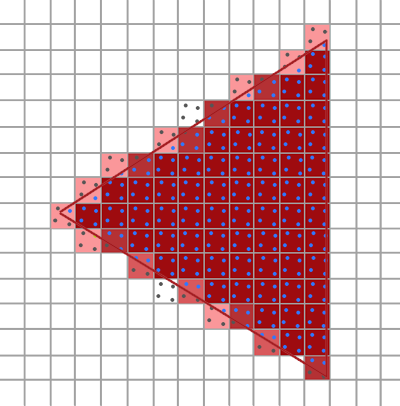
The hard steps are replaced by pixels of in-between shades, which from a normal viewing distance read as a smooth edge. Storing four colours and four depths per pixel still costs memory and bandwidth, but the expensive part, pixel shading, is done roughly once per pixel, as before. When several triangles meet within one pixel, each contributes to the subsamples it covers, so the averaged result mixes all of them, which is why colours are stored per subsample and not only per pixel.
The rasterizer's real rules have more detail than this (exact sample positions, tie-breaking along edges), but this picture is enough to use MSAA well.
MSAA in Direct3D
To multisample, we need a render target that stores several samples per pixel: a
.SampleDesc = { .Count = 1 },
But it only works for the old "bit-block transfer" swap chains. Our lessons use the modern
glEnable(GL_MULTISAMPLE). Triangles drawn into a multisampled render target are multisampled; the rasterizer state's MultisampleEnable field, which our lessons leave at 0, only affects how lines are anti-aliased.
Off-screen MSAA
This is the setup the lesson uses: a multisampled colour texture with a matching multisampled depth buffer, both the size of the window, and a resolve at the end of each frame. Tab switches between drawing into them and drawing straight into the back buffer, as every lesson so far has done, so the two can be compared.
Multisampled textures
A multisampled texture is created like any other, with one field changed: SampleDesc.Count, the number of samples per pixel, which has been 1 everywhere so far. The lesson's helper for render targets, the same as in Framebuffers, takes the sample count as a parameter:
create_render_target: proc(device: *ID3D11Device, width: i32, height: i32, format: DXGI_FORMAT, samples: UINT) -> render_target = {
    t: render_target = {};
    desc: D3D11_TEXTURE2D_DESC = {
        .Width = cast(width, UINT),
        .Height = cast(height, UINT),
        .MipLevels = 1,
        .ArraySize = 1,
        .Format = format,
        .SampleDesc = { .Count = samples },
        .BindFlags = D3D11_BIND_RENDER_TARGET | D3D11_BIND_SHADER_RESOURCE,
    };
    ID3D11Device_CreateTexture2D(device, desc&, null, t.texture&);
    ID3D11Device_CreateRenderTargetView(device, cast(t.texture, *ID3D11Resource), null, t.rtv&);
    ID3D11Device_CreateShaderResourceView(device, cast(t.texture, *ID3D11Resource), null, t.srv&);
    return t;
}
This is OpenGL's null lets Direct3D pick the multisampled dimension) is only readable sample by sample, as we will see at the end. Our lesson never reads it in a shader.
A multisampled depth buffer
Every render target bound together with a depth buffer must have the same sample count as it, so a 4x colour target needs a 4x depth buffer. OpenGL would usually make it a multisampled renderbuffer, with
// A depth buffer for drawing into a render target of the same size.
create_depth_buffer: proc(device: *ID3D11Device, width: i32, height: i32, samples: UINT) -> *ID3D11DepthStencilView = {
    desc: D3D11_TEXTURE2D_DESC = {
        .Width = cast(width, UINT),
        .Height = cast(height, UINT),
        .MipLevels = 1,
        .ArraySize = 1,
        .Format = DXGI_FORMAT.DXGI_FORMAT_D24_UNORM_S8_UINT,
        .SampleDesc = { .Count = samples },
        .BindFlags = D3D11_BIND_DEPTH_STENCIL,
    };
    texture: *ID3D11Texture2D = null;
    dsv: *ID3D11DepthStencilView = null;
    ID3D11Device_CreateTexture2D(device, desc&, null, texture&);
    ID3D11Device_CreateDepthStencilView(device, cast(texture, *ID3D11Resource), null, dsv&);
    return dsv;
}
At startup the lesson makes one of each, with four samples:
// configure the MSAA framebuffer: a 4x colour target and 4x depth
// ---------------------------------------------------------------
samples: UINT = 4;
msaa: render_target = create_render_target(device, scr_width, scr_height, DXGI_FORMAT.DXGI_FORMAT_R8G8B8A8_UNORM, samples);
msaa_depth: *ID3D11DepthStencilView = create_depth_buffer(device, scr_width, scr_height, samples);
enabled: b32 = 1;
Four samples is safe to ask for without checking: from feature level 10.1 up, hardware must support 4x MSAA for the common render target formats, R8G8B8A8_UNORM among them.
Rendering to a multisampled target
Drawing into the multisampled target is just drawing: bind its views and draw, and the rasterizer and output merger handle the subsamples. The lesson picks the views each frame according to Tab:
target: *ID3D11RenderTargetView = enabled ? msaa.rtv : backbuffer_rtv;
target_depth: *ID3D11DepthStencilView = enabled ? msaa_depth : depth_dsv;
ID3D11DeviceContext_OMSetRenderTargets(context, 1, target&, target_depth);
ID3D11DeviceContext_RSSetViewports(context, 1, viewport&);
ID3D11DeviceContext_ClearRenderTargetView(context, target, clear_color[0]&);
ID3D11DeviceContext_ClearDepthStencilView(context, target_depth, D3D11_CLEAR_DEPTH, 1.0, 0);
Then it draws one cube, with a pixel shader that returns plain green. It is rotated so that its edges run at slants, where the steps show best. After drawing, the multisampled image has to reach the screen. It cannot be presented as it is, and it cannot simply be copied either, since the back buffer has one sample per pixel. It must be resolved. OpenGL resolves as a side effect of
// average every pixel's four samples into the back buffer
if (enabled) {
    ID3D11DeviceContext_ResolveSubresource(context, cast(backbuffer, *ID3D11Resource), 0,
                                           cast(msaa.texture, *ID3D11Resource), 0, DXGI_FORMAT.DXGI_FORMAT_R8G8B8A8_UNORM);
}
Its arguments are the destination and its subresource (the back buffer, mip 0), the source and its subresource, and the format to resolve in. The two textures must agree in size and in format family. The back buffer is an ordinary texture, so it can be the destination directly, and then we present as usual.
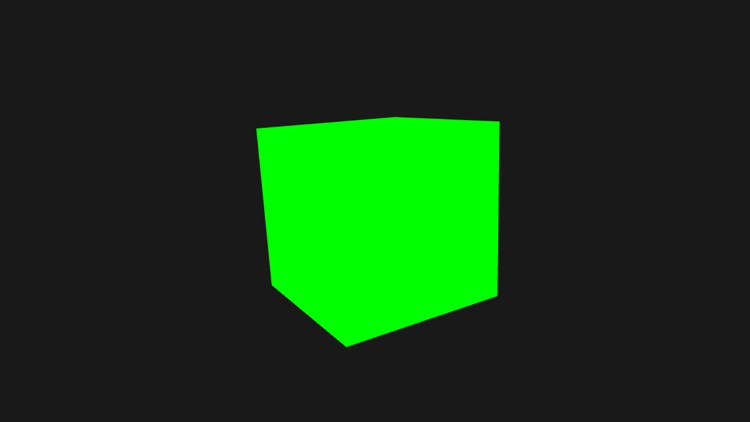
The lesson starts with MSAA on. Again, at full size the difference is subtle; magnified, it is not. These are the same 40 by 30 pixels of the cube's lower left edge, copied from the two screenshots and enlarged eight times:
Without MSAA, every pixel is either fully green or fully grey. With it, the pixels along the edge take in-between shades, according to how many of their four samples the cube covered, and the staircase turns into a ramp.
MSAA and post-processing
If the scene is to be post-processed, as in Framebuffers, it has to be resolved first, since a post-processing shader samples the scene with ordinary texture filtering, and a multisampled texture cannot be sampled that way. So the scene is resolved into a second, single-sample render target with a shader resource view, and the post-processing pass reads that, drawing into the back buffer.
One thing to be aware of: from that point on, the image is no longer multisampled, and anything the post-processing pass does happens at one sample per pixel. An edge-detection kernel, for example, will find the edges of the resolved image and produce new jagged ones. Blurring afterwards, or a post-process anti-aliasing filter, can help.
A custom anti-aliasing algorithm
We do not have to let sampler2DMS, read with Texture2DMS, with its sample count as a template argument, read with
Texture2DMS<float4, 4> scene_ms : register(t0);
...
float4 sample3 = scene_ms.Load(int2(p.position.xy), 3);   // the fourth sample of this pixel
Since SV_Position in a pixel shader holds the pixel's own coordinates, it makes a ready-made address for
Going the other way, a pixel shader can also ask to be run once per sample rather than per pixel, by taking an input marked SV_SampleIndex. That is sample-rate shading, which removes the aliasing inside triangles as well, at close to the cost of super-sampling. Neither is needed often, but they are there.
The full program is here, and its shader here.
Additional resources
- ResolveSubresource: the resolve call and its format rules.
- DXGI_SAMPLE_DESC: sample counts and quality levels.
- Rasterization rules: how Direct3D decides coverage, including multisampling.
- LearnOpenGL's Anti Aliasing: the OpenGL version of this chapter.
Exercises
- Change samples to 8, and to 2, and compare the edges. Use
CheckMultisampleQualityLevels first to make sure your GPU supports the count you pick. - Combine this lesson with Framebuffers: draw into the multisampled target, resolve into a single-sample render target, and post-process that onto the back buffer with the greyscale effect.
- Write your own resolve: instead of
ResolveSubresource , draw a full-screen triangle whose pixel shader reads the four samples of the multisampled texture withTexture2DMS.Loadand averages them. Then try taking the darkest sample instead of the average, and look at the edges.