Lighting
The previous chapter was all equations. In this one we turn them into a renderer, lit by ordinary analytic light sources: the point, directional and spot lights of the Light casters chapter. We will use four point lights, and at the end we will have a grid of spheres that shows off the two numbers at the centre of a PBR material, metallic and roughness.
Here is the reflectance equation once more, in the form we finished with:
\[ L_o(p,\omega_o) = \int\limits_{\Omega} \left( k_d\frac{c}{\pi} + \frac{D\,F\,G}{4(\omega_o \cdot n)(\omega_i \cdot n)} \right) L_i(p,\omega_i)\, (n \cdot \omega_i)\, d\omega_i \]We know what each part means now. The part we haven't pinned down is \(L_i\): how do we express the light in the scene as radiance arriving from a direction? Radiance, as we defined it, is flux through an infinitely small area within an infinitely small solid angle, which is to say the light carried by a single ray. So the question becomes: for a given point light and a given surface point, which rays carry light, and how much?
Say we have one point light with a radiant flux of (23.47, 21.31, 20.79), as an RGB triple. A point light shines the same in every direction, so its radiant intensity is that same flux whichever way we look. Now stand at a point \(p\) on a surface and look out over its hemisphere of incoming directions. A point light is infinitely small, so of all those directions exactly one points at it. That one direction carries the light's radiance; every other direction carries nothing at all.
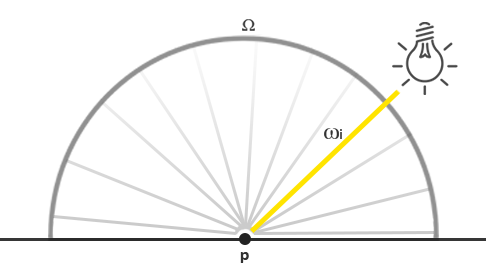
If we ignored distance, the radiance along that ray would be the light's colour wherever the light was, since its intensity is the same in every direction. A real point light does fade with distance, so we scale its intensity by an attenuation factor that depends on how far \(p\) is from the light. Then the \(n \cdot \omega_i\) of the equation weakens it by the angle it arrives at. Written out:
light_color = (23.47, 21.31, 20.79)
wi          = normalize(light_pos - frag_pos)
cos_theta   = max(dot(n, wi), 0.0)
attenuation = calculate_attenuation(frag_pos, light_pos)
radiance    = light_color * attenuation * cos_theta
Apart from the vocabulary, this is exactly the diffuse lighting we have done since Basic Lighting. For direct light, computing radiance is the same as computing lighting was before, because only one direction contributes per light. (That holds only because point lights have no size. A light with an area, like a glowing panel, covers a patch of the hemisphere and contributes along many directions at once.)
Other single-point lights work the same way. A directional light has the same \(\omega_i\) everywhere and no attenuation. A spot light is a point light whose intensity also depends on the angle between \(\omega_i\) and the direction the spot is pointing.
This also takes care of the integral. With only a known handful of directions carrying any light, the integral over the hemisphere is zero everywhere except at those directions, and the sum reduces to a loop over the lights. Direct PBR lighting is therefore easy: for each light, evaluate the BRDF once, multiply by the light's radiance and the cosine, and add. When light can arrive from every direction, as it does from an environment in the IBL chapters, we will have to deal with the integral properly.
A PBR surface model
Our shader is pbr.hlsl. The vertex shader is the familiar one: it moves the position and the normal into world space, where we do the lighting, and passes on the texture coordinates.
vs_out vs_main(vs_in v)
{
    vs_out o;
    float4 world = mul(model, float4(v.position, 1.0));
    o.world = world.xyz;
    o.position = mul(projection, mul(view, world));
    o.normal = mul((float3x3)normal_matrix, v.normal);
    o.uv = v.uv;
    return o;
}
The material arrives in a constant buffer of its own, at register b1. For now these are constants across the whole object; the last section of this chapter reads them from textures instead.
cbuffer material : register(b1)
{
    float3 material_albedo;
    float material_metallic;
    float material_roughness;
    float material_ao;
    int textured;
};
On the rin side the same layout is a plain struct:
material_constants: struct = {
    albedo: vec3;
    metallic: f32;
    roughness: f32;
    ao: f32;
    textured: i32;
    pad: f32;
}
HLSL packs a constant buffer into 16-byte registers and never lets a vector straddle two of them. material_albedo is 12 bytes, so material_metallic fits into the last 4 bytes of the same register, and the next four values fill the second register exactly. The rin struct mirrors that byte for byte, with pad rounding it up to 32 bytes, because a constant buffer's size must be a multiple of 16. Ordering the fields so that every float3 is followed by a scalar is the cheap way to keep the two sides in agreement.
The four lights have a buffer at b2:
cbuffer lights : register(b2)
{
    float4 light_positions[4];
    float4 light_colors[4];
};
They are float4 even though we only use three components, because every element of a constant buffer array starts on a new 16-byte register. An array of float3 would leave 4 bytes of padding after each element on the HLSL side, and a tightly packed array of vec3 on the CPU side would then go out of step after the first element. Using float4 on both sides makes the layout obvious.
The pixel shader begins as any lighting shader does, with the normal and the direction towards the eye:
float3 n = normalize(p.normal);
...
float3 v = normalize(view_position - p.world);
Direct lighting
Our scene's light comes from four point lights, so the reflectance equation becomes a loop of four. For each light we find the direction towards it, its distance, and its radiance at the surface:
// reflectance equation: the four point lights
float3 lo = 0.0;
for (int i = 0; i < 4; i++)
{
    float3 to_light = light_positions[i].xyz - p.world;
    float d = length(to_light);
    lo += cook_torrance(n, v, to_light / d, light_colors[i].rgb / (d * d), albedo, metallic, roughness);
}
The attenuation is the inverse-square law, 1 / (d * d): light from a point spreads over a sphere whose area grows with the square of its radius. We could not use it in the early lighting chapters, where the lighting was computed and displayed in gamma space and the falloff looked far too harsh. Now that we light in linear space and tone map the result (more on both below), the physically correct falloff looks right. The constant-linear-quadratic attenuation of Light casters is still an option when an artist wants more control over where a light's reach ends, even though it isn't physical.
The real work happens in
// Light reflected towards `v` from one light arriving along `l` with
// `radiance`, by a surface of the given material.
float3 cook_torrance(float3 n, float3 v, float3 l, float3 radiance, float3 albedo, float metallic, float roughness)
{
    float3 h = normalize(v + l);
    float n_dot_v = max(dot(n, v), 0.0);
    float n_dot_l = max(dot(n, l), 0.0);
    // Dielectrics reflect about 4% head on; metals reflect their own colour.
    float3 f0 = lerp(0.04.xxx, albedo, metallic);
    float3 f = fresnel_schlick(max(dot(h, v), 0.0), f0);
    float3 specular = distribution_ggx(n, h, roughness) * geometry_smith(n_dot_v, n_dot_l, roughness, false) * f
                    / (4.0 * n_dot_v * n_dot_l + 0.0001);
    // What is not reflected is refracted and scattered: diffuse. Metals
    // absorb it, so they have none.
    float3 kd = (1.0 - f) * (1.0 - metallic);
    return (kd * albedo / PI + specular) * radiance * n_dot_l;
}
Let's take it a piece at a time.
First the halfway vector \(h\), which the microfacet terms are all about, and the two cosines we need more than once.
Then Fresnel, which tells us how the light divides between reflection and refraction. Schlick's formula needs \(F_0\), the reflectance looking straight at the surface. As the theory chapter explained, the metallic workflow uses 0.04 for every dielectric and takes metals' \(F_0\) from their albedo;
float3 fresnel_schlick(float cos_theta, float3 f0)
{
    return f0 + (1.0 - f0) * pow(saturate(1.0 - cos_theta), 5.0);
}
Then \(D\) and \(G\), from the theory chapter:
float distribution_ggx(float3 n, float3 h, float roughness)
{
    float a = roughness * roughness;
    float a2 = a * a;
    float n_dot_h = max(dot(n, h), 0.0);
    float d = n_dot_h * n_dot_h * (a2 - 1.0) + 1.0;
    return a2 / (PI * d * d);
}

float geometry_schlick_ggx(float n_dot_x, float k)
{
    return n_dot_x / (n_dot_x * (1.0 - k) + k);
}

// k depends on the use: direct light remaps roughness one way, image based
// lighting (the `ibl` path) another.
float geometry_smith(float n_dot_v, float n_dot_l, float roughness, bool ibl)
{
    float r = roughness + 1.0;
    float k = ibl ? roughness * roughness / 2.0 : r * r / 8.0;
    return geometry_schlick_ggx(n_dot_v, k) * geometry_schlick_ggx(n_dot_l, k);
}
Unlike the formulas in the theory chapter, both functions take the roughness as the artist set it and derive what they need from it. false for ibl). Following Disney and Epic, squaring roughness for the distribution makes the roughness slider feel even across its whole range; without it, most of the change in appearance would bunch up near zero.
Multiply the three together, divide by the normalisation factor, and we have the specular BRDF:
\[ \frac{D\,F\,G}{4(\omega_o \cdot n)(\omega_i \cdot n)} \]
The + 0.0001 in the denominator stops a division by zero where either dot product is 0, on the silhouette or where the light is exactly at the horizon.
Finally the diffuse share. \(F\) is the fraction reflected, our \(k_s\), so 1.0 - f is the fraction refracted, \(k_d\). Metals refract nothing back out, so we scale it by 1.0 - metallic: a pure metal ends up with no diffuse at all. Lambert's \(c/\pi\) times \(k_d\), plus the specular BRDF, times the incoming radiance, times \(n \cdot l\): that is the integrand of the reflectance equation for this one light's direction. We don't multiply the specular by \(k_s\), since \(F\) is already in it.
Summed over the four lights, lo is the outgoing radiance, the result of the integral. We didn't have to approximate the integral at all, because we know the only four directions with light in them.
A surface lit by nothing but four points would be black wherever they don't reach, so we add a small improvised ambient term, which the next chapter will replace with real light from the surroundings:
float3 color = 0.03 * albedo * ao + lo;This is the one place ao is used: it darkens only ambient light, since direct light is shadowed (or, as here, not) by other means.
Linear and HDR rendering
All of the above assumes linear colour, and PBR is strict about it. The equations are about amounts of energy, which add and multiply linearly; feed them gamma-encoded inputs and the results are simply wrong, not just a little off in tone. The lights are also given in something like physical units, and physical light varies enormously: our lights have a colour of 300, and a sphere close to one of them can easily receive radiance far above 1. Written straight to an 8-bit back buffer, everything above 1 would be clipped to white. So, as in HDR, we map the high dynamic range down to 0..1 first, here with the Reinhard operator, at the end of the pixel shader:
// Reinhard tone mapping; the sRGB back buffer does the gamma
color = color / (color + 1.0);
return float4(color, 1.0);
LearnOpenGL follows this with pow(color, 1.0 / 2.2) for gamma correction. We don't, for the reason the comment gives. As in Gamma Correction, our back buffer is viewed through a render target view with an _SRGB format, and the output merger encodes every linear value we write into sRGB on its way into memory:
// The back buffer is viewed as sRGB: what the shaders write is linear, and
// the view gamma-encodes it on the way in (5.2).
backbuffer_view: D3D11_RENDER_TARGET_VIEW_DESC = {
    .Format = DXGI_FORMAT.DXGI_FORMAT_R8G8B8A8_UNORM_SRGB,
};
It applies the exact sRGB curve rather than the 2.2 approximation, and costs nothing. There is no separate post-processing pass in this lesson, so tone mapping goes at the end of the forward shader. LearnOpenGL's comparison shows why both steps matter: without linear lighting and without tone mapping, the same spheres and lights look harsh, clipped and flat.
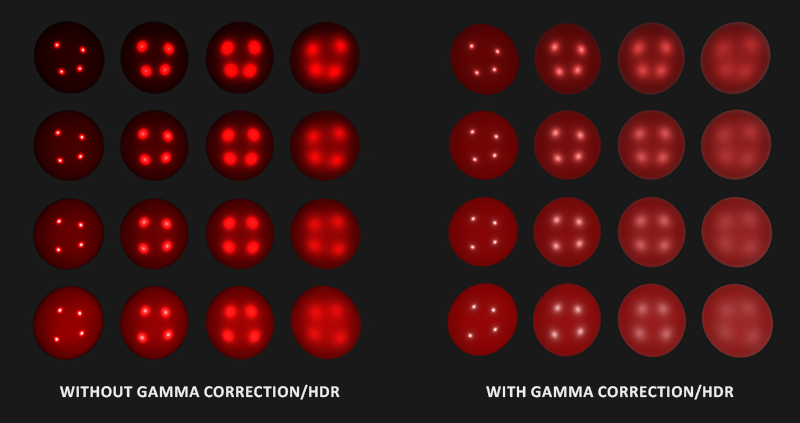
Tone mapping and linear lighting are not refinements in a PBR renderer, they are prerequisites. Without them the brightest and darkest parts of a scene can't both be represented, and the careful physics in the BRDF is thrown away at the last step.
Full direct lighting PBR shader
That is the whole shader. Leaving aside the texture branch, which the next section is about, its pixel shader reads:
float4 ps_main(vs_out p) : SV_Target
{
    float3 albedo = material_albedo;
    float metallic = material_metallic;
    float roughness = material_roughness;
    float ao = material_ao;
    float3 n = normalize(p.normal);
    ...
    float3 v = normalize(view_position - p.world);

    // reflectance equation: the four point lights
    float3 lo = 0.0;
    for (int i = 0; i < 4; i++)
    {
        float3 to_light = light_positions[i].xyz - p.world;
        float d = length(to_light);
        lo += cook_torrance(n, v, to_light / d, light_colors[i].rgb / (d * d), albedo, metallic, roughness);
    }

    float3 color = 0.03 * albedo * ao + lo;
    // Reinhard tone mapping; the sRGB back buffer does the gamma
    color = color / (color + 1.0);
    return float4(color, 1.0);
}
With the theory chapter behind it, there is hopefully nothing mysterious left in it. To see what it can do, the program draws a 7 by 7 grid of spheres, all with the same dark red albedo, metallic rising from the bottom row to the top and roughness rising from the left column to the right:
m: material_constants = { .albedo = v3(0.5, 0.0, 0.0), .ao = 1.0, .textured = textured };
// render rows*column number of spheres with varying metallic/roughness values:
// metallic from bottom to top, roughness from left to right
for (row: i32 = 0; row < 7; row += 1) {
    for (col: i32 = 0; col < 7; col += 1) {
        m.metallic = cast(row, f32) / 6.0;
        // perfectly smooth reflects one point of light, which looks wrong
        // for a point light: start just above zero
        m.roughness = clampf(cast(col, f32) / 6.0, 0.05, 1.0);
        update_buffer(context, material_buffer, m&, sizeof(material_constants));
        draw_sphere(context, transforms_buffer, t&, ball&, m4_translate(v3(cast(col - 3, f32) * 2.5, cast(row - 3, f32) * 2.5, 0.0)));
    }
}
Each sphere gets its own material values through
The spheres themselves come from
// the lights wander a little, so the highlights move across the spheres
for (i: u32 = 0; i < 4; i += 1) {
    lights.positions[i].x = (i % 2 == 0 ? -10.0 : 10.0) + 5.0 * sinf(current_frame);
}
update_buffer(context, lights_buffer, lights&, sizeof(lights_constants));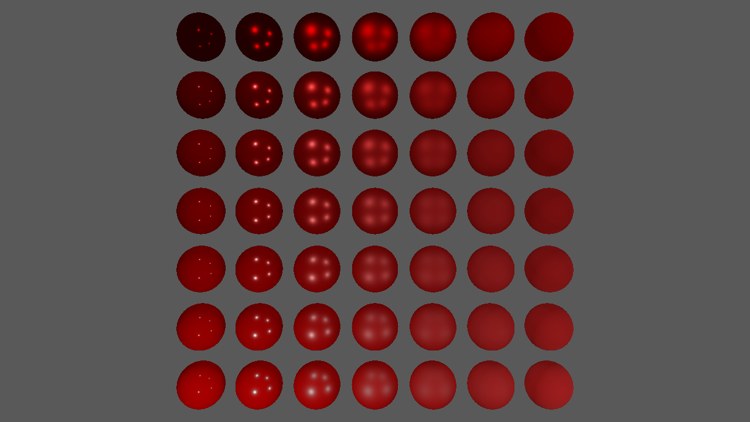
Two numbers, and already a wide range of materials. Along the bottom row the spheres are dielectrics, red plastic, with white highlights: the 4% of light a dielectric reflects is uncoloured, and the red comes from the diffuse light underneath. Moving up, the diffuse fades out and the highlights take on the albedo's colour, until the top row is pure metal, dark everywhere except its red highlights. Moving right, every highlight grows wider and fainter, keeping the same energy spread over more of the sphere. Fly around with the camera (hold the right mouse button to look, WASD to move) to see the highlights from other angles.
The source of this program is here, and its shader here.
Textured PBR
Uniform values are good for studying the model, but real surfaces vary from point to point. Reading the five parameters from the five maps of the theory chapter gives each texel its own material. In LearnOpenGL this is a separate program; in ours, Tab switches the same program between the two, by setting the textured field of the material buffer. The pixel shader starts from the constants and, when textured is set, replaces all of them:
Texture2D albedo_map : register(t0);
Texture2D normal_map : register(t1);
Texture2D metallic_map : register(t2);
Texture2D roughness_map : register(t3);
Texture2D ao_map : register(t4);
SamplerState linear_wrap : register(s0);
if (textured)
{
albedo = albedo_map.Sample(linear_wrap, p.uv).rgb;
metallic = metallic_map.Sample(linear_wrap, p.uv).r;
roughness = roughness_map.Sample(linear_wrap, p.uv).r;
ao = ao_map.Sample(linear_wrap, p.uv).r;
n = normal_from_map(normal_map.Sample(linear_wrap, p.uv).rgb * 2.0 - 1.0, p.world, n, p.uv);
}
An HLSL if on a constant buffer value is cheap: every pixel of a draw goes the same way, so the branch never splits a group of pixels between its two sides.
Albedo maps are painted by artists on sRGB monitors, so they store gamma-encoded colours, and the lighting needs them linear. LearnOpenGL decodes them in the shader with pow(color, 2.2). We let the texture do it, as in Gamma Correction: the albedo texture is created with an _SRGB format, and every sample is decoded to linear before filtering, which is also more correct than decoding after it. The other four maps hold data that was written linear, so they use the plain format. That is the srgb flag of
.Format = srgb ? DXGI_FORMAT.DXGI_FORMAT_R8G8B8A8_UNORM_SRGB : DXGI_FORMAT.DXGI_FORMAT_R8G8B8A8_UNORM,// loads one PBR material's five maps from a folder; only albedo is a colour
load_material: proc(device: *ID3D11Device, context: *ID3D11DeviceContext, folder: [*]const char, out: [*]*ID3D11ShaderResourceView) -> void = {
names: [5][*]const char = { "albedo.png", "normal.png", "metallic.png", "roughness.png", "ao.png" };
for (i: u32 = 0; i < 5; i += 1) {
path: [260]char = {};
cstr_copy(path, filesystem_path(folder));
cstr_append(path, names[i]);
out[i] = load_texture(device, context, path[0]&, i == 0);
}
}
All five views go to slots t0 to t4 in a single call each frame:
ID3D11DeviceContext_PSSetShaderResources(context, 0, 5, rusted_iron[0]&);
Ambient occlusion maps can be either; depending on the tool that produced them they may be sRGB-encoded, in which case they would want the _SRGB format too. Metallic and roughness are practically always linear.
Normals without tangents
In Normal Mapping each vertex carried a tangent, which with the normal defined the frame the normal map's vectors are expressed in. Our sphere's vertices have only a position, a normal and texture coordinates. Instead of adding tangents to the mesh,
// A normal map read without stored tangents: the tangent frame is rebuilt
// per pixel from how position and uv change across the screen.
float3 normal_from_map(float3 tangent_normal, float3 world, float3 n, float2 uv)
{
    float3 q1 = ddx(world);
    float3 q2 = ddy(world);
    float2 st1 = ddx(uv);
    float2 st2 = ddy(uv);
    // The direction u grows in; the determinant's sign keeps it right
    // whichever way v runs.
    float det = st1.x * st2.y - st2.x * st1.y;
    float3 t = normalize((q1 * st2.y - q2 * st1.y) * sign(det));
    t = normalize(t - n * dot(n, t));
    // The map's y points down the image, along v: cross(t, n), as in 5.4
    // normal mapping.
    float3 b = cross(t, n);
    return normalize(mul(tangent_normal, float3x3(t, b, n)));
}
The next line makes the tangent exactly perpendicular to the interpolated normal (the Gram-Schmidt step from Normal Mapping), and the bitangent completes the frame. It is cross(t, n), which points towards increasing v: our textures are stored top row first, so v runs down the image, and these normal maps, like the bricks, have their green channel pointing down it too. Building the matrix from the three vectors as rows and multiplying the map's vector on the left gives t * x + b * y + n * z, the map's vector in world space.
The result is a tangent frame that costs some arithmetic per pixel but no vertex data, which is handy for meshes, like ours, that don't come with tangents. It is a little less smooth than interpolated per-vertex tangents, since it is constant across each triangle.
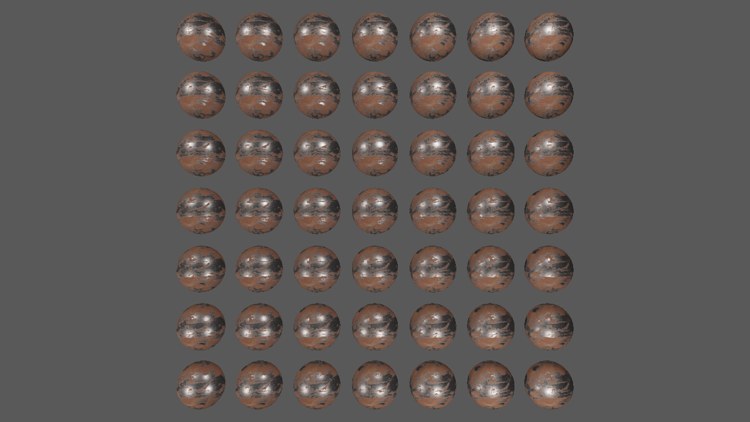
Every sphere in the grid now shows the same rusted iron, and the material varies across each sphere instead: patches of bare, smooth metal with bright, tight highlights in the light's colour, and rough orange rust between them, matte and lit mostly by diffuse light. That is the variety a single texel-level metallic and roughness value buys us.
Notice also how dark the bare metal is away from the highlights. Metals have no diffuse light, and with only four point lights to reflect, almost every direction a metal could reflect towards us is empty. In the real world a metal surface reflects its surroundings, which is exactly what we will add with image based lighting in the next two chapters. Even without it, what we have now is a physically based renderer, and its lights and materials already behave far more convincingly than anything Phong could do.
Additional resources
- Real Shading in Unreal Engine 4, Brian Karis: the source of these BRDF terms, the roughness remapping and the inverse-square falloff with a window function, which is a good next step for attenuation.
- Packing rules for constant variables: exactly how HLSL lays out a constant buffer, register by register.
- ddx and ddy: the screen-space derivatives used to rebuild the tangent frame.
- Followup: Normal Mapping Without Precomputed Tangents, Christian Schüler: the derivation behind building a tangent frame from derivatives.
- LearnOpenGL's PBR Lighting: the OpenGL original of this chapter.
Exercises
- Replace the inverse-square falloff with the constant-linear-quadratic attenuation of Light casters, and lower the light colours until the grid looks reasonable again. What happens to the spheres nearest the lights, compared with the inverse-square version?
- Remove the squaring of roughness in
distribution_ggx (usea = roughness). How does the left-to-right progression of the grid change? - Comment out the Reinhard line and look at the grid again. Then try the exposure tone mapper from HDR,
1.0 - exp(-color * exposure), and find an exposure that looks good. - Load the albedo map with srgb false, so the shader receives the gamma-encoded colours as if they were linear. Compare the rust with Tab before and after.