Cubemaps
Every texture so far has been a flat image read with a 2D coordinate. Direct3D has a few other kinds, and this chapter is about one that turns out to be surprisingly useful: the
Why bundle six images instead of binding six textures? Because of how a cubemap is read. We do not give it a uv coordinate; we give it a direction. Picture a small cube with the origin at its centre, and an arrow pointing out from the origin. The arrow pierces one of the six faces at some point, and the cubemap returns the texel found there. The length of the arrow is irrelevant, only where it points.
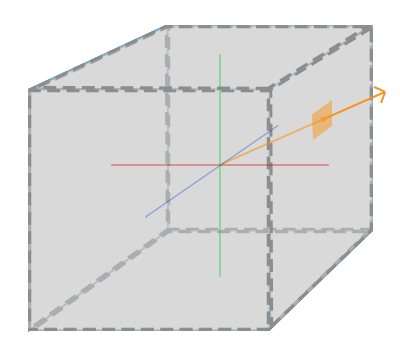
LearnOpenGL's diagram shows the idea. Now suppose the cube we texture with a cubemap is itself centred on the origin. Then every point on its surface, its local vertex position, is also a direction from the centre, and the interpolated position is exactly the direction we need to sample with. A cube centred on the origin needs no texture coordinates at all: its positions are its texture coordinates.
Creating a cubemap
OpenGL has a dedicated texture target for cubemaps, GL_TEXTURE_CUBE_MAP, and fills it with six calls to
| Array slice | Face | Our image |
|---|---|---|
| 0 | +x | right.jpg |
| 1 | -x | left.jpg |
| 2 | +y | top.jpg |
| 3 | -y | bottom.jpg |
| 4 | +z | front.jpg |
| 5 | -z | back.jpg |
Since all six faces are part of one texture, they are all given at creation, the same way a buffer gets its contents: an array of six D3D11_SUBRESOURCE_DATA, one per slice. The rules that decide which face a direction lands on, and where on that face, are the same in both APIs, so the images LearnOpenGL uses load into Direct3D unchanged, with nothing flipped.
In HLSL the texture is declared as a TextureCube instead of a Texture2D, and sampled with a float3 direction instead of a float2:
TextureCube sky : register(t0);
SamplerState linear_wrap : register(s0);
...
    return float4(sky.Sample(linear_wrap, p.direction).rgb, 1.0);
LearnOpenGL sets the cubemap's wrap mode to GL_CLAMP_TO_EDGE so that directions landing exactly on a seam between two faces don't pick up texels from the wrong side. Direct3D 11 hardware filters across cube faces by itself (seamless cubemap filtering, which OpenGL only gets with GL_TEXTURE_CUBE_MAP_SEAMLESS), and the address mode plays no part in a cube lookup. That is why our lesson can sample the sky with the same wrapping sampler it would use for any other texture, bound once into s0.
So what is the point of all this? Quite a few techniques become easy once the surroundings live in a texture we can look up by direction. The best-known is the skybox.
Skybox
A
Skybox images found online usually come as six separate files, or sometimes as one image laid out like an unfolded cube, which has to be cut into six. Folded back up, the six faces join without seams:
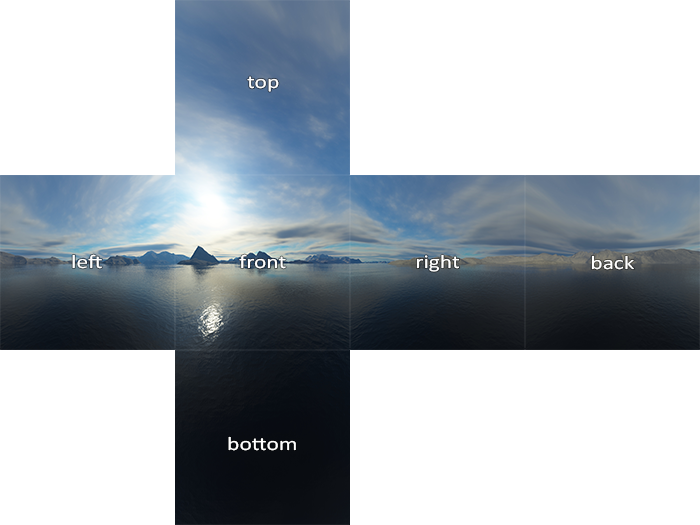
This is LearnOpenGL's skybox, the lake among mountains, and it is the one in our resources/textures/skybox folder.
Loading a skybox
The lesson wraps everything above in one function. It loads the six images, hands them to
// loads a cubemap texture from 6 individual texture faces, in the order
// +x (right), -x (left), +y (top), -y (bottom), +z (front), -z (back)
// -------------------------------------------------------------------
load_cubemap: proc(device: *ID3D11Device, faces: [6][*]const char) -> *ID3D11ShaderResourceView = {
    data: [6]D3D11_SUBRESOURCE_DATA = {};
    size: i32 = 0;
    for (i: u32 = 0; i < 6; i += 1) {
        img: image = image_load(faces[i]);
        if (img.pixels == null) {
            printf("Cubemap texture failed to load at path: %s\n", faces[i]);
            exit(1);
        }
        data[i].pSysMem = img.pixels;
        data[i].SysMemPitch = cast(img.width * 4, UINT);
        size = img.width;
    }
    desc: D3D11_TEXTURE2D_DESC = {
        .Width = cast(size, UINT),
        .Height = cast(size, UINT),
        .MipLevels = 1,
        .ArraySize = 6,
        .Format = DXGI_FORMAT.DXGI_FORMAT_R8G8B8A8_UNORM,
        .SampleDesc = { .Count = 1 },
        .BindFlags = D3D11_BIND_SHADER_RESOURCE,
        .MiscFlags = D3D11_RESOURCE_MISC_TEXTURECUBE,
    };
    texture: *ID3D11Texture2D = null;
    ID3D11Device_CreateTexture2D(device, desc&, data[0]&, texture&);
    view: D3D11_SHADER_RESOURCE_VIEW_DESC = {
        .Format = desc.Format,
        .ViewDimension = D3D11_SRV_DIMENSION.D3D11_SRV_DIMENSION_TEXTURECUBE,
        .TextureCube = { .MipLevels = 1 },
    };
    srv: *ID3D11ShaderResourceView = null;
    ID3D11Device_CreateShaderResourceView(device, cast(texture, *ID3D11Resource), view&, srv&);
    return srv;
}
Three things make this texture a cubemap rather than a stack of six pictures:
- ArraySize is 6: one slice per face, in the order of the table above. Each slice gets its own entry in data, with its pixel pointer and its row pitch (four bytes per pixel, since
image_load always returns RGBA). - MiscFlags holds D3D11_RESOURCE_MISC_TEXTURECUBE. Without it the texture is a plain 2D array, and Direct3D refuses to make a cube view of it.
- The shader resource view has the dimension D3D11_SRV_DIMENSION_TEXTURECUBE. This is what the shader's
TextureCubebinds to. The same texture could also be viewed as aTexture2DArray, and read slice by slice with 2D coordinates; the view decides.
The paths go in a six-element array, in face order, and the function hands back the view:
faces: [6][*]const char = {
    filesystem_path("resources/textures/skybox/right.jpg"),
    filesystem_path("resources/textures/skybox/left.jpg"),
    filesystem_path("resources/textures/skybox/top.jpg"),
    filesystem_path("resources/textures/skybox/bottom.jpg"),
    filesystem_path("resources/textures/skybox/front.jpg"),
    filesystem_path("resources/textures/skybox/back.jpg"),
};
skybox: *ID3D11ShaderResourceView = load_cubemap(device, faces);
Displaying a skybox
A skybox is drawn on a cube, so we need a cube's vertices. We already have one: the lesson's unit cube, which runs from -0.5 to 0.5 on each axis and is centred on the origin, so its positions double as directions. Its vertices also carry normals and texture coordinates for the objects in the scene, and we simply reuse the same vertex buffer and the same input layout for the sky. The skybox vertex shader only asks for POSITION; an input layout is allowed to describe more attributes than a shader reads, and the rest are ignored.
The skybox shader lives in its own file, skybox.hlsl:
struct sky_vertex
{
    float4 position : SV_Position;
    float3 direction : DIRECTION;
};

sky_vertex vs_main(float3 position : POSITION)
{
    sky_vertex o;
    // The cube's corners double as the directions to look up.
    o.direction = position;
    float4 clip = mul(projection, mul(view, float4(position, 1.0)));
    // z = w: after the divide, depth is exactly 1, the far plane.
    o.position = clip.xyww;
    return o;
}

float4 ps_main(sky_vertex p) : SV_Target
{
    return float4(sky.Sample(linear_wrap, p.direction).rgb, 1.0);
}
The vertex shader passes the local position on as the lookup direction, and the rasterizer interpolates it across each face. The pixel shader samples the cube with it. (The .xyww on the position is an optimization we come to in a moment; for now read it as the ordinary clip-space position.)
There is a catch. We want the sky to stay infinitely far away: the player can walk as far as they like and never get any closer to the mountains. But the view matrix translates everything by the camera's position, so as the camera moves, the little sky cube would be left behind. What we want is for the sky to turn with the camera, but never move. Rotation lives in the upper-left 3x3 part of the view matrix and translation in the last column, so we clear the translation and keep the rest. LearnOpenGL does it with glm::mat4(glm::mat3(view)); our math library has a function for it:
// The view matrix with its translation removed: what a skybox is drawn with,
// so it turns with the camera but never gets closer.
m4_without_translation: proc(a: mat4) -> mat4 = {
    r: mat4 = a;
    r.m[3] = 0.0;
    r.m[7] = 0.0;
    r.m[11] = 0.0;
    r.m[12] = 0.0;
    r.m[13] = 0.0;
    r.m[14] = 0.0;
    r.m[15] = 1.0;
    return r;
}
Our matrices are stored row by row, m[row * 4 + col], so m[3], m[7] and m[11] are the translation column. With the camera's translation gone, the camera is always at the centre of the sky cube, and only its orientation matters. Immediately the scene feels vast:
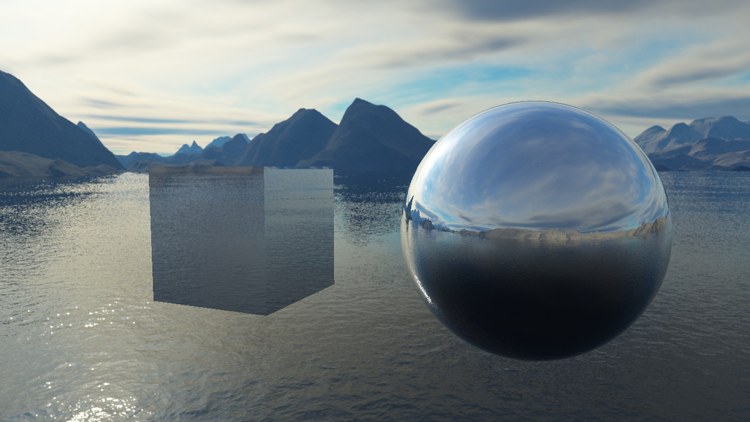
The two objects in front are the subject of the second half of this chapter. The sky itself is everything behind them.
An optimization
LearnOpenGL first draws the skybox before anything else, with depth writes off, so that the scene is drawn over it. That works, but it runs the sky's pixel shader for every pixel on the screen, including all the ones that the scene will cover a moment later. It is cheaper to draw the sky last: by then the depth buffer holds the depth of everything in the scene, and the early depth test can reject every sky pixel that lies behind an object before its pixel shader runs.
The difficulty is that the sky cube is tiny: half a unit from the camera. Drawn last with the normal depth test, it would win nearly everywhere and cover the scene. We need the depth test to believe that the sky is as far away as anything can be, at depth 1.0, the far plane.
Recall from Coordinate Systems that after the vertex shader, the rasterizer divides the clip-space position by its w component, and from Depth testing that the resulting z is the depth that gets tested. If we make the vertex shader output w in place of z, the division gives \(z_{ndc} = w / w = 1\) for every vertex of the sky, whatever its distance. That is what clip.xyww does. Direct3D's depth range is 0 to 1, so 1 is exactly the far plane (in OpenGL it is the far plane too, at the top of GL's -1 to 1 range).
Two pieces of depth-stencil state go with it. The depth buffer is cleared to 1.0, and the sky's depth is also exactly 1.0, so the default comparison, D3D11_COMPARISON_LESS, would reject the sky even where nothing was drawn. We need less-or-equal. And there is no reason for the sky to write its depth, so writes are switched off:
// The sky sits exactly on the far plane, so it needs LESS_EQUAL to pass.
sky_depth_desc: D3D11_DEPTH_STENCIL_DESC = {
    .DepthEnable = 1,
    .DepthWriteMask = D3D11_DEPTH_WRITE_MASK.D3D11_DEPTH_WRITE_MASK_ZERO,
    .DepthFunc = D3D11_COMPARISON_FUNC.D3D11_COMPARISON_LESS_EQUAL,
};
sky_depth: *ID3D11DepthStencilState = null;
ID3D11Device_CreateDepthStencilState(device, sky_depth_desc&, sky_depth&);
OpenGL would call glDepthFunc(GL_LEQUAL) and glDepthMask(GL_FALSE) here; in Direct3D both settings live in one immutable state object, made once at startup. At the end of the frame we bind it, draw the sky, and put back the default state by binding null:
// draw skybox as last
t.view = m4_without_translation(t.view);   // remove translation from the view matrix
shader_use(context, skybox_shader&);
ID3D11DeviceContext_OMSetDepthStencilState(context, sky_depth, 0);
draw_vertices(context, transforms_buffer, t&, cube_vb, 36, m4_identity());
ID3D11DeviceContext_OMSetDepthStencilState(context, null, 0);
The sky's model matrix is the identity, so the cube stays centred where the camera is. We look at the cube from the inside, which means we are looking at the back of each face; that is fine here, since the lessons leave culling off (see Face culling).
Environment mapping
We now have the whole surrounding world in a single texture, and the skybox is only one thing to do with it. The other is to let objects pick up their surroundings: shiny ones reflect the environment, transparent ones bend it. Techniques that use a cubemap of the environment this way are called
Reflection
A mirror shows whatever lies in the direction a ray from your eye bounces off it. Which part of the world that is depends on where you stand: move, and the reflection changes. To compute it, we take the direction from the eye to the point being shaded, \(\bar{I}\), and mirror it around the surface normal \(\bar{N}\) to get the reflected direction \(\bar{R}\). Then we look up the cubemap along \(\bar{R}\).
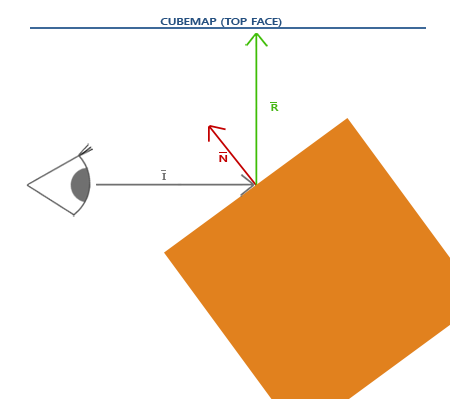
HLSL has the mirroring built in, as cubemaps.hlsl, whose vertex shader is the one we have used since the lighting chapters: it passes on the world-space position and the normal, transformed by the normal matrix. The pixel shader does the rest:
float4 ps_main(vs_out p) : SV_Target
{
    float3 n = normalize(p.normal);
    float3 eye_ray = normalize(p.world - view_position);
    float3 lookup = refract_mode ? refract(eye_ray, n, 1.0 / 1.52) : reflect(eye_ray, n);
    return float4(sky.Sample(linear_wrap, lookup).rgb, 1.0);
}
eye_ray is \(\bar{I}\), pointing from the camera to the surface. Both it and the normal are in world space, the same space the cubemap's directions are in, since the sky is drawn with no rotation of its own. The camera position, view_position, comes from the shared transforms constant buffer. Before drawing, the cubemap is bound to t0 for the pixel shader:
shader_use(context, s&);
bind_constants(context, 1, env_buffer);
bind_texture(context, 0, skybox);
draw_vertices(context, transforms_buffer, t&, cube_vb, 36, m4_mul(m4_translate(v3(-1.0, 0.0, 0.0)), m4_rotate(current_frame * 0.5, v3(0.0, 1.0, 0.0))));
draw_vertices(context, transforms_buffer, t&, sphere_vb, sphere_count, m4_translate(v3(1.2, 0.0, 0.0)));
The result is the screenshot above: a slowly turning cube on the left and a sphere on the right, both perfect mirrors. A cube makes a so-so mirror, since each face is flat and reflects one patch of sky, but the sphere shows the effect off well. LearnOpenGL draws its backpack model with the same shader; our lesson builds a sphere in code instead, with
Real objects are rarely mirrors all over. A common refinement is a
Refraction
The other environment mapping effect is
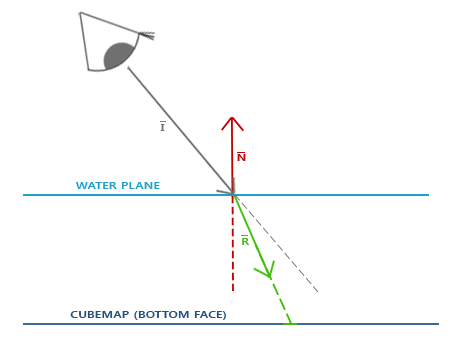
HLSL's
| Material | Refractive index |
|---|---|
| Air | 1.00 |
| Water | 1.33 |
| Ice | 1.309 |
| Glass | 1.52 |
| Diamond | 2.42 |
Our objects are glass, seen from air, so the ratio is \(\frac{1.00}{1.52} \approx 0.658\), the 1.0 / 1.52 in the shader above. Which of the two lookups the shader does is decided by refract_mode, an integer in a small second constant buffer at b1:
cbuffer env : register(b1)
{
    int refract_mode;
};
On the CPU side it is a struct padded out to 16 bytes, the size of one constant register, and Tab flips it each time it is pressed:
env_constants: struct = {
    refract: i32;
    pad: [3]i32;
}
...
if (key_pressed(VK_TAB)) { refract = 1 - refract; }
...
e: env_constants = { .refract = refract };
update_buffer(context, env_buffer, e&, sizeof(env_constants));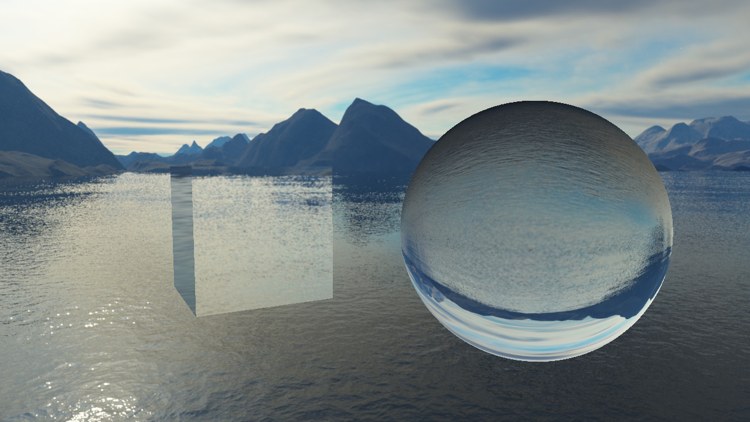
The sphere now behaves like a glass ball, with the sky and the water turned upside down. The cube looks more like a slab of glass slightly shifting what is behind it. Different ratios give quite different looks; try water's 1.33 or diamond's 2.42.
Strictly, light that enters a glass ball also leaves it on the other side, and bends a second time there. We refract only once, at the surface facing us, which is a common simplification and good enough to read as glass. With the right mix of lighting, reflection, refraction and moving vertices, the same building blocks make convincing water.
Dynamic environment maps
Our environment is a fixed set of six photographs. That looks good, but the mirrors only ever show the sky: place a second object beside the sphere and it will not appear in the reflection, as if it were not there.
To fix that, we could render the scene six times from the object's position, once along each axis, into the six faces of a cubemap, and use that cubemap for its reflections. In Direct3D that means a cube texture created with D3D11_BIND_RENDER_TARGET as well as D3D11_BIND_SHADER_RESOURCE, and either one render target view per face (a 2D array view of a single slice), or one view of all six faces with a geometry shader choosing the face per triangle through SV_RenderTargetArrayIndex. The Point Shadows chapter does exactly that for depth. This is
The full program is here, the objects' shader here and the skybox's here.
Additional resources
- Introduction to textures in Direct3D 11: texture arrays and cubemaps, and how their subresources are numbered.
- TextureCube: the HLSL object and its methods.
- LearnOpenGL's Cubemaps: the OpenGL version of this chapter.
Exercises
- Draw the skybox first instead of last, the way LearnOpenGL starts out: with depth writes off and an ordinary position instead of
.xyww. Check that the picture is the same, and think about which version runs fewer pixel shaders. - Remove the
m4_without_translation call and walk around with W, A, S and D. What happens to the sky, and why? - Mix the two effects: compute both the reflected and the refracted colour in the pixel shader and blend them, using more reflection where the surface is seen at a grazing angle (for example with
pow(1.0 - saturate(dot(-eye_ray, n)), 5.0)as the weight). This is a rough version of the Fresnel effect that returns in the PBR chapters.