Bloom
A monitor cannot show anything brighter than its own white, so very bright light is hard to put across on screen. A lamp of strength 15 and a lamp of strength 1.5 can both end up as the same white pixels. Our eyes and cameras give us a clue to work with: around a very bright source, light seems to spill over its edges into the surroundings, because a little of it scatters in the lens. We read that halo as "this is intensely bright". Reproducing it in a renderer is the
Bloom is a post-processing effect: it works on the finished image, not on the geometry. It is easy to overdo (some games have made everything glow like a dream sequence), but used with restraint it makes light sources and brightly lit surfaces read as bright in a way that tone mapping alone cannot.
Bloom and HDR are often mentioned in the same breath, and sometimes confused, but they are separate techniques. Bloom can be done on an 8-bit image, and HDR is useful without bloom. They just work very well together: with HDR values, "bright" can mean "above 1", a threshold that ordinary lit surfaces rarely cross, so we get precise control over what glows.
The recipe has three steps:
- Render the lit scene in HDR, and at the same time make a second image that contains only the pixels brighter than some threshold.
- Blur that second image. The blur is what spreads the light past the edges of the bright regions, and its size and shape decide what the glow looks like.
- Add the blurred image back on top of the scene, then tone map the sum as in the previous chapter.
Most of the quality of the effect lives in step 2. The first and last steps are a few lines each; the blur is where the choices are. We take the steps in order.
Extracting bright colour
Step 1 needs two images out of one render of the scene. We could draw the scene twice, once per image, but the pipeline can do better: a pixel shader can write to several render targets at once. This is
hdr16: DXGI_FORMAT = DXGI_FORMAT.DXGI_FORMAT_R16G16B16A16_FLOAT;
color_target: render_target = create_render_target(device, scr_width, scr_height, hdr16, 1);
bright_target: render_target = create_render_target(device, scr_width, scr_height, hdr16, 1);
scene_depth: *ID3D11DepthStencilView = create_depth_buffer(device, scr_width, scr_height, 1);
targets: [2]*ID3D11RenderTargetView = { color_target.rtv, bright_target.rtv };
unbind_textures(context);
zero: [4]f32 = { 0.0, 0.0, 0.0, 0.0 };
ID3D11DeviceContext_OMSetRenderTargets(context, 2, targets[0]&, scene_depth);
for (i: u32 = 0; i < 2; i += 1) { ID3D11DeviceContext_ClearRenderTargetView(context, targets[i], zero[0]&); }
ID3D11DeviceContext_ClearDepthStencilView(context, scene_depth, D3D11_CLEAR_DEPTH, 1.0, 0);
That is all the setup there is. OpenGL attaches the two textures to one framebuffer object and then needs
On the shader side, a pixel shader writes several targets by returning a struct whose members carry the semantics SV_Target0, SV_Target1 and so on, the number being the slot in the array we bound:
// two outputs: SV_Target0 goes to the first bound target, SV_Target1 to the second
struct bloom_out
{
    float4 color : SV_Target0;
    float4 bright : SV_Target1;
};

bloom_out ps_main(vs_out p)
{
    float3 color = emit_color.rgb;
    if (emit_color.w == 0.0)
    {
        float3 base = albedo.Sample(linear_wrap, p.uv).rgb;
        float3 n = normalize(p.normal);
        color = 0.02 * base;
        for (int i = 0; i < 4; i++)
        {
            float3 to_light = light_positions[i].xyz - p.world;
            float d = length(to_light);
            color += max(dot(n, to_light / d), 0.0) * base * light_colors[i].rgb / (d * d);
        }
    }
    bloom_out o;
    o.color = float4(color, 1.0);
    // perceived brightness; anything above 1 goes to the blur
    float brightness = dot(color, float3(0.2126, 0.7152, 0.0722));
    o.bright = float4(brightness > 1.0 ? color : 0.0, 1.0);
    return o;
}
The lighting is the same diffuse-plus-inverse-square as in the HDR tunnel, with a touch of ambient. One shader draws both the crates and the light cubes: a small constant buffer, emit_color, holds a colour and a flag in w. For the crates and the floor w is 0 and the surface is lit; for a light cube w is 1 and the cube is simply its light's HDR colour, unlit:
// the lights themselves: no lighting, just their own HDR colour
for (i: u32 = 0; i < 4; i += 1) {
    e.color = lights.colors[i];
    e.color.w = 1.0;
    update_buffer(context, emit_buffer, e&, sizeof(emit_constants));
    p: vec4 = lights.positions[i];
    draw_vertices(context, transforms_buffer, t&, cube_vb, 36, m4_mul(m4_translate(v3(p.x, p.y, p.z)), m4_scale(v3(0.25, 0.25, 0.25))));
}
After the colour is known, the shader decides whether it is bright. Comparing each channel against 1 would count a pure blue of strength 2 as just as bright as a pure green of strength 2, though to us the green looks several times brighter, so instead we convert to
This is where HDR earns its place in bloom. The four lights have colours (5, 5, 5), (10, 0, 0), (0, 0, 15) and (0, 5, 0), with luminances 5, 2.1, 1.08 and 3.6: all above the threshold, though the blue one only just. The crates, even close to the lights, mostly stay below it. With an 8-bit image we would have to put the threshold below 1, say at 0.8, and then any surface that happens to be well lit, a white wall or a field of snow, would start to glow too.
Gaussian blur
The bright image now needs blurring. In Framebuffers we blurred with a small kernel that averaged a pixel's neighbours. That is a
A
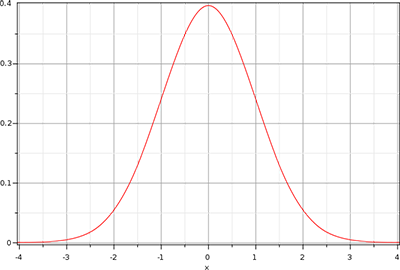
In two dimensions the weights form a round hill around the pixel. The trouble is cost: a blur 32 pixels across would read \(32 \times 32 = 1024\) texels for every pixel of the image. Fortunately the 2D Gaussian has a very useful property. It is
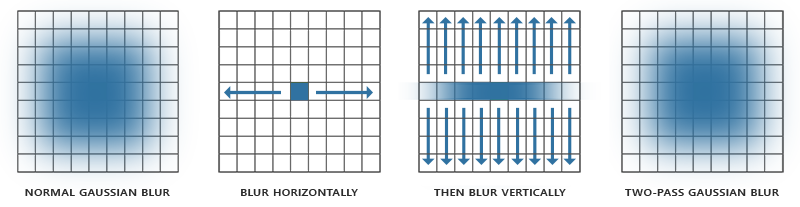
This is the
// one direction of a Gaussian blur: nine taps along `direction`
cbuffer blur : register(b1)
{
    float2 direction;
};

Texture2D source : register(t0);
SamplerState linear_clamp : register(s1);

static const float weights[5] = { 0.227027, 0.1945946, 0.1216216, 0.054054, 0.016216 };

float4 ps_main(fullscreen_vertex p) : SV_Target
{
    float3 sum = source.Sample(linear_clamp, p.uv).rgb * weights[0];
    for (int i = 1; i < 5; i++)
    {
        sum += source.Sample(linear_clamp, p.uv + direction * i).rgb * weights[i];
        sum += source.Sample(linear_clamp, p.uv - direction * i).rgb * weights[i];
    }
    return float4(sum, 1.0);
}
Nine taps: the centre and four on each side. The weights add up to 1 (the centre once, the others twice), so the blur moves light around without adding or removing any. They are not computed from the formula at run time; they are a row of binomial coefficients, which approximate a Gaussian well. Take row 12 of Pascal's triangle, drop the two smallest entries at each end, and divide by what remains: \(924 / 4070 = 0.227027\), \(792 / 4070 = 0.1945946\), and so on.
Where LearnOpenGL passes a horizontal flag and has two loops, we pass the step itself, direction: one texel along x for a horizontal pass, one texel along y for a vertical one. The same nine lines then serve both. The texture is read through a second sampler in slot s1, with clamping instead of wrapping, so that a light near the left edge of the screen does not bleed in at the right:
clamp_desc: D3D11_SAMPLER_DESC = sampler_desc;
clamp_desc.Filter = D3D11_FILTER.D3D11_FILTER_MIN_MAG_MIP_LINEAR;
clamp_desc.AddressU = D3D11_TEXTURE_ADDRESS_MODE.D3D11_TEXTURE_ADDRESS_CLAMP;
clamp_desc.AddressV = D3D11_TEXTURE_ADDRESS_MODE.D3D11_TEXTURE_ADDRESS_CLAMP;
clamp_sampler: *ID3D11SamplerState = null;
ID3D11Device_CreateSamplerState(device, clamp_desc&, clamp_sampler&);
ID3D11DeviceContext_PSSetSamplers(context, 1, 1, clamp_sampler&);
Ping-pong
One horizontal plus one vertical pass is a single Gaussian blur, and nine taps is a narrow one. For a wider glow we simply blur the blurred image again, and again. Each pass reads one texture and writes another, and a texture cannot be both at once, so we keep two targets and bounce between them: draw from A into B, then from B into A, and so on. This is called
Our two ping-pong targets are half the window's width and height:
half_w: i32 = scr_width / 2;
half_h: i32 = scr_height / 2;
pingpong: [2]render_target = { create_render_target(device, half_w, half_h, hdr16, 1), create_render_target(device, half_w, half_h, hdr16, 1) };
half_viewport: D3D11_VIEWPORT = viewport;
half_viewport.Width = cast(half_w, f32);
half_viewport.Height = cast(half_h, f32);
This is a departure from LearnOpenGL, which blurs at full size, and it is nearly free quality. A blur is a low-frequency image; it has no fine detail to lose at lower resolution. At half size a pass costs a quarter of the work, and since each tap now steps over two full-size pixels, the same nine taps spread the glow twice as far. The first pass also does the downsampling for us, at no extra cost: the centre of each half-size pixel falls exactly on the corner where four full-size texels meet, so a bilinear sample there returns the average of all four.
The blur loop runs ten passes, alternately horizontal and vertical, which is five full Gaussian blurs:
shader_use(context, blur_shader&);
bind_constants(context, 1, blur_buffer);
ID3D11DeviceContext_RSSetViewports(context, 1, half_viewport&);
source: *ID3D11ShaderResourceView = bright_target.srv;
for (i: u32 = 0; i < 10; i += 1) {
    b: blur_constants = {
        .direction = i % 2 == 0 ? v2(1.0 / cast(half_w, f32), 0.0) : v2(0.0, 1.0 / cast(half_h, f32)),
    };
    update_buffer(context, blur_buffer, b&, sizeof(blur_constants));
    unbind_textures(context);
    ID3D11DeviceContext_OMSetRenderTargets(context, 1, pingpong[i % 2].rtv&, null);
    bind_texture(context, 0, source);
    ID3D11DeviceContext_Draw(context, 3, 0);
    source = pingpong[i % 2].srv;
}
A few things to notice. The viewport is changed to the half size before the loop; the viewport is what maps the full-screen triangle onto the target, and leaving it at window size would draw a quarter of the image into the corner. The variable source starts out as the bright target and afterwards always names the texture the previous pass wrote, which takes care of LearnOpenGL's first_iteration special case. And t0, and it must be unbound before it can become a render target. After pass 9, source is the second ping-pong target, holding the finished blur.
Blending both textures
Step 3 adds the blur to the scene and tone maps the result. The shader is the HDR chapter's, with a second texture:
cbuffer combine : register(b1)
{
    float exposure;
    int bloom;
};

Texture2D scene_color : register(t0);
Texture2D blurred : register(t1);
SamplerState linear_clamp : register(s1);

float4 ps_main(fullscreen_vertex p) : SV_Target
{
    float3 color = scene_color.Sample(linear_clamp, p.uv).rgb;
    if (bloom) color += blurred.Sample(linear_clamp, p.uv).rgb;
    return float4(1.0 - exp(-color * exposure), 1.0);
}
The blur texture is half size, but the texture coordinates run from 0 to 1 whatever the size, and the linear filter stretches it back up smoothly. The order of operations matters: the glow is added while the values are still HDR, and only the sum is tone mapped. That way the glow around a light rolls off just as the light does, instead of being pasted on top of an image that has already been squeezed into 0..1. As in the HDR chapter, the sRGB back buffer view does the gamma encoding.
unbind_textures(context);
ID3D11DeviceContext_OMSetRenderTargets(context, 1, backbuffer_rtv&, null);
ID3D11DeviceContext_RSSetViewports(context, 1, viewport&);
...
bind_texture(context, 0, color_target.srv);
bind_texture(context, 1, source);
ID3D11DeviceContext_Draw(context, 3, 0);
The viewport goes back to full size for the final pass. The program starts with bloom on, and Tab switches it off and on:
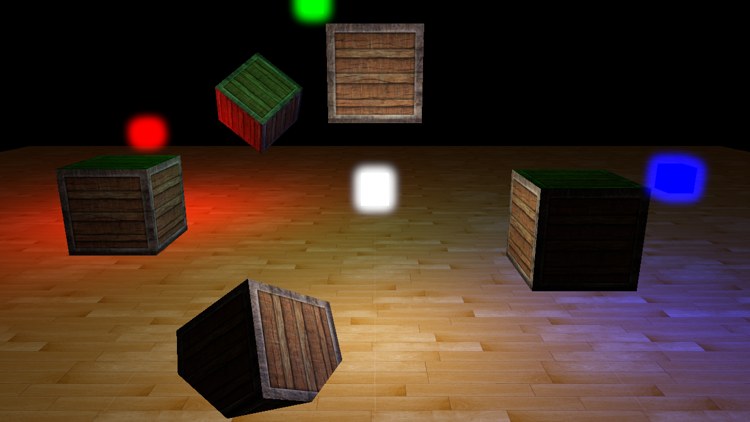
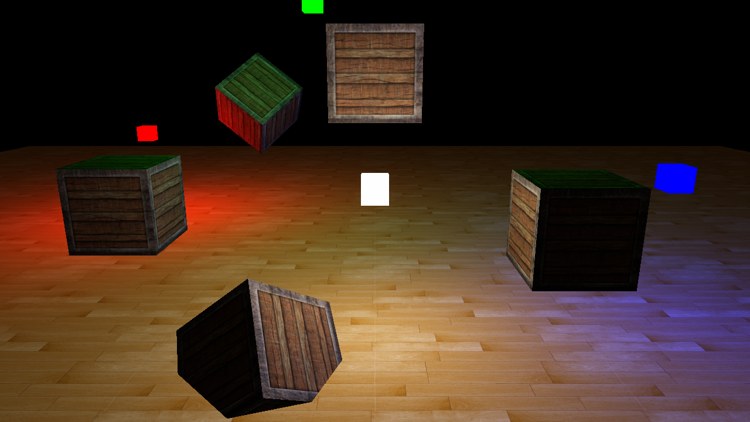
With bloom (left), the four light cubes glow, and the glow is coloured by each light; without it (right) they are flat patches with hard edges that read as painted squares rather than lamps. The lit crates and floor look the same in both images, because hardly anything on them crosses the threshold. That is the control HDR gives us: only what is really bright blooms.
The scene is small, so the effect is modest here. In a big scene with the sun glinting off water, or street lights at night, a good bloom makes a large difference. And because so much of the result depends on the blur, that is where improvements go. Common ones are more taps or more passes; combining blurs of several widths (one tight, one wide) to get a sharp core with a long soft tail; or blurring a chain of ever smaller copies of the bright image and adding them all together, which gives a very wide glow for little cost. The Additional resources below cover a few of these.
The full program is here, with its shaders for the scene here, the blur here and the final combine here.
Additional resources
- Efficient Gaussian blur with linear sampling: where the binomial weights come from, and how bilinear filtering can halve the number of taps.
- Bloom post process effect: Epic Games on building a better bloom from several Gaussians.
- How to do good bloom for HDR rendering: Kalogirou on blurring a chain of downsampled images.
- ID3D11DeviceContext::OMSetRenderTargets: binding several render targets at once, and the rules they must follow.
- LearnOpenGL's Bloom: the OpenGL version of this chapter.
Exercises
- Change the number of blur passes from 10 to 2, and then to 20. How does the size of the glow change, and how much does each extra pair of passes add?
- Make the ping-pong targets full size, as LearnOpenGL does (remember the viewport and the direction step). Compare the glow with the half-size version. Then try quarter size.
- Lower the brightness threshold in
bloom.hlslfrom 1.0 to 0.5. Which parts of the scene start to glow, and why does that look worse? - Add up and down keys for the exposure in the final pass, as in the HDR lesson, and see how the bloom behaves at low and high exposure.