Multiple lights
Over the last few chapters we have built up a good deal: the Phong model, materials, lighting maps, and three kinds of light caster. Each lesson so far has had exactly one light. In this chapter we put it all together into one scene lit by six lights at once: a directional light for the sun, four coloured point lights scattered among the crates, and the flashlight from the previous chapter.
The idea that makes this possible is simple: light adds up. Two lamps on a desk light it with the sum of what each would give on its own. So to light a pixel with several sources, we work out each source's contribution separately, exactly as in the previous chapters, and add the results. In outline:
color  = sun's contribution
for each point light:
    color += that light's contribution
color += flashlight's contribution
return color
A pixel near two point lights gets the light of both and comes out brighter than near one, which is just what we expect.
Writing all of that out inline in ps_main would be long and repetitive, since every light needs the same ambient, diffuse and specular arithmetic. So, like LearnOpenGL, we move the lighting into functions. HLSL functions look and behave like C functions: a return type, a name, typed parameters. As in C, a function must be declared before the code that calls it; our file simply defines its functions above ps_main. (The compiler inlines every function call, so splitting the shader up this way costs nothing at run time.)
One function for every light
LearnOpenGL writes one function per kind of light,
Everything the function needs to know about the surface it is lighting is gathered in a struct first, filled once per pixel:
struct surface
{
    float3 position;
    float3 normal;
    float3 to_eye;
    float3 albedo;
    float3 shine;
};
This also means each texture is sampled just once per pixel, however many lights there are. LearnOpenGL's functions sample both maps again for every light, which it points out as room for improvement; the struct is that improvement. Here is the function:
// One light arriving from `to_light` with `color`: ambient, diffuse and
// specular, as in 4.1. Ambient is a twentieth of the colour.
float3 phong(surface s, float3 to_light, float3 color)
{
    float3 ambient = 0.05 * color * s.albedo;
    float3 diffuse = 0.8 * color * max(dot(s.normal, to_light), 0.0) * s.albedo;
    float3 specular = color * pow(max(dot(s.to_eye, reflect(-to_light, s.normal)), 0.0), shininess) * s.shine;
    return ambient + diffuse + specular;
}
These are the terms of Lighting maps, with one simplification. Instead of separate ambient, diffuse and specular colours per light, each light here has a single colour, and the function takes fixed fractions of it: 5% for ambient, 80% for diffuse, all of it for the highlight. That keeps six lights' worth of constants manageable, and the ratios are the ones the previous lessons used anyway (0.1, 0.8 and 1 in Light casters, with less ambient here since six lights' ambient adds up).
Distance falloff is a function of its own, the formula from the previous chapter with the same terms for a 50-unit light:
float attenuation(float3 from, float3 to)
{
    float d = length(to - from);
    return 1.0 / (1.0 + 0.09 * d + 0.032 * d * d);
}
The lights
Directional light
The sun is the simplest: its direction is the same everywhere, and nothing is attenuated. The pixel shader starts its total with it:
float3 color = phong(s, normalize(-sun_direction), sun_color);Its colour is a dim, slightly bluish grey, more like moonlight than a summer sun, so that the coloured point lights stand out against it:
lights: lights_constants = {
    .sun_direction = v3(-0.2, -1.0, -0.3),
    .sun_color = v3(0.4, 0.4, 0.45),
    ...
};
Point lights
Each point light has a position and a colour. HLSL lets us declare a struct type and keep an array of them in a constant buffer, just as GLSL keeps an array of uniform structs:
struct point_light
{
    float3 position;
    float3 color;
};
The shader loops over the four of them, adding each one's attenuated contribution:
for (int i = 0; i < 4; i++)
{
    float3 to_light = normalize(points[i].position - s.position);
    color += phong(s, to_light, points[i].color) * attenuation(s.position, points[i].position);
}
This is where the single
Spotlight
The flashlight is a point light whose contribution is also scaled by the soft cone from Light casters:
float3 to_spot = normalize(spot_position - s.position);
float cone = saturate((dot(to_spot, -spot_direction) - spot_outer_cos) / (spot_inner_cos - spot_outer_cos));
color += phong(s, to_spot, float3(1.0, 1.0, 1.0)) * attenuation(s.position, spot_position) * cone;
It is white, and its cone runs from 12.5 to 15 degrees, a little tighter at the edge than before. Unlike the previous chapter's flashlight, its ambient part is scaled by the cone too: with the sun and four lamps in the scene, nothing is left completely black outside the beam anyway. The camera's position and direction are copied in every frame, as before:
lights.spot_position = cam.position;
lights.spot_direction = cam.front;
Putting it all together
Here is the whole pixel shader. It fills in the surface, then adds up the sun, the four point lights and the flashlight:
float4 ps_main(vs_out p) : SV_Target
{
    surface s;
    s.position = p.world;
    s.normal = normalize(p.normal);
    s.to_eye = normalize(view_position - p.world);
    s.albedo = diffuse_map.Sample(linear_wrap, p.uv).rgb;
    s.shine = specular_map.Sample(linear_wrap, p.uv).rgb;

    float3 color = phong(s, normalize(-sun_direction), sun_color);

    for (int i = 0; i < 4; i++)
    {
        float3 to_light = normalize(points[i].position - s.position);
        color += phong(s, to_light, points[i].color) * attenuation(s.position, points[i].position);
    }

    float3 to_spot = normalize(spot_position - s.position);
    float cone = saturate((dot(to_spot, -spot_direction) - spot_outer_cos) / (spot_inner_cos - spot_outer_cos));
    color += phong(s, to_spot, float3(1.0, 1.0, 1.0)) * attenuation(s.position, spot_position) * cone;

    return float4(color, 1.0);
}
An array in a constant buffer
On the program's side, LearnOpenGL sets each light's uniforms by name, one at a time: "pointLights[0].position", "pointLights[0].constant" and so on, dozens of calls. With a constant buffer we do what we have done all along: fill a struct that matches the cbuffer and copy it over whole. Here is the cbuffer:
cbuffer lights : register(b1)
{
    float3 sun_direction;
    float shininess;
    float3 sun_color;
    float3 spot_position;
    float spot_inner_cos;
    float3 spot_direction;
    float spot_outer_cos;
    point_light points[4];
};
The packing rule from Colors applies as usual: the shininess and the two cone cosines fill the spare bytes after the float3s, and sun_color leaves four bytes unused. The array brings one more rule: every array element starts on a fresh 16-byte register. A point_light is two float3s, and since the second cannot share the first's register, each element takes two whole registers, 32 bytes. The rin struct must have the same 32 bytes, so each of its vec3s is padded:
point_light: struct = {
    position: vec3;
    pad0: f32;
    color: vec3;
    pad1: f32;
}

lights_constants: struct = {
    sun_direction: vec3;
    shininess: f32;
    sun_color: vec3;
    pad0: f32;
    spot_position: vec3;
    spot_inner_cos: f32;
    spot_direction: vec3;
    spot_outer_cos: f32;
    points: [4]point_light;
}floats in a cbuffer takes not 16 bytes but 52, because each element starts a new register (only the last one is not padded out to a full 16). If you mirror one in a rin struct as [4]f32, every element after the first is read from the wrong place. Pad each element to 16 bytes, or pack four floats into one float4 and index its components.
Most of the lights never change, so the struct is filled once before the render loop:
lights: lights_constants = {
    .sun_direction = v3(-0.2, -1.0, -0.3),
    .sun_color = v3(0.4, 0.4, 0.45),
    .shininess = 32.0,
    .spot_inner_cos = cosf(radians(12.5)),
    .spot_outer_cos = cosf(radians(15.0)),
    .points = {
        { .position = v3(0.7, 0.2, 2.0), .color = v3(1.0, 0.6, 0.0) },
        { .position = v3(2.3, -3.3, -4.0), .color = v3(1.0, 0.0, 0.0) },
        { .position = v3(-4.0, 2.0, -12.0), .color = v3(1.0, 1.0, 0.0) },
        { .position = v3(0.0, 0.0, -3.0), .color = v3(0.2, 0.2, 1.0) },
    },
};
An orange light just in front of the crates, a red one below and to the right, a yellow one far back on the left and a blue one in the middle of the group. The positions are LearnOpenGL's; the colours are our own. Each frame the flashlight's two members are updated and the whole struct is copied with a single
lights.spot_position = cam.position;
lights.spot_direction = cam.front;
update_buffer(context, light_buffer, lights&, sizeof(lights_constants));
One copy of 192 bytes, instead of a few dozen uniform calls.
Four light cubes
Each point light gets a light cube at its position, in its own colour, using the lamp shader's colour buffer once more:
for (i: u32 = 0; i < 4; i += 1) {
    c: vec3 = lights.points[i].color;
    lamp_color: vec4 = v4(c.x, c.y, c.z, 1.0);
    update_buffer(context, lamp_buffer, lamp_color&, 16);
    shader_use(context, lamp_shader&);
    bind_constants(context, 1, lamp_buffer);
    draw_cube(context, transforms_buffer, t&, m4_mul(m4_translate(lights.points[i].position), m4_scale(v3(0.2, 0.2, 0.2))));
}
The lesson also darkens the clear colour to 0.05, to suit a night-time scene. And here it is:
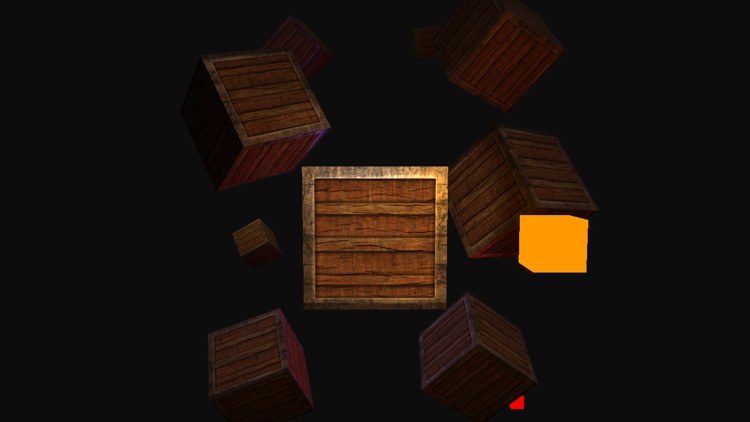
The flashlight picks out the crate in front of us, the orange lamp sits to its right and floods the crates nearby, the red one glows from below at the crates on the lower right, and the blue one, hidden behind the central crate, tints the faces around it. Above it all the faint sun lights every upward-facing side. Fly around, and notice how the faces change colour as you pass from one lamp's reach into another's.
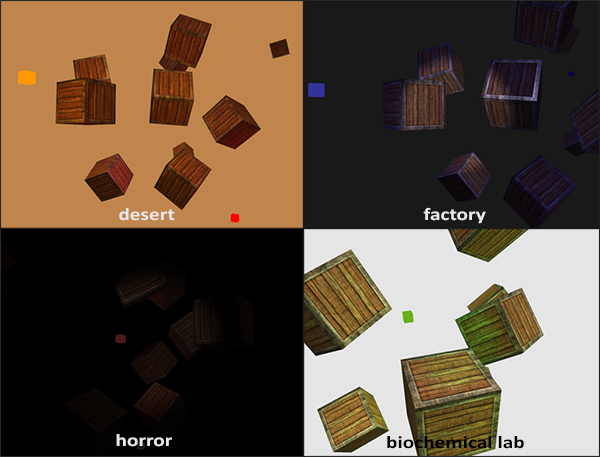
The values are only a starting point. Artists light scenes by adjusting exactly these kinds of numbers, often in an editor, until the mood is right, and even our small scene can be turned into very different places just by changing the colours. LearnOpenGL shows a few such moods:
The cost of many lights
Six lights cost about six times as much as one. Every pixel of every crate runs
There are two classic ways out. One is to skip lights that cannot matter, for instance by giving each light a radius beyond which it is ignored; the attenuation table of the previous chapter gives a sensible radius for each set of terms. The other is to stop lighting pixels that end up hidden: Deferred Shading first draws the scene's surfaces into textures without lighting them, and then lights each pixel on screen exactly once.
There is a second catch in adding lights up: the sum can grow past 1. A face close to the orange lamp, also lit by the sun and the flashlight, can ask for more than full red, and the back buffer, which stores each channel from 0 to 1, simply clips it. Bright areas then flatten into a single colour and lose their detail. Our scene keeps its lights dim enough that this rarely shows, but it is the problem HDR rendering solves properly.
And with that we have a good handle on lighting. Everything in this chapter was made from a few vectors, a couple of textures and some arithmetic in a pixel shader.
The full program is here, and its shader here.
Additional resources
- Packing rules for constant variables: including how arrays and structs are laid out in a
cbuffer. - Functions (HLSL): the syntax of HLSL functions and their parameters.
- LearnOpenGL's Multiple lights: the OpenGL version of this chapter.
Exercises
- Recreate some of LearnOpenGL's moods by changing the clear colour, the sun's colour and the point lights' colours. A desert wants a strong warm sun; a horror scene almost no sun at all.
- Make the number of point lights a
#definein the shader, sayNR_POINT_LIGHTS, used for both the array size and the loop. Then add a fifth light, changing the rin struct and the lamp loop to match. - Give each point light its own attenuation terms, so that some reach further than others. The constant term can stay at 1; where in
point_lightcan the linear and quadratic terms go without adding a register?