SSAO
Back in Basic Lighting we added an ambient term: a small constant amount of light everywhere, standing in for all the light that bounces around a scene before reaching a surface. It was a crude stand-in. Real indirect light is not the same everywhere. Look at the corners of a room, the gap under a sofa, the creases of a curtain: they are a little darker than the open wall, because the surrounding surfaces block much of the light that could otherwise reach them. Estimating that blocking is called
Done properly, ambient occlusion means asking, for every point, how much of the sky above it is hidden by geometry, which takes many rays per point: far too slow for real time. In 2007 Crytek presented a cheap approximation for Crysis called
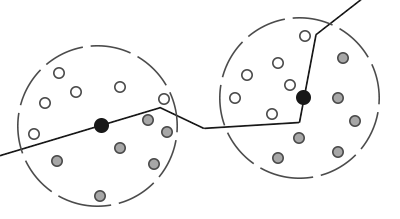
In LearnOpenGL's diagram, the grey samples are the buried ones. The point in the corner on the right has more of them, so it gets less ambient light.
The quality depends on the number of samples. Too few and the occlusion comes in visible steps, an artifact called
Crytek's version took its samples in a full sphere around the point. On a flat wall, half of that sphere is always inside the wall, so every flat surface counts as half occluded, and the whole image turns a uniform grey. Instead we will use a
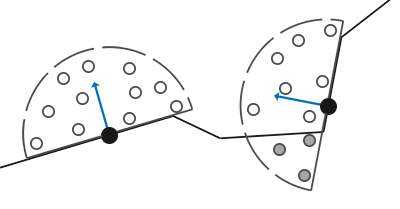
The method here, like LearnOpenGL's, follows John Chapman's SSAO tutorial, listed in the resources at the end.
Sample buffers
For each pixel, SSAO needs:
- the position of its surface point;
- the normal there;
- a set of sample offsets, the
sample kernel , to place around the point; - a random rotation to turn the kernel by.
The first two are exactly what a G-buffer holds, and SSAO is a natural partner for the deferred renderer from Deferred Shading. Our lesson is a cut-down version of it in four passes:
- A geometry pass writes positions and normals, this time in view space.
- An SSAO pass reads them and writes one occlusion value per pixel.
- A blur pass smooths the occlusion.
- A lighting pass lights the scene, scaling the ambient term by the occlusion.
Why view space? The whole test is about depth as the camera sees it: whether a sample point is in front of or behind what is visible at its position. In view space the camera sits at the origin and looks down -z (our view space is right-handed, as in OpenGL), so a point's depth is just its z, and comparing depths is comparing z values. Because everything visible lies at negative z, a point nearer to the camera has a larger z.
The vertex shader takes position and normal through the view matrix as well as the model matrix:
view_vertex vs_main(float3 position : POSITION, float3 normal : NORMAL)
{
    view_vertex o;
    float4 view_pos = mul(view, mul(model, float4(position, 1.0)));
    o.view_pos = view_pos.xyz;
    o.position = mul(projection, view_pos);
    o.normal = mul((float3x3)view, mul((float3x3)normal_matrix, normal * flip_normals));
    return o;
}

g_buffer ps_main(view_vertex p)
{
    g_buffer g;
    g.position = float4(p.view_pos, 1.0);
    g.normal = float4(normalize(p.normal), 0.0);
    return g;
}
The view matrix only rotates and translates, so its upper 3x3 turns normals correctly without an inverse transpose. The flip_normals constant is -1 for the room, a large cube we look at from inside, and 1 for the backpack. As before, w is set to 1 wherever something was drawn.
There is no albedo target. The lesson lights everything in one plain off-white, the better to see the occlusion, so the G-buffer is two 16-bit float targets plus depth:
hdr16: DXGI_FORMAT = DXGI_FORMAT.DXGI_FORMAT_R16G16B16A16_FLOAT;
positions: render_target = create_render_target(device, scr_width, scr_height, hdr16, 1);
normals: render_target = create_render_target(device, scr_width, scr_height, hdr16, 1);
occlusion: render_target = create_render_target(device, scr_width, scr_height, DXGI_FORMAT.DXGI_FORMAT_R16_FLOAT, 1);
smoothed: render_target = create_render_target(device, scr_width, scr_height, DXGI_FORMAT.DXGI_FORMAT_R16_FLOAT, 1);
g_depth: *ID3D11DepthStencilView = create_depth_buffer(device, scr_width, scr_height, 1);
The other two are for the SSAO result and its blurred copy. Occlusion is a single number per pixel, so DXGI_FORMAT_R16_FLOAT, one 16-bit channel, is all it needs.
Normal-oriented hemisphere
The sample kernel is a set of offsets inside a hemisphere. We cannot make one kernel per possible normal, so we make a single one in
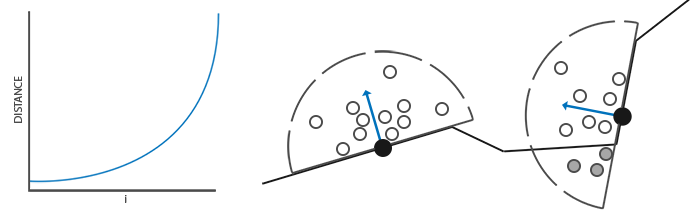
A point in the hemisphere has x and y anywhere from -1 to 1 and z from 0 to 1 (z from -1 to 1 would be a full sphere). We pick a random direction like that, normalize it, and scale it by a random length so the points fill the inside of the hemisphere, not just its surface. Then one more adjustment: occluders close to the surface matter more than distant ones, so we want more samples near the centre. The scale factor grows with the sample's index, slowly at first and quickly at the end (it interpolates from 0.1 to 1 by the square of the index), which packs the early samples near the origin:
srand(3);
k: ssao_constants = {};
for (i: u32 = 0; i < 64; i += 1) {
    p: vec3 = v3_normalize(v3(random01() * 2.0 - 1.0, random01() * 2.0 - 1.0, random01()));
    scale: f32 = cast(i, f32) / 64.0;
    p = v3_scale(p, random01() * lerpf(0.1, 1.0, scale * scale));
    k.kernel[i] = v4(p.x, p.y, p.z, 0.0);
}
update_buffer(context, ssao_buffer, k&, sizeof(ssao_constants));
LearnOpenGL's diagram shows the effect of the scale: the curve on the left is a sample's distance from the centre against its index, and the hemispheres on the right are denser in the middle.
The 64 samples go to the shader in a constant buffer:
ssao_constants: struct = {
    kernel: [64]vec4;    // points in a hemisphere around +z, in tangent space
}
They are 3D points, but the array holds vec4s, matching float4 kernel[64] in the shader. That is the constant buffer packing rule from Advanced HLSL: every element of an array starts on a new 16-byte register, so a float3 array would take 16 bytes per element anyway, with a hole the CPU side would have to mirror. Declaring it as float4 on both sides says so plainly.
Random kernel rotations
The random rotation could be a different vector for every pixel, but a whole screen of them is a lot of memory for noise. A small tile of random vectors repeated across the screen works just as well. Ours is 4 by 4: sixteen vectors with random x and y and z = 0. Since the kernel's normal is +z, a vector in the xy plane is a direction to rotate the kernel around z, which is all we want.
noise_pixels: [16]vec4 = {};
for (i: u32 = 0; i < 16; i += 1) {
    noise_pixels[i] = v4(random01() * 2.0 - 1.0, random01() * 2.0 - 1.0, 0.0, 0.0);
}
noise_desc: D3D11_TEXTURE2D_DESC = {
    .Width = 4,
    .Height = 4,
    .MipLevels = 1,
    .ArraySize = 1,
    .Format = DXGI_FORMAT.DXGI_FORMAT_R32G32B32A32_FLOAT,
    .SampleDesc = { .Count = 1 },
    .BindFlags = D3D11_BIND_SHADER_RESOURCE,
};
noise_init: D3D11_SUBRESOURCE_DATA = {
    .pSysMem = noise_pixels[0]&,
    .SysMemPitch = 4 * sizeof(vec4),
};
noise_texture: *ID3D11Texture2D = null;
noise: *ID3D11ShaderResourceView = null;
ID3D11Device_CreateTexture2D(device, noise_desc&, noise_init&, noise_texture&);
ID3D11Device_CreateShaderResourceView(device, cast(noise_texture, *ID3D11Resource), null, noise&);
The texture is created with its contents, like the immutable buffers of Hello Triangle. SysMemPitch is the size in bytes of one row of the data: four texels of 16 bytes. The format is four 32-bit floats per texel, exactly the layout of our vec4 array, so the data can be handed over as it is.
LearnOpenGL makes this texture repeat with GL_REPEAT and scales the texture coordinates by the screen size over 4 so that it tiles. We will not need either, as the next section shows.
The SSAO shader
The SSAO pass is a full-screen draw into the occlusion target, reading the two G-buffer textures and the noise:
unbind_textures(context);
white: [4]f32 = { 1.0, 1.0, 1.0, 1.0 };
ID3D11DeviceContext_OMSetRenderTargets(context, 1, occlusion.rtv&, null);
ID3D11DeviceContext_ClearRenderTargetView(context, occlusion.rtv, white[0]&);
shader_use(context, ssao_shader&);
bind_constants(context, 1, ssao_buffer);
g_views: [3]*ID3D11ShaderResourceView = { positions.srv, normals.srv, noise };
ID3D11DeviceContext_PSSetShaderResources(context, 0, 3, g_views[0]&);
ID3D11DeviceContext_Draw(context, 3, 0);
The shader also needs the projection matrix, to find where each sample lands on screen. It reads it from the transforms constant buffer at b0, still bound from the geometry pass. The constants it declares itself are the kernel and two tuning values:
cbuffer ssao : register(b1)
{
    float4 kernel[64];
};

Texture2D positions : register(t0);
Texture2D normals : register(t1);
Texture2D noise : register(t2);
SamplerState point_clamp : register(s0);

static const float radius = 0.5;
static const float bias = 0.025;
The pixel shader begins by fetching its own pixel's data:
int3 pixel = int3(p.position.xy, 0);
float4 here = positions.Load(pixel);
if (here.w == 0.0) return 1.0;
float3 n = normalize(normals.Load(pixel).xyz);

// Load reads one texel by integer coordinates: the noise repeats every
// four pixels, no sampler involved
float3 random = noise.Load(int3(pixel.xy % 4, 0)).xyz;
As in the deferred lighting pass,
Orienting the kernel
Next we build a tangent-space basis around the normal, as in normal mapping, but without any tangents from the mesh:
// a tangent frame around the normal, turned by the random vector
float3 tangent = normalize(random - n * dot(random, n));
float3 bitangent = cross(n, tangent);
float3x3 tbn = float3x3(tangent, bitangent, n);
Subtracting from random its component along n leaves a vector perpendicular to the normal; this is the
How the matrix is used needs care, because it is one of the places where HLSL and GLSL differ. GLSL's mat3(t, b, n) takes its three vectors as columns, and LearnOpenGL multiplies TBN * sample. HLSL's float3x3(t, b, n) takes them as rows. Multiplying the sample on the left, mul(sample, tbn), treats it as a row vector, and works out to \(x \, \vec{t} + y \, \vec{b} + z \, \vec{n}\): exactly the tangent-to-view transformation we want. (#pragma pack_matrix does not come into this; it only affects how matrices are read from constant buffers.)
Testing the samples
Now the loop over the 64 samples:
float occluded = 0.0;
for (int i = 0; i < 64; i++)
{
    float3 sample_pos = here.xyz + mul(kernel[i].xyz, tbn) * radius;
    // where on screen that point is, and what the g-buffer has there
    float4 clip = mul(projection, float4(sample_pos, 1.0));
    float2 uv = float2(clip.x / clip.w * 0.5 + 0.5, 0.5 - clip.y / clip.w * 0.5);
    float stored_z = positions.SampleLevel(point_clamp, uv, 0).z;
    // view space looks down -z, so nearer means a larger z; surfaces
    // far outside the radius should not count, hence the range falloff
    float in_range = smoothstep(0.0, 1.0, radius / abs(here.z - stored_z));
    occluded += (stored_z >= sample_pos.z + bias ? 1.0 : 0.0) * in_range;
}
return 1.0 - occluded / 64.0;
Each kernel offset is turned into view space, scaled by radius (half a unit: the size of the neighbourhood we search), and added to the pixel's position. That gives a sample point in view space.
To compare it with the scene we need to know what is on screen at that point. The projection matrix takes it to clip space, and dividing by w gives normalized device coordinates, -1 to 1 in x and y. To turn those into texture coordinates, x maps to 0..1 with * 0.5 + 0.5. For y there is a Direct3D twist: NDC y points up, but texture v runs down from the top of the image, so y maps with 0.5 - y * 0.5. LearnOpenGL can use * 0.5 + 0.5 for both, because OpenGL's texture coordinates also start at the bottom. Get this wrong and every sample is looked up in the mirror image of the screen, and the occlusion lands on all the wrong places.
We look up the position target at that uv and keep its z: stored_z is the depth of the visible surface where the sample would appear. If that surface is nearer to the camera than the sample (a larger z, since we look down -z), then the sample is behind something, buried, and counts as occluding. The bias of 0.025 asks for the surface to be a little nearer than that, which keeps flat surfaces from shadowing themselves through rounding, much like shadow acne.
The lookup uses return that some pixels take and others do not, and with coordinates that jump about from sample to sample, it does not, and the compiler warns about such gradients in flow control. s0 point_clamp; the lesson binds just its usual sampler there, though, the anisotropic, wrapping one used for textures elsewhere. On a buffer of positions, point sampling with clamping is the better fit, and the exercises suggest making one.
The range check
One problem remains. Near the silhouette of an object, some samples land on screen positions that show a surface much nearer the camera, perhaps another object entirely, a metre in front. The test above would count those samples as buried, and a dark halo would appear around everything that stands in front of something else. Such distant surfaces are not really occluding our point; they are just in front of it. The
When the depth difference is less than the radius, the ratio is above 1 and the sample counts fully. As the difference grows past the radius, the ratio falls towards 0 and the sample's weight with it.

Finally the shader returns 1 minus the fraction of buried samples. The result is not the occlusion but its opposite, the amount of ambient light that gets through, so the lighting pass can multiply by it directly. The return type is a single float, written to the one channel of the R16_FLOAT target.
Ambient occlusion blur
Straight out of the SSAO pass, the occlusion carries the imprint of the noise tile: a fine 4x4 pattern of slightly different values all over the image, since each of the 16 pixels in a tile rotated its kernel differently. The cure exploits the tile's size. Averaging any 4x4 block of pixels takes in exactly one of each of the 16 rotations, so the pattern cancels:
// the average of 4x4 pixels: exactly one tile of the noise, which cancels
Texture2D<float> occlusion : register(t0);

float ps_main(fullscreen_vertex p) : SV_Target
{
    int2 pixel = int2(p.position.xy);
    float sum = 0.0;
    for (int y = -2; y < 2; y++)
    {
        for (int x = -2; x < 2; x++)
        {
            sum += occlusion.Load(int3(pixel + int2(x, y), 0));
        }
    }
    return sum / 16.0;
}
Texture2D<float> declares a texture whose reads return one float instead of a float4, which is all a one-channel texture holds. The offsets run from -2 to 1, four values each way, so the block is not quite centred on the pixel; with an even size it cannot be. The pass writes into the smoothed target:
unbind_textures(context);
ID3D11DeviceContext_OMSetRenderTargets(context, 1, smoothed.rtv&, null);
shader_use(context, blur_shader&);
bind_texture(context, 0, occlusion.srv);
ID3D11DeviceContext_Draw(context, 3, 0);The program's second mode (one Tab) shows the blurred result on its own:
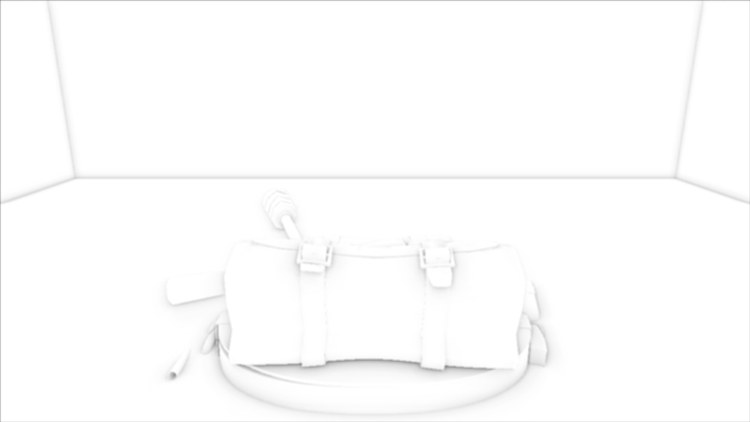
Most of the image is white, unoccluded, as it should be: flat walls are not darkened, thanks to the hemisphere. Grey gathers along the room's edges, in the folds of the backpack, around its straps and buckles, and in the shadowy band where it rests on the floor. Even with nothing else, the backpack is plainly lying on the floor and not hovering above it. (This view is written through the sRGB back buffer like everything else, so the greys look lighter on screen than the values themselves.)
Applying ambient occlusion
The lighting pass is deferred lighting with one light, done in view space, with the blurred occlusion multiplied into the ambient term:
float4 ps_main(fullscreen_vertex p) : SV_Target
{
    int3 pixel = int3(p.position.xy, 0);
    float ao = occlusion.Load(pixel);
    if (mode == 1) return float4(ao.xxx, 1.0);
    if (mode == 2) ao = 1.0;

    float4 here = positions.Load(pixel);
    if (here.w == 0.0) return float4(0.0, 0.0, 0.0, 1.0);
    float3 n = normalize(normals.Load(pixel).xyz);
    float3 albedo = 0.95;
    float3 light_color = float3(0.2, 0.2, 0.7);

    // in view space the eye is at the origin
    float3 to_eye = normalize(-here.xyz);
    float3 to_light = light_position - here.xyz;
    float d = length(to_light);
    to_light /= d;
    float3 halfway = normalize(to_light + to_eye);
    float falloff = 1.0 / (1.0 + 0.09 * d + 0.032 * d * d);

    float3 ambient = 0.3 * albedo * ao;
    float3 diffuse = max(dot(n, to_light), 0.0) * albedo * light_color;
    float3 specular = pow(max(dot(n, halfway), 0.0), 8.0) * light_color;
    return float4(ambient + (diffuse + specular) * falloff, 1.0);
}
Because everything is in view space, the eye is at the origin, and the direction to it is simply -here.xyz. The light must be in view space too. It sits at (2, 4, -2) in the world, and the program takes it through the view matrix every frame, since the view changes as the camera moves:
view_light: vec4 = m4_mul_v4(t.view, v4(2.0, 4.0, -2.0, 1.0));
lit.light_position = v3(view_light.x, view_light.y, view_light.z);
lit.mode = mode;
Apart from the change of space, the only new thing is the factor ao on the ambient term. Tab cycles through the three modes: lit with SSAO (the start), the occlusion alone, and lit without SSAO. Here are the first and the last:
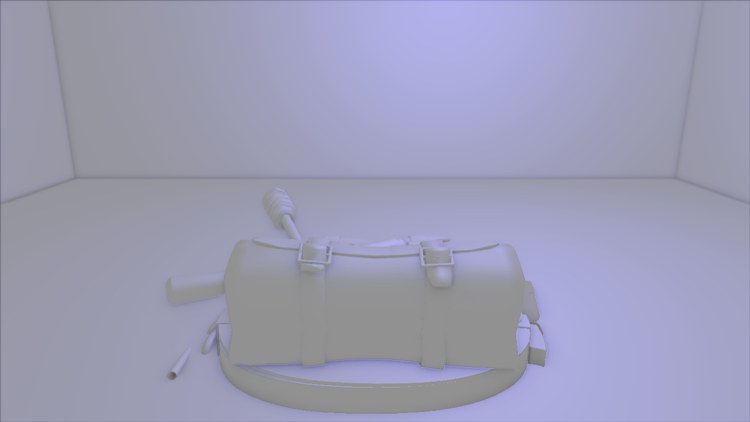
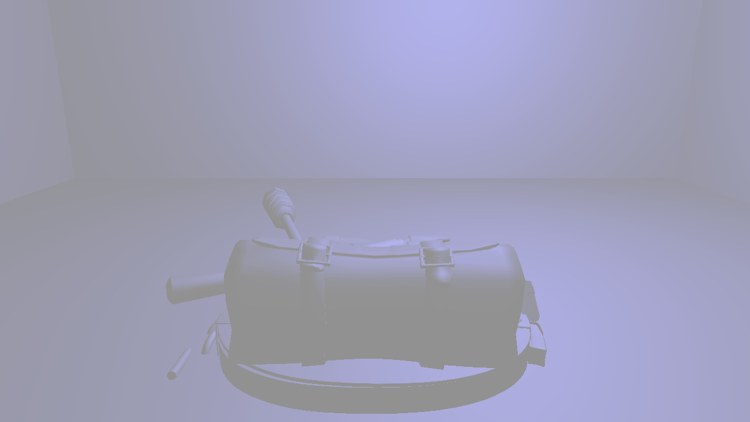
With SSAO (left), the room's corners and edges are softly shaded, the backpack's straps and folds stand out, and a soft contact shadow ties it to the floor. Without it (right), the ambient light is the same everywhere; the room's corners nearly disappear, and the backpack's shape is much harder to read. The effect is subtle, and it is supposed to be. Its absence is what makes a scene look flat and computer-generated, more than its presence draws the eye.
SSAO has many knobs, and no setting suits every scene. Small, cluttered scenes want a small radius; large open ones a larger radius and more samples. Our 64 samples are generous; real-time renderers often get by with 16 or fewer, leaning on the rotation and blur. The radius, the bias, the kernel size and the noise size are all worth trying, and one more is popular: raising the result to a power, pow(result, power), to strengthen or soften the darkening without changing anything else.
The full program is here, with the shaders for the geometry pass here, the SSAO pass here, the blur here and the lighting here.
Additional resources
- SSAO Tutorial: John Chapman's tutorial, on which this chapter's method is based.
- Know your SSAO artifacts: a catalogue of what goes wrong with SSAO, and how to fix each.
- SSAO With Depth Reconstruction: OGLDev on rebuilding view-space positions from the depth buffer, so the position target can go.
- SampleLevel (DirectX HLSL Texture Object): sampling at an explicit mip level.
- LearnOpenGL's SSAO: the OpenGL version of this chapter.
Exercises
- Reduce the kernel to 16 samples (the loop count and the divisor in
ssao.hlsl) and compare the result with 64, with the blur and without it (point the lighting pass at occlusion instead of smoothed). - Create a real point-filtering, clamping sampler (D3D11_FILTER_MIN_MAG_MIP_POINT, D3D11_TEXTURE_ADDRESS_CLAMP), bind it in a free slot such as
s1for the SSAO pass, and changessao.hlslto use it. Look closely at the edges of the screen: what changes? - Fix the dark border from the blur: clamp each
Load coordinate between 0 and the texture size minus 1 (the size can be read withGetDimensions ). - Add keys to change radius and a
powerexponent at run time (move them fromstatic constinto thessaoconstant buffer), and find settings you like for this room.