Geometry Shader
Between the vertex shader and the rasterizer sits an optional stage we have left empty so far: the
To get a feel for it, here is a small geometry shader written in HLSL. It is not part of our lesson, just a first look at the syntax:
struct gs_vertex { float4 position : SV_Position; };

[maxvertexcount(2)]
void gs_main(point gs_vertex input[1], inout LineStream<gs_vertex> output)
{
    gs_vertex v = input[0];
    v.position = input[0].position + float4(-0.1, 0.0, 0.0, 0.0);
    output.Append(v);
    v.position = input[0].position + float4( 0.1, 0.0, 0.0, 0.0);
    output.Append(v);
}
It takes a point and emits a short horizontal line centred on it. Draw four points with it and four little dashes appear on the screen, though the vertex buffer holds only four positions. The shapes are made on the GPU, on the fly.
Using geometry shaders
Let's go through that shader piece by piece. Everything a GLSL geometry shader declares with layout qualifiers, HLSL puts in the function's signature and an attribute.
The first parameter is the input primitive: an array with one element per vertex, preceded by a keyword that says which kind of primitive it is. The keyword has to agree with the primitive topology set on the input assembler:
| HLSL keyword | Vertices | Topologies that feed it |
|---|---|---|
point | 1 | D3D11_PRIMITIVE_TOPOLOGY_POINTLIST |
line | 2 | _LINELIST, _LINESTRIP |
triangle | 3 | _TRIANGLELIST, _TRIANGLESTRIP |
lineadj | 4 | _LINELIST_ADJ, _LINESTRIP_ADJ |
triangleadj | 6 | _TRIANGLELIST_ADJ, _TRIANGLESTRIP_ADJ |
The adjacency kinds also deliver the neighbouring vertices of each line or triangle, for effects such as finding silhouette edges. Each element of the array is whatever the vertex shader returned, here a struct, so a geometry shader reads input[1].position where GLSL reads gl_in[1].gl_Position. This is the place where the struct-per-stage habit from Advanced HLSL pays off most: the geometry shader's input is simply an array of the vertex shader's output struct.
The second parameter is the output, an inout
PointStream<T>emits points,LineStream<T>emits line strips,TriangleStream<T>emits triangle strips.
With just these three, nearly any shape can be built. The emitted struct must include an SV_Position, since the rasterizer comes next and needs clip-space positions, plus anything the pixel shader reads.
Last, the [maxvertexcount(N)] attribute states the most vertices one invocation will ever emit, like GLSL's max_vertices. The GPU reserves output space according to it, so it should be no larger than needed; vertices beyond it are dropped.
Inside the function,

Our example appends two vertices to a line strip, which makes exactly one line. To emit several separate lines from one invocation, call
Compiling and binding
A geometry shader is compiled like the others, with its own target, gs_5_0, and created with .hlsl file contains a gs_main, it compiles that too.
if (cstr_find(cast(source, [*]const char), "gs_main") >= 0) {
    gs: *ID3DBlob = shader_compile(path, source, size, "gs_main", "gs_5_0");
    ID3D11Device_CreateGeometryShader(device, ID3D10Blob_GetBufferPointer(gs), ID3D10Blob_GetBufferSize(gs), null, result.gs&);
    ID3D10Blob_Release(gs);
}
It is a plain text search for the name, which is good enough for our files. null for a file without one, binding any other shader also clears the geometry stage again. That matters: pipeline state stays set until changed, and a geometry shader left bound from an earlier draw would happily run on the next one.
shader_use: proc(context: *ID3D11DeviceContext, s: *const shader) -> void = {
    ID3D11DeviceContext_IASetInputLayout(context, s[0].layout);
    ID3D11DeviceContext_VSSetShader(context, s[0].vs, null, 0);
    ID3D11DeviceContext_GSSetShader(context, s[0].gs, null, 0);
    ID3D11DeviceContext_PSSetShader(context, s[0].ps, null, 0);
}
Constant buffers are bound per stage, as we saw last chapter, so a geometry shader that reads the camera's matrices needs them bound with
A pass-through geometry shader
The simplest useful geometry shader passes its primitive on untouched. For triangles:
[maxvertexcount(3)]
void gs_main(triangle vs_out input[3], inout TriangleStream<vs_out> output)
{
    for (int i = 0; i < 3; i++)
        output.Append(input[i]);
}
Bind it, and the picture is exactly the same as without it. Dull, but it shows that the plumbing works, and it is the skeleton for both of the effects in our lesson.
Let's build houses
LearnOpenGL's first real geometry shader turns each of four points into a small house: a square body and a triangular roof. It is a nice illustration of triangle strips, although our lesson does not include it. In a
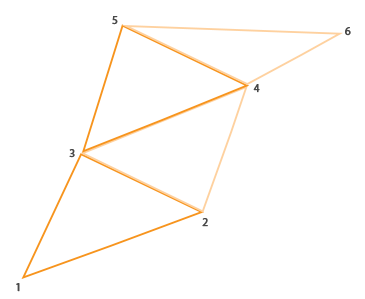
A house is three triangles, so a strip of five vertices does it: bottom-left, bottom-right, top-left, top-right, and the top of the roof. In HLSL:
[maxvertexcount(5)]
void gs_main(point house_vertex input[1], inout TriangleStream<house_vertex> output)
{
    house_vertex v = input[0];
    float4 p = input[0].position;
    v.position = p + float4(-0.2, -0.2, 0.0, 0.0); output.Append(v);  // bottom-left
    v.position = p + float4( 0.2, -0.2, 0.0, 0.0); output.Append(v);  // bottom-right
    v.position = p + float4(-0.2,  0.2, 0.0, 0.0); output.Append(v);  // top-left
    v.position = p + float4( 0.2,  0.2, 0.0, 0.0); output.Append(v);  // top-right
    v.color = float3(1.0, 1.0, 1.0);                                   // snow on the roof
    v.position = p + float4( 0.0,  0.4, 0.0, 0.0); output.Append(v);  // top
}
Every emitted vertex carries a full copy of the output struct, so a colour that came with the input point is passed on to each corner simply by starting from input[0]. Changing it before the last vertex makes the roof's peak white, and the rasterizer blends it down the roof, as if the houses had snow on them. Since a strip alternates between the two windings, the rasterizer flips its idea of front and back for every other triangle so that the whole strip faces the same way.
Generating shapes this way can beat storing them in vertex buffers when they are simple and very numerous (blades of grass, cubes in a voxel world, particles), though modern GPUs often run geometry shaders slower than the same work done with instancing, so it is worth measuring.
Exploding objects
Houses are fun, but not much use. Exploding a model is not much use either, but it is more fun, and it is the first of our lesson's two effects. To explode a model we push each triangle outward, along the direction it faces, by an amount that changes over time. The triangles drift apart and come back together, and since the effect only needs each triangle's own corners, it works on any model, however complex.
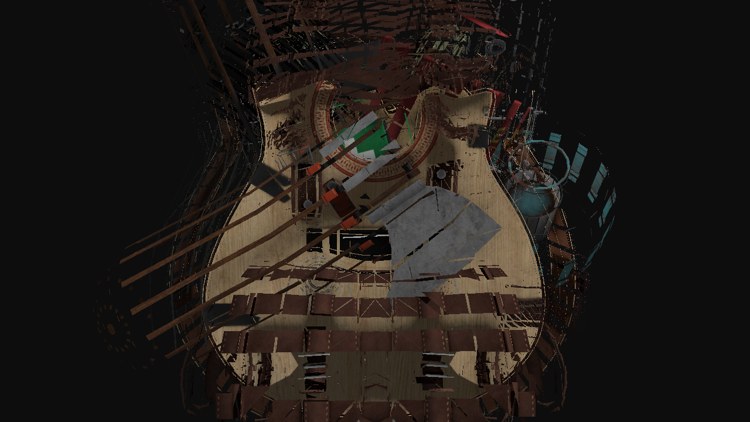
This is exactly the kind of thing a vertex shader cannot do: it sees one vertex, and the direction a triangle faces depends on all three of its corners. The geometry shader has all three. It gets the triangle's
The order of the two edges matters: swapped, the normal points inward. Our triangles are counter-clockwise when seen from outside, in a right-handed world, so this order points out of the model. Here is the geometry shader from explode.hlsl:
// vs_main only moves to world space; the geometry shader projects, once
// it has moved the triangle.
[maxvertexcount(3)]
void gs_main(triangle vs_out input[3], inout TriangleStream<vs_out> output)
{
    float3 face_normal = normalize(cross(input[1].world - input[0].world, input[2].world - input[0].world));
    float3 offset = face_normal * amount * 0.5;
    for (int i = 0; i < 3; i++)
    {
        vs_out v = input[i];
        v.world += offset;
        v.position = mul(projection, mul(view, float4(v.world, 1.0)));
        output.Append(v);
    }
}
It works in world space, on the world positions the vertex shader passes on, moves all three corners by the same offset, and only then projects them to clip space for the rasterizer. (The vertex shader is the standard one and computes a clip-space position as well, but the geometry shader replaces it.) LearnOpenGL computes its normal from the clip-space gl_Position values instead; working in world space keeps the push the same length however the camera looks at the model. All the other members of vs_out, the normal and the uv, travel through unchanged, because each output vertex starts as a copy of its input vertex, so the pixel shader textures and lights the pieces as usual.
The distance comes from a small constant buffer at b1, a single float padded to a 16-byte register:
cbuffer explode : register(b1)
{
    float amount;   // 0: whole, 1: every triangle pushed out
};
The program fills it each frame. In the exploding mode it follows a sine of the time, moved from -1..1 into 0..1 so that the model never implodes; in the other modes it is zero, and the same geometry shader passes the model through whole:
amount: [4]f32 = { 0.0, 0.0, 0.0, 0.0 };
if (mode == 1) { amount[0] = (sinf(current_frame * 2.0) + 1.0) * 0.5; }
update_buffer(context, amount_buffer, amount[0]&, 16);
shader_use(context, explode&);
bind_constants(context, 1, amount_buffer);
model_draw(context, backpack&);
The model is the backpack from Model, loaded and drawn exactly as there; apart from
Visualizing normal vectors
Now for a use of the geometry shader that earns its keep. When lighting looks wrong, the cause is very often the normals: loaded wrongly, described wrongly in the input layout, or transformed wrongly in a shader. The quickest way to check them is to look at them, and a geometry shader can draw them for us, for any model, with no extra vertex data.
The idea is to draw the model twice. First as usual, then a second time with a shader whose geometry shader turns every triangle into three short lines, one sticking out of each corner along that corner's normal:
struct line_vertex
{
    float4 position : SV_Position;
};

// Triangles in, lines out: for each corner, a line from the surface along
// its normal. Two vertices per line, three lines per triangle.
[maxvertexcount(6)]
void gs_main(triangle vs_out input[3], inout LineStream<line_vertex> output)
{
    for (int i = 0; i < 3; i++)
    {
        line_vertex a;
        line_vertex b;
        a.position = mul(projection, mul(view, float4(input[i].world, 1.0)));
        b.position = mul(projection, mul(view, float4(input[i].world + normalize(input[i].normal) * 0.04, 1.0)));
        output.Append(a);
        output.Append(b);
        output.RestartStrip();
    }
}
The input is a triangle and the output a LineStream, so the primitive type really does change in this stage. Each line is two appended vertices followed by
float4 ps_main(line_vertex p) : SV_Target
{
    return float4(1.0, 1.0, 0.0, 1.0);
}
Drawing it is a second
if (mode == 2) {
    shader_use(context, normals&);
    model_draw(context, backpack&);
}
The model buffer still says triangle list; the geometry shader is the only thing that turns them into lines. And because the lines are drawn with the depth test on, after the model, the ones on the far side of the backpack are hidden behind it.
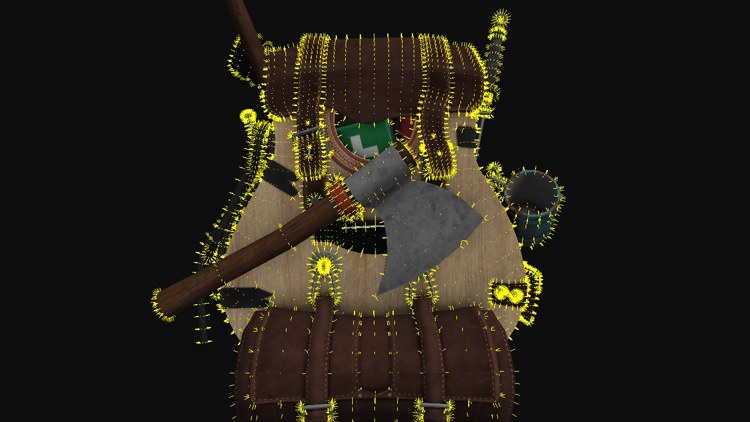
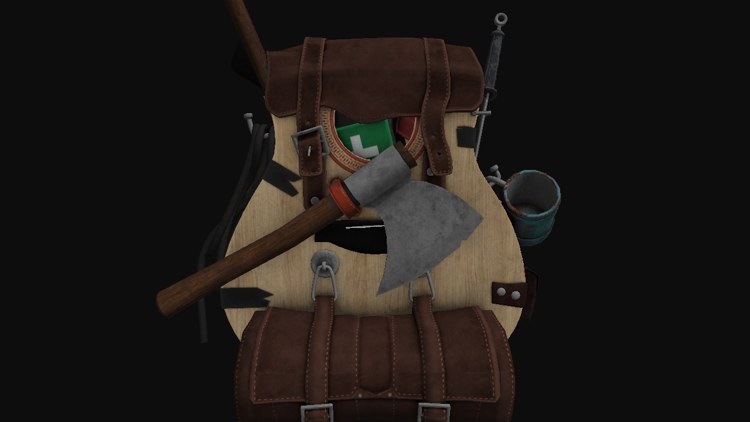
The lesson starts in this mode, with the normals shown (left). Tab cycles to the plain model (right), then to the explosion, then back. Normals that stand straight out of the surface, and fan out evenly around curves, are what we hope to see; normals that point inward, lie flat, or are missing in places are the first suspects when lighting goes wrong. Besides debugging, the same trick makes fur: emit a few lines or thin strips per triangle, curved and shaded, and the model grows a coat.
The full program is here, the explode shader here and the normal visualization shader here.
SV_RenderTargetArrayIndex. Point Shadows uses it to draw every triangle into all six faces of a cubemap in a single pass.
Additional resources
- Geometry shader stage: Microsoft's overview of the stage.
- Geometry shader object: the HLSL syntax, the input primitive types and the stream objects.
- LearnOpenGL's Geometry Shader: the OpenGL version of this chapter, with the houses.
Exercises
- Change the normal visualization to also draw each triangle's face normal, a line from the triangle's centre along the cross product used by the explode shader. Remember to raise
maxvertexcount. - Make the explosion spin: rotate each triangle around its own centre by an angle that grows with amount, before pushing it out.
- Write the houses: draw four points with the D3D11_PRIMITIVE_TOPOLOGY_POINTLIST topology and a shader whose geometry shader emits a five-vertex triangle strip per point.